Table of Contents
Do you want to add a file upload field to the WooCommerce checkout screen? In this tutorial, I’ll walk you through the process of enabling checkout files upload for WooCommerce. The best part? The entire process takes less than 10 minutes from start to finish.
Key Takeaways
- WooCommerce’s default checkout flow doesn’t include a file upload field, which is invaluable for stores that need customer documents, images, or design files to fulfill orders.
- Enabling file uploads on the WooCommerce checkout page lets customers attach files while placing their orders and keeps everything tied to the correct order from the start.
- Checkout file uploads are ideal for a wide range of niches: print shops, custom manufacturers, B2B stores, service-based businesses, regulated industries, and more.
- The Dotstore’s WooCommerce Product Attachment plugin makes it easy to add checkout file uploads in under 10 minutes. Uploaded files are saved as structured order data and are visible in the admin dashboard and in order-related emails.
The default WooCommerce checkout page contains several fields (21 billing + contact + order notes fields to be exact!). However, it doesn’t include a file upload field for customers to upload documents and other files during the checkout process.
In this post, we’ll discuss the benefits of enabling customers to upload files during checkout and show you how to add a file upload field on the checkout page using the powerful WooCommerce Product Attachment plugin by The Dotstore.
We’ll also answer frequently asked questions about enabling checkout file uploads for WooCommerce.
A quick note:Hello, we’re the Dotstore, makers of the WooCommerce Product Attachment plugin (available in both free and pro versions)! Since its launch in 2017, over 10,000 stores across various niches have used it to enable file uploads at the checkout page, add files to the product page, send files as order email attachments, and more. Check out its demo or get the plugin now!
WooCommerce Product Attachment
Increase conversion rates with detailed information using multiple attachments.
14-day, no-questions-asked money-back guarantee.
What does it mean to enable file uploads at the WooCommerce checkout?
Enabling file uploads on the WooCommerce checkout page means giving customers a way to attach documents, images, or other files during the order placement process.
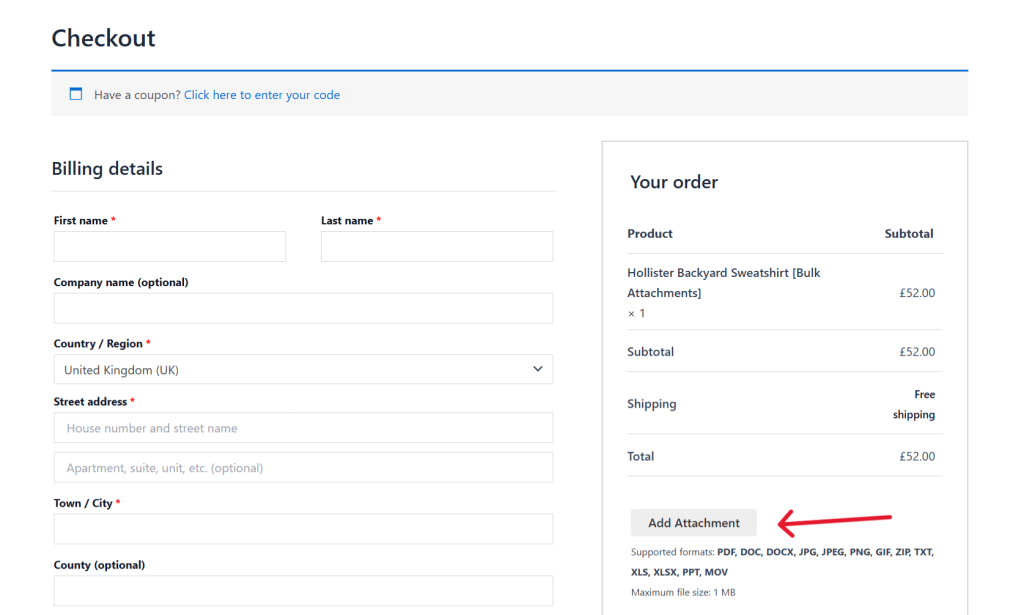
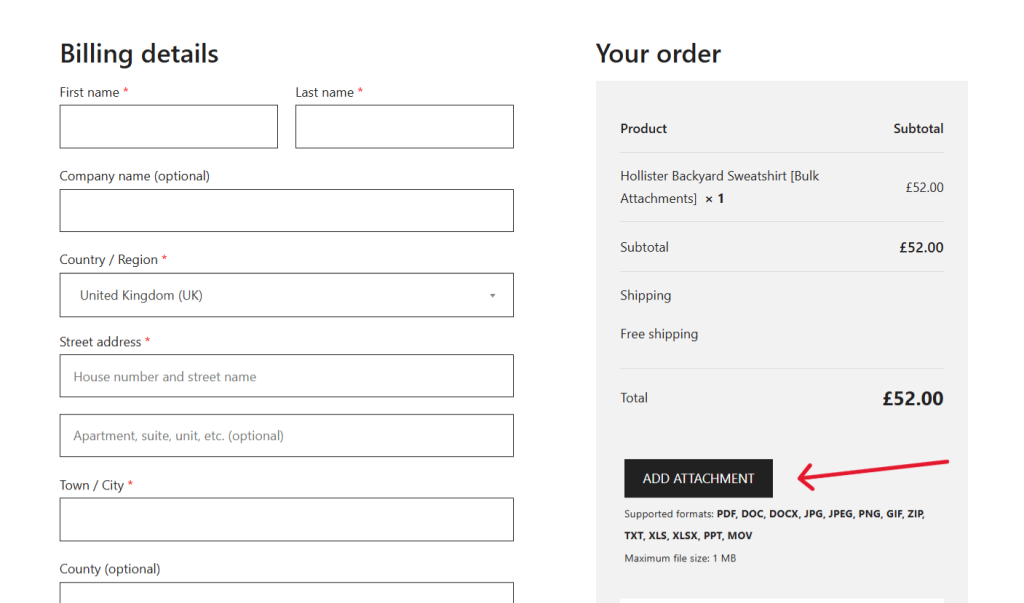
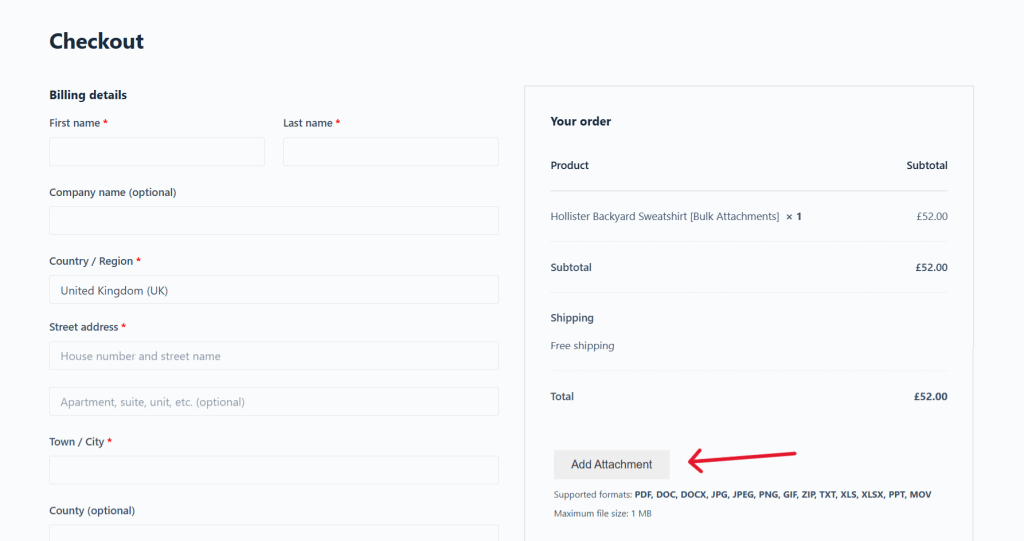
Instead of sending order-related files via email, contact forms, or support tickets later, customers upload them directly on the checkout screen (as pictured in the image above), before they complete payment.
Important note: Enabling file uploads on the checkout page is different from enabling file uploads on the product page. With product page file uploads, the uploaded file is attached to the selected specific product before checkout. Whereas, with checkout file uploads, the uploaded file is attached to the entire order, not one specific item.
Use cases for the file upload field in the WooCommerce checkout
Here are a few examples of WooCommerce stores across various niches that use a WooCommerce file upload field on the checkout page to allow customers to attach important documents to their orders:
- Print and personalized products stores. For example, t-shirts and apparel stores that want to collect logo or artwork files.
- Custom product manufacturers. For example, fabrication businesses that need CAD files or sketches for made-to-order products.
- B2B and wholesale stores that need to collect purchase orders or tax documents.
- Service-based businesses, like legal or consulting firms that need to collect intake documents.
- Regulated industries where compliance documentation is mandatory. For example, medical equipment suppliers that request doctors’ prescriptions.
Why enable file uploads in the WooCommerce checkout?
There are heaps of benefits to allowing customers to upload files during the WooCommerce checkout flow, namely:
- It speeds up the order fulfillment process. Since there’s no manual coordination and no waiting period, your team can open the order, download the file, and quickly begin the order fulfillment process. This can easily shave hours or even days off turnaround time, particularly during busy periods. Everything needed is made available upfront, which improves delivery timelines and customer satisfaction.
- Improved order accuracy. When customers upload files during checkout, documents are clearly tied to the correct order. There’s no confusion about which file belongs to which purchase or risk of mismatched email attachments. Plus, the uploaded file is stored as order data inside WooCommerce, which keeps everything organized, traceable, and easy to reference later. This is particularly beneficial in situations where customers place multiple orders, files look similar, or orders must be handled by multiple team members.
- Improved user experience (UX). In WooCommerce stores that don’t fit the default “add to cart and ship” model, enabling customers to upload important files during the checkout flow provides a polished and professional user experience. Customers have now come to expect it as it has become a standard feature across ecommerce stores that require order documents to be attached.
- Better internal workflows. Instead of using up your theme’s bandwidth by having them juggle email inboxes, cloud storage links, messaging apps, and the like, all important order documents will be housed where they already work: the WooCommerce order screen. This frees up your staff’s time to focus on other, more pressing tasks.
A powerful plugin for enabling file uploads in the WooCommerce checkout
WooCommerce Product Attachment is a powerful plugin that enables customers to upload images, documents, and other types of files during the checkout flow.
Launched in 2017, more than ten thousand WooCommerce stores that operate using a wide range of business models, including stores that sell custom goods, offer design services, run B2B operations with purchase order requirements, and others, now trust its file handling capabilities to collect files from customers at the moment of purchase.
Here’s a quick rundown of how the WooCommerce Product Attachment plugin works: it lets you add a file upload field to the checkout page, which allows customers to submit images, documents, or other file types while placing their order. Customers can upload multiple files at a time (up to 1MB).
When a customer uploads a file on the WooCommerce checkout page, it is sent to your site’s server and stored as order meta, just like a shipping address or selected product variation. Once the purchase is complete, that file becomes part of the order’s data and is easily accessible in your WordPress admin.
Store admins can view and download these uploaded files directly from the WooCommerce order details screen in the dashboard. Plus, it includes the uploaded files in order notification emails, which makes it easy for your fulfillment team to access.
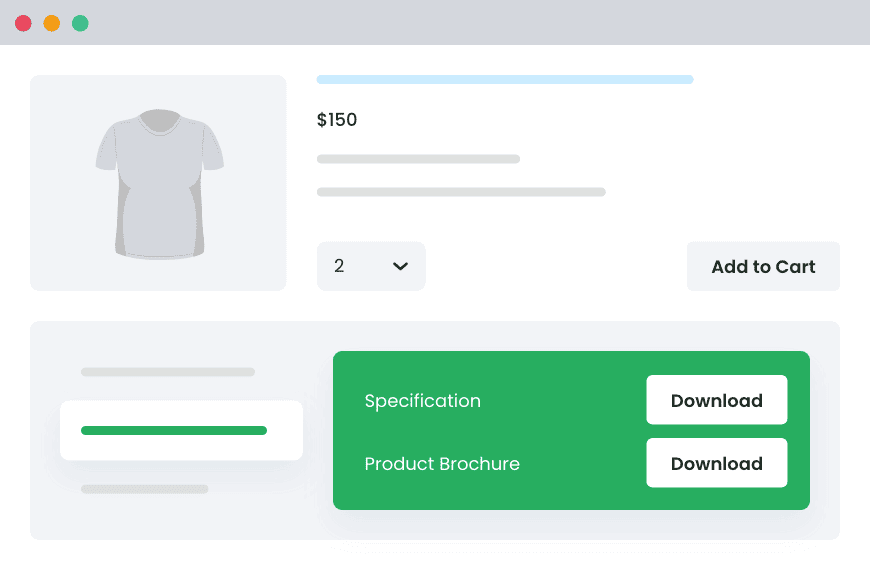
WooCommerce Product Attachment plugins’ file upload features work both ways. Site admins can upload files to be shown on product pages and during different order stages. For instance, an equipments manufacturer can attach machine specifications on the product page and installation guides to be only shared with a customer when an order is marked as completed in WooCommerce. This makes it so much easier to share files with customers at the exact point of need in the buyer’s journey.
Top features
- ✔️ Its file upload field integrates cleanly on the checkout screen. It adds the “Add Attachment” button to an easy-to-notice section on the checkout page: in the “Order Summary” section, directly between the order total and payment method options. This placement minimizes the added friction from adding one more step in the checkout flow.
- ✔️ Support for multiple file formats. It accepts both common and uncommon file formats, namely PDF, JPG, JPEG, PNG, GIF, ZIP, TXT, XLS, XLSX, DOC, DOCX, PPT, and MOV. This makes the plugin suitable for a wide range of business use cases, such as images for design or print jobs, PDFs for documents and proofs, text or document files for service-based orders, compressed files for larger design assets, and more.
- ✔️ Uploaded files are saved as structured order data. When a customer uploads a file at checkout, it is stored as structured order data. There’s no risk of files being misplaced or associated with the wrong order. And as files are linked directly to the order, admins can access them from the WooCommerce order details screen and in transactional order emails.
- ✔️ Admins can upload files for different stages of the customer journey. Store admins can attach files such as manuals, specification sheets, authenticity certificates, etc., to product pages. Plus, they can send files to customers via order emails based on order status — for instance, to share warranties or final deliverables after the checkout process.
How to add file upload to the WooCommerce checkout
Using the powerful WooCommerce Product Attachment plugin by The Dotstore, enabling file uploads on the WooCommerce checkout page is pretty straightforward. Follow these steps:
- Get the WooCommerce Product Attachment plugin, then install and activate it on your website.
- Navigate to Dotstore Plugins → Product Attachment → Global Settings.
- Locate the “Global Default Setting” collapsible panel. Select “Yes” under the “Show user attachments button on checkout page” option.

- Scroll to the bottom of the page and press “Save Changes”.
That’s all. Head to your WooCommerce store’s checkout page and test the file upload field.
FAQs about enabling file uploads at the WooCommerce checkout
Can customers upload multiple files at the WooCommerce checkout?
Yes, customers can upload multiple files at the WooCommerce checkout, using a checkout files upload for WooCommerce plugin like WooCommerce Product Attachment by The Dotstore. WooCommerce’s default checkout page doesn’t include a file upload function, let alone support for multiple uploads. You’ll need a dedicated plugin to allow customers to upload more than one file during checkout.
Where are files uploaded during checkout stored in WooCommerce?
With the WooCommerce Product Attachment plugin by The Dotstore, when customers upload files at the WooCommerce checkout, those files are stored on your WordPress site’s server and linked directly to the order they belong to. The plugin records the file details as order meta, which ties it directly to each WooCommerce order so that files don’t get mixed up between orders.
Ready to enable checkout files upload for WooCommerce?
The default WooCommerce checkout does a solid job of collecting customer details like billing, shipping, and contact information. However, it doesn’t include a field for customers to upload images, documents, and other reference files while checking out.
The Dotstore’s WooCommerce Product Attachment plugin enables checkout file uploads for WooCommerce. Customers can upload multiple files in one go, directly on the checkout page, and the uploaded information is submitted as soon as the payment is completed.
The plugin is simple to set up and use; it takes under 10 minutes to configure. It supports uploads of multiple file types from PDFs and images to PPTs, Excel documents, and more.
Uploaded files are saved as structured order meta, which means that they become available in your WooCommerce site’s dashboard and can be included in order notification emails. Your order fulfillment team can immediately access the files they need and begin processing the order as soon as it is received.
In addition to enabling file uploads at checkout, WooCommerce Product Attachment lets admins upload files to product pages so that customers can view or download them before purchasing. You can also automatically send files to customers based on order status, which is useful for sharing proofs, invoices, manuals, or final deliverables as orders progress.
Check out WooCommerce Product Attachment’s live demo or install its free or pro version on your site now!
WooCommerce Product Attachment
Increase conversion rates with detailed information using multiple attachments.
14-day, no-questions-asked money-back guarantee.