Table of Contents
You’re already past the point of debating whether checkout matters. What matters is that your default Shopify setup can look fine on the product page and still leak margin the moment a buyer reaches payment, shipping, or post-purchase. That’s where a Shopify Checkout App earns its keep, if you choose one that matches your plan, your fee model, and the current Shopify checkout architecture.
If you’re still staring at app listings that promise everything, from upsells to shipping logic to tracking, the safer move is to ignore the hype and ask one blunt question, what can this app change on your store today? Shopify has moved checkout customizations into a stricter, app-based system, and that shift matters more than most marketplace copy admits.
When a Default Checkout Starts Costing You Money
A merchant doing steady volume can miss the problem for months because the product margin looks healthy on paper. Then checkout starts taking its cut through undercharged shipping on bulky orders, payment costs that never get recovered on small-ticket sales, and cash-on-delivery handling that shows up on every relevant order.
The damage usually isn’t dramatic in one spot. It shows up as a surcharge that should have been passed through but wasn’t, a regional fee that got absorbed, or a manual rule the team applies by hand until someone forgets. That is how a “good enough” checkout becomes a margin leak.
The leaks merchants usually notice too late
A default Shopify install won’t solve merchant-paid payment surcharges on its own, and it won’t make sense of every region, payment method, or customer group without help. It also won’t reliably handle special delivery instructions, B2B reference fields, or fee logic that should change based on cart value.
Practical rule: if the fee or validation logic affects margin, compliance, or payment-method choice, it is not a theme tweak. It belongs in checkout logic.
Dedicated checkout tools exist for stores that need controlled fee rules, explicit disclosure, and checkout behavior a theme file cannot hold at scale. Some stores can live with the default setup. Others need a checkout app because the built-in flow cannot enforce the rules that protect margin. Once those gaps start showing up, the decision shifts from whether to add an app to which checkout behavior you are trying to fix.
What a Shopify Checkout App Does
A Shopify checkout app extends checkout, cart, or post-checkout surfaces in places the native admin does not handle cleanly. In plain terms, it adds visible elements, like custom fields or trust cues, and runs logic, like fee calculations or validation, at the moment the order is finalized.
The two jobs that matter
First, it adds UI elements. That includes custom fields, upsells, trust messages, order notes, and other blocks that appear on supported checkout surfaces. Second, it inserts logic that decides what happens next, whether that means adding a fee, changing shipping behavior, or validating input before the buyer moves on.
The technical shape matters because Shopify has moved away from the old theme-file approach. Old apps leaned on checkout.liquid, but Shopify’s current model uses Checkout Extensibility, the supported path for new checkout customizations. If a vendor has not caught up with that shift, the app may look current while still sitting on a dead foundation.
For merchants trying to connect checkout behavior with revenue operations, our Checkout Champ connector is a useful example of how checkout-related systems now need to fit into a more structured app environment.
Where the modern model lives
Shopify now routes checkout customization through extension types such as UI extensions, Functions, web pixels, and payments extensions. The app is part of the control layer for the hosted checkout itself, not just a bolt-on widget. That matters more now, because the 2024 to 2026 transition away from checkout.liquid and the Shopify Plus plan split decide which capabilities a merchant can use on a given plan.
Once those gaps appear, the question shifts from whether to add an app to which checkout behavior you’re trying to fix.
How Checkout Extensibility Replaced Checkout Liquid
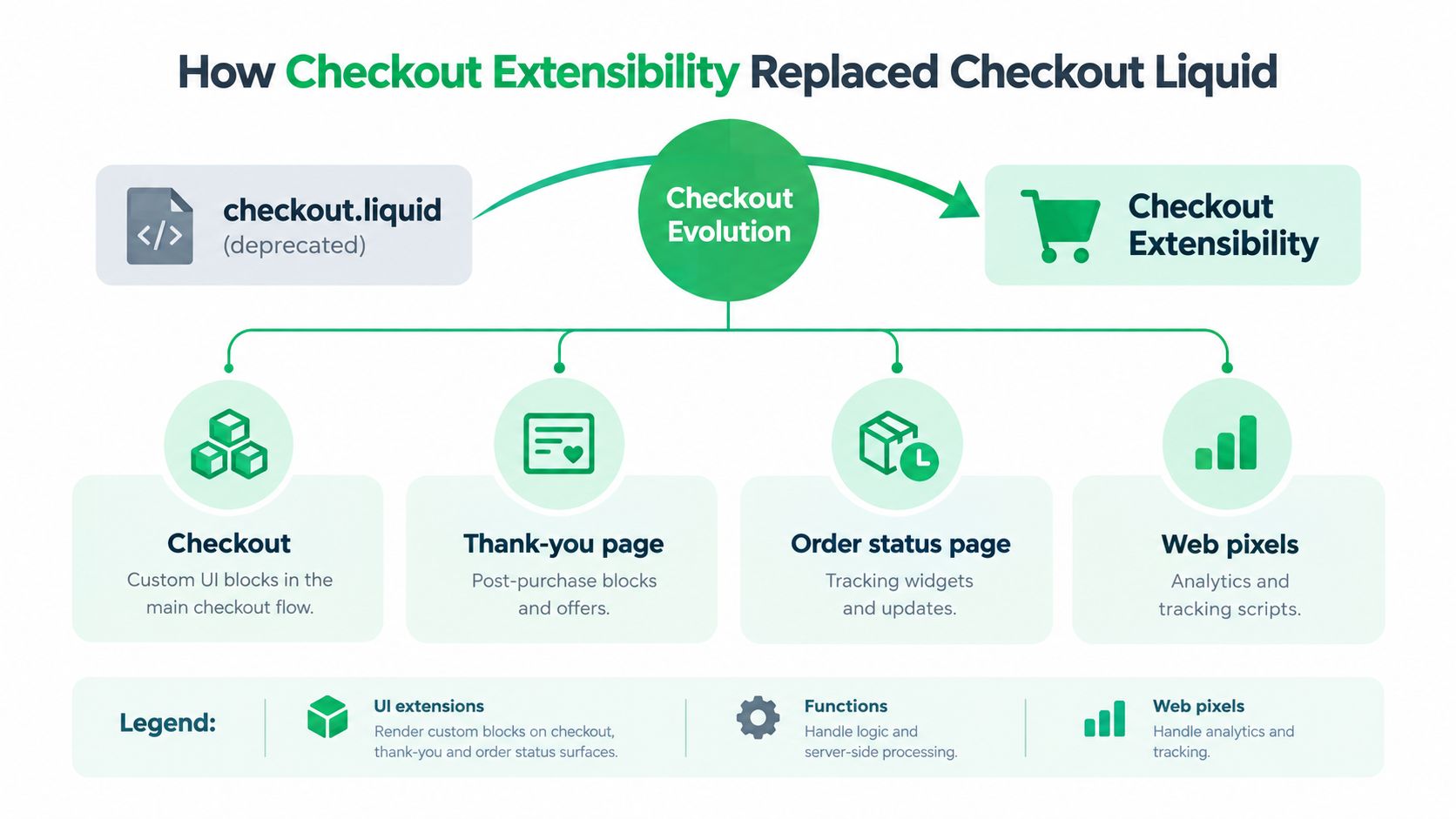
Shopify’s shift away from checkout.liquid isn’t cosmetic. It changed the rules for where customization can happen, who can do it, and how safely those changes survive platform updates. Shopify also says checkout is built around Checkout Extensibility, with support for UI extensions, Functions, web pixels, and payments extensions, and it links that architecture to faster checkout interactions and an average conversion increase of over 1% in its own materials. Shopify enterprise guidance
What each extension surface actually changes
UI extensions are the visible blocks. They let you place custom content on checkout, thank-you, and order status surfaces, plus defined points such as product information, shipping, payment, order summary, and Shop Pay. That’s the layer merchants feel most directly because it changes what buyers see.
Functions are the logic layer. They run behind the scenes for discounts, shipping customization, delivery rules, and payment customization. They’re the right tool when you want the checkout to behave differently without turning the page into a script-heavy mess.
Web pixels replace older script-tag tracking setups. They’re for analytics and measurement, not for building the buyer-facing experience itself.
Payments extensions open up payment options and custom wallet-style flows on the payment step. For stores that need specific payment behavior, the control lives here.
Keep the logic silent and the UI deliberate. If the buyer needs to notice the rule engine, the rule engine is probably too loud.
Shopify’s own materials also note that it released 14 new APIs and UI components for Checkout Extensibility in its Winter ’24 Edition, and that the migration off checkout.liquid was already on a staged timetable. Shopify Partners blog on CheckoutBlocks
Features Merchants Look For in a Checkout App
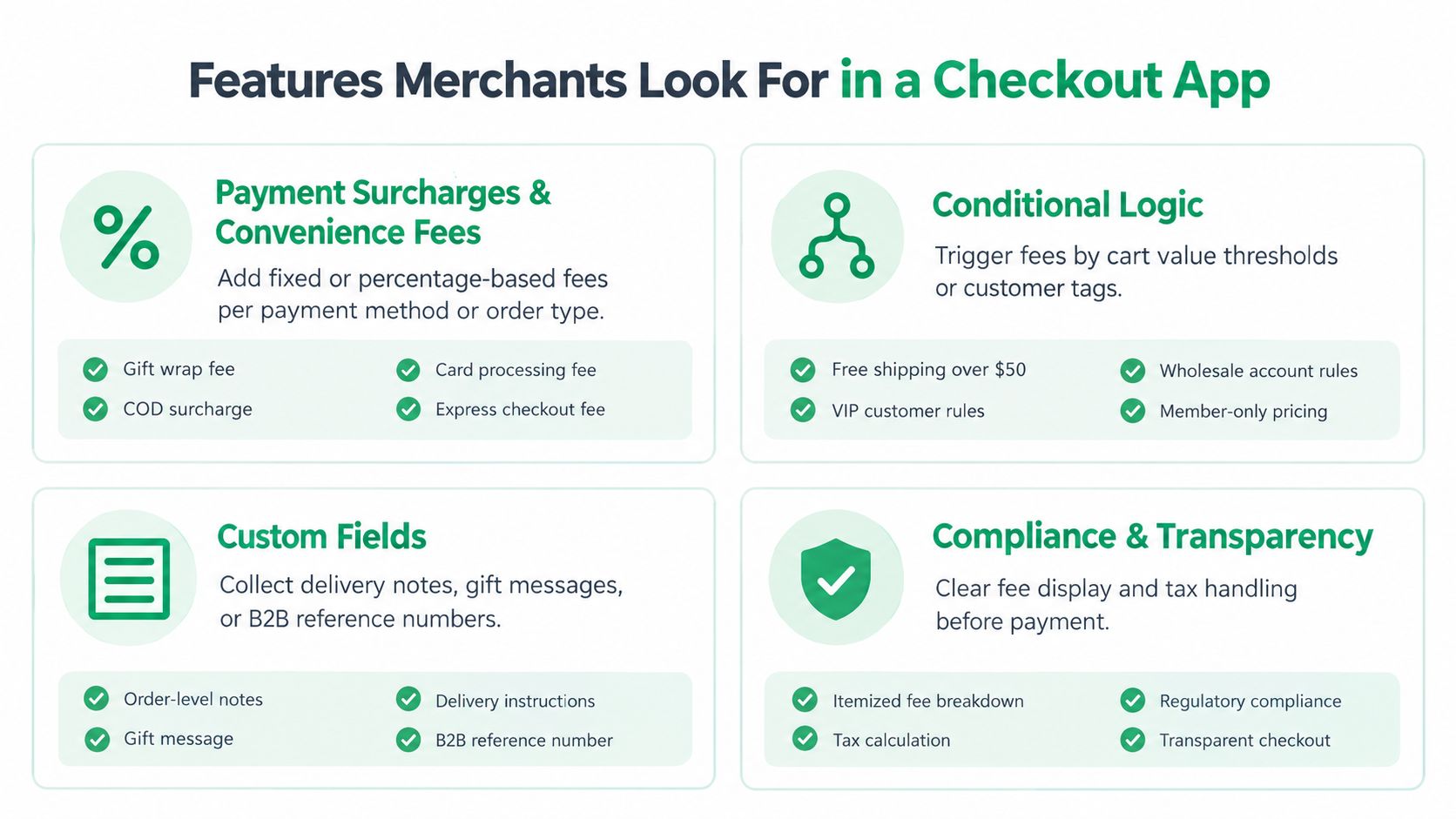
Most app listings cluster around the same handful of features, but not all of them move money. The ones that matter most are the ones that recover margin or reduce checkout friction in a way you can measure.
The features that usually pay for themselves
Payment surcharges and convenience fees are the clearest margin-recovery play. They matter when you need to pass along payment processing costs, COD handling, or region-specific fees, but they only work if the fee is labeled clearly and the buyer consents where Shopify requires it. Shopify’s app guidelines also stress transparent disclosure and explicit consent for optional charges. Shopify app best practices
Conditional logic is the key differentiator when a fee should only appear for certain carts, customer tags, or order types. That’s how you keep a surcharge from hitting the wrong buyer and creating support tickets.
Custom fields help with delivery notes, gift messages, and B2B purchase references. They’re useful, but don’t overrate them unless the missing information is causing real operational pain.
Compliance & transparency is not optional. If the fee is hidden, mislabeled, or applied inconsistently, the app is working against you.
The features that look impressive but rarely close the deal
Gift wrapping, tipping, and thank-you-page offers can improve the experience, but they rarely justify the app by themselves unless they fit a larger revenue strategy. Address validation can save failed deliveries, but it’s still an operational tool, not a growth engine. If your main issue is margin recovery, prioritize fees and logic first.
For a broader sales-focused comparison outside checkout-only use cases, this roundup of Shopify sales apps is a useful reference point.
If you’re evaluating a fee-focused setup, connect Shopify with Exerta only makes sense if your workflow needs that integration layer, not as a default add-on.
Plan Tier Limits That Change What an App Can Do
Shopify’s plan split decides how far a checkout app can go, and merchants get burned when they shop for features before checking their tier. Shopify Plus is the gate for apps that customize the information, shipping, and payment steps. Lower-tier plans can still use checkout-related apps for customer account pages, web pixels, post-purchase features, and some Functions-based capabilities. Shopify help on checkout apps
What non-Plus stores can and can’t expect
If you are on Shopify or Advanced, you can still use checkout apps, but the key question is which extension surfaces your plan supports. You can add blocks, run logic, and handle some downstream behavior, but you cannot rewrite the shipping or payment step layout the way Plus stores can.
That split explains most of the confusion in the app market. Fee and surcharge apps often rely on Functions and UI extensions, so they can work across current plan tiers. Apps that try to reshape the payment or shipping step usually reserve those features for Plus stores because the platform only exposes that level of control there. For cash-on-delivery setups, a focused resource like Shopify cash-on-delivery transaction fees is the kind of reference that shows where fee handling fits by plan.
A quick capability check by plan tier
| Capability | Shopify / Advanced | Shopify Plus |
|---|---|---|
| UI extensions on supported checkout surfaces | Yes | Yes |
| Functions-based fee or logic rules | Yes, in supported use cases | Yes |
| Web pixels for analytics and tracking | Yes | Yes |
| Post-purchase and account-related checkout apps | Yes | Yes |
| Shipping step customization | Limited | Yes |
| Payment step customization | Limited | Yes |
| Checkout step layout changes on the hosted flow | Limited | Yes |
The other constraint is timing. Shopify’s checkout.liquid deprecation has already pushed old workarounds out of the picture, and support ends on different surfaces at different dates. If a store still depends on the legacy file, the app it wants today may stop fitting the platform migration path tomorrow. Shopify checkout deprecation notice
How to Evaluate Any Shopify Checkout App
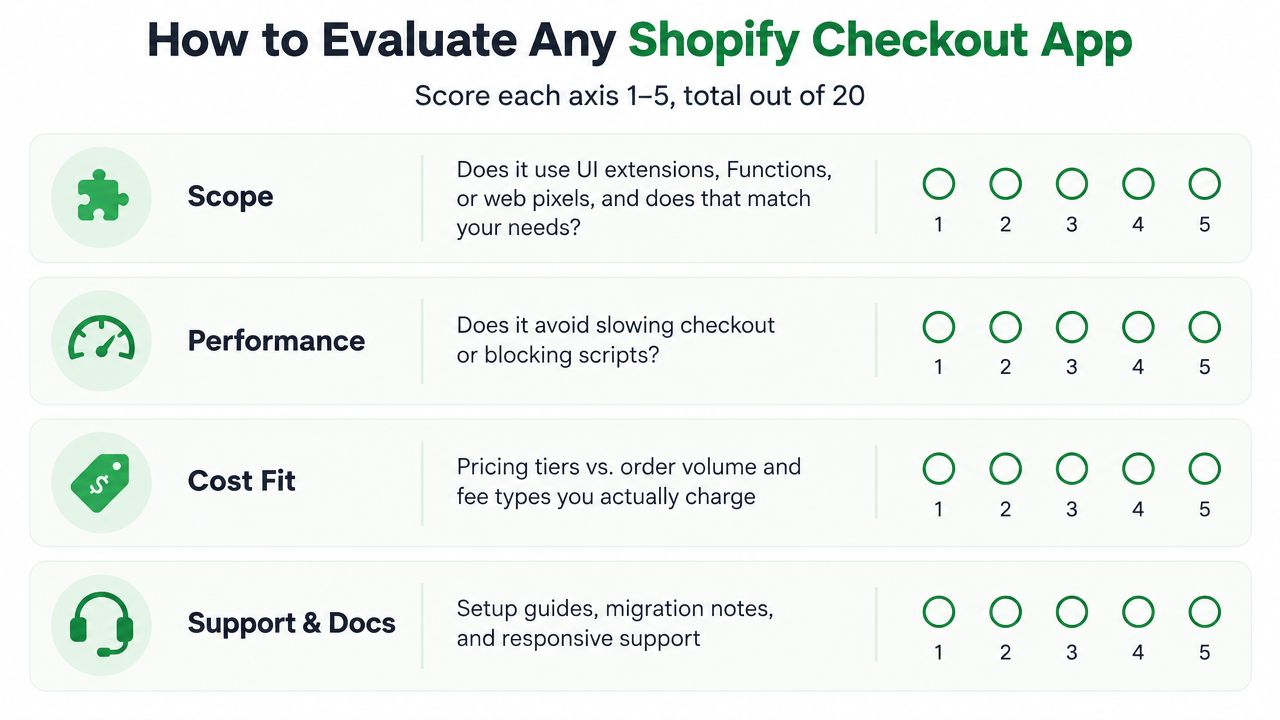
A decent app can still be wrong for your store. The fast way to avoid that mistake is to score it against the problem you have, not the feature list on the marketplace page.
The four things to score first
Scope. Does the app use UI extensions, Functions, or web pixels, and does that line up with what you’re trying to change? If it solves the wrong layer, it’s clutter.
Transparency. Does the listing clearly explain fee types, regional limits, and plan requirements? If the vendor hides the restrictions, expect surprises later.
Performance. Does it stay out of the way, or does it add heavy scripts and extra tracking that can slow the checkout experience? Checkout is not the place for bloat.
Support and docs. Does the developer publish release notes, migration guidance, and setup docs that reflect Shopify’s ongoing changes? If not, you’re buying uncertainty.
A quick ten-minute sanity check
- Read the changelog. You want to see maintenance tied to Shopify’s current checkout framework.
- Search reviews for “broke.” That word usually tells you whether an app survives updates cleanly.
- Confirm plan compatibility. Plenty of apps are technically installable but practically useless on the wrong tier.
- Check migration language. If the vendor still talks like
checkout.liquidis normal, move on.
The cheapest app with the longest feature list is usually the wrong call. Fit with your plan tier, your fee model, and your upgrade path matters more than raw feature count.
Where Dotstore’s Checkout Fee App Fits In
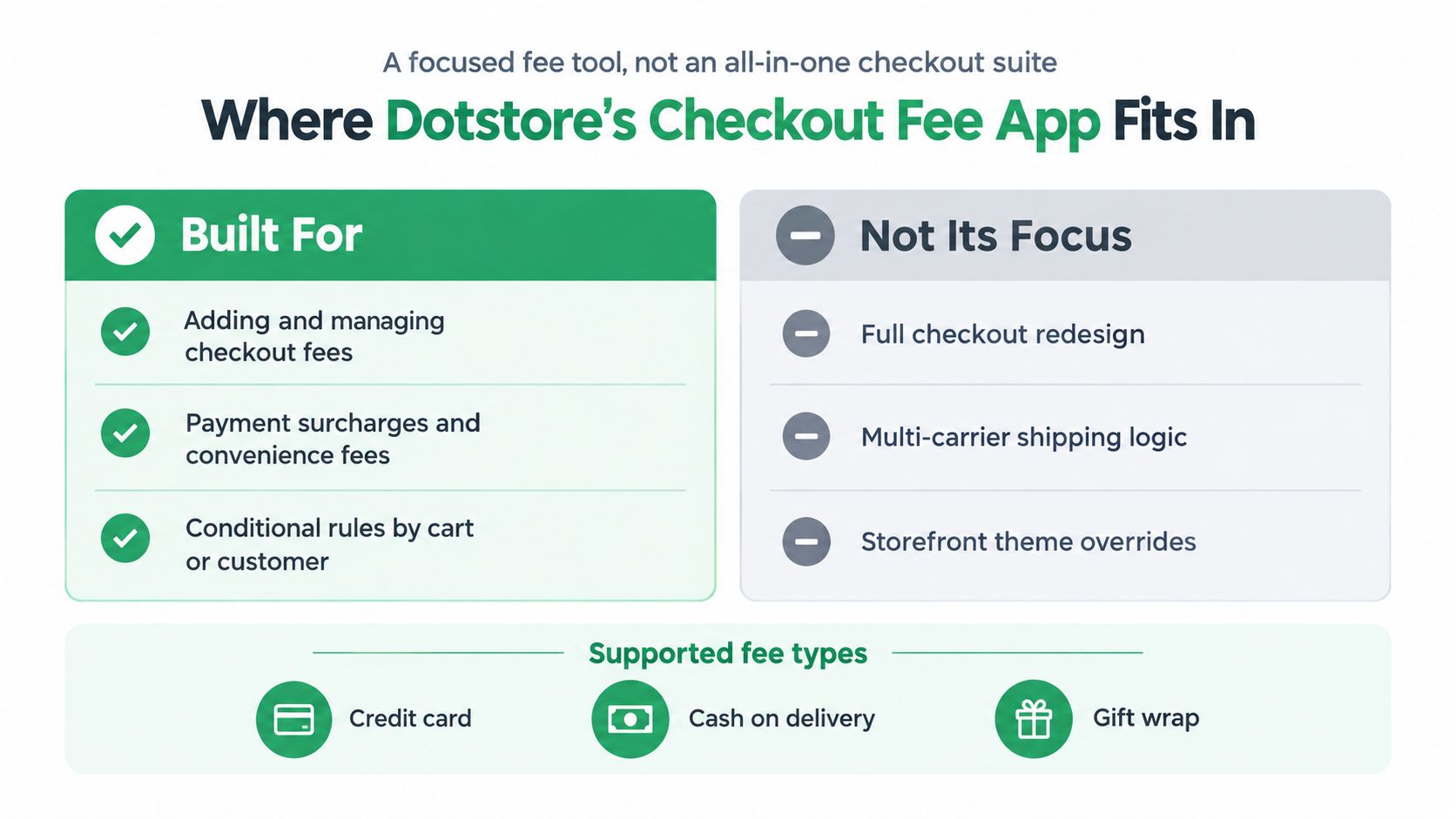
A focused fee tool, not an all-in-one checkout suite.
Dotstore’s Shopify Extra Fees Manager fits merchant teams that want to add and manage checkout fees, surcharges, and conditional rules without pretending the app is a full checkout redesign platform. That makes it relevant for stores that need to pass payment costs through on specific order types, apply service charges in regulated markets, or enforce fee logic by cart and customer context. The app’s own positioning around checkout fees and surcharges lines up with that narrower use case. Dotstore’s fee app page
Where it fits cleanly
It makes sense when the core problem is fee control. If you need a cleaner way to add payment surcharges, COD fees, or other checkout charges with conditional rules, a focused app like this is easier to justify than a broad tool full of features you’ll never use.
It’s also a better fit for merchants who already know they don’t need shipping-step redesign or a post-purchase funnel stack. In other words, it solves one job well instead of pretending to replace your whole checkout strategy.
Where it is not the answer
If you want multi-carrier shipping logic, full storefront overrides, or a rebuilt checkout experience, this isn’t the right category. The same goes for merchants who mainly want post-purchase upsells or thank-you-page monetization. Those are different tools, and trying to force one fee app to do all of them is how stacks get messy.
Pick the tool for the leak, not the category label.
That’s the right way to think about Dotstore here, one option in a fee-management lane, not a default answer for every checkout problem. If your issue is margin recovery through transparent charges, it belongs on the shortlist. If your issue is broader checkout architecture, it doesn’t.
Your Next Step Choosing the Right App
Start with your plan tier, because that decides which checkout surfaces are even in play. Then write down the one or two behaviors that would change margin or conversion the most, such as a surcharge rule, a fee disclosure flow, or a validation step that prevents bad orders.
Next, shortlist two or three apps that match those exact behaviors, not the most feature-packed listings. Verify that each one supports your plan, survives the checkout.liquid migration path, and clearly states how it handles fees, regions, and buyer consent. If the vendor can’t explain that cleanly, you already have your answer.
The cheapest app is rarely the most expensive mistake, but the wrong app for your plan tier absolutely is. Buy for the leak you need to fix, not for the longest feature list.
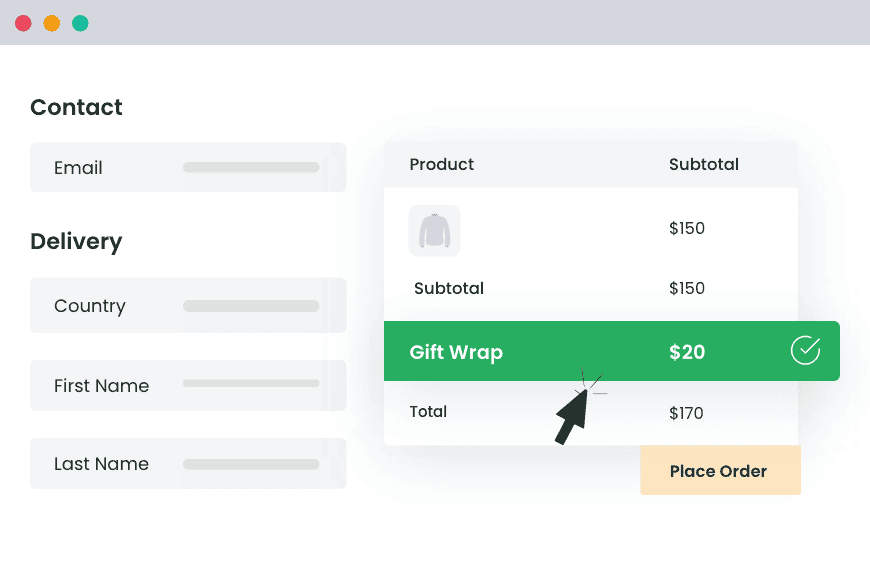
Shopify Extra Fees Manager
Add dynamic checkout fees for add-ons, upcharges, surcharges, etc., to your Shopify store — the easy way!
14-day, no-questions-asked money-back guarantee.
Conclusion
Dotstore builds checkout-fee and rule-based tools that fit the kind of margin control discussed here, including a Shopify app for adding fees and surcharges in a controlled way. If you’re comparing options for Shopify checkout logic, visit Dotstore and check whether its fee-focused app matches the exact checkout behavior your store needs.
Frequently Asked Questions
What is a Shopify checkout app?
A Shopify checkout app extends the checkout, cart, or post-purchase pages beyond what the native Shopify admin allows. It adds visible elements, such as custom fields or trust messages, and runs logic, such as fee calculations, shipping rules, or input validation.
What is Shopify Checkout Extensibility?
Checkout Extensibility is Shopify’s current framework for customizing checkout through apps. It replaced checkout.liquid and uses four extension types: UI extensions, Functions, web pixels, and payments extensions. Customizations built on it are designed to stay compatible with Shopify platform updates.
What is the difference between Shopify Functions and UI extensions?
UI extensions change what buyers see at checkout, such as custom fields, banners, or trust messages. Shopify Functions change how checkout behaves behind the scenes, such as discounts, shipping rules, delivery options, and payment customization.
Can I add a fee or surcharge to Shopify checkout?
Yes, with a checkout fee app. Fee apps built on Shopify Functions and UI extensions can add payment surcharges, COD fees, or service charges based on conditions such as cart value, customer tags, or order type. Shopify requires clear labeling and buyer consent for optional charges.
Which Shopify checkout app features are worth paying for?
Payment surcharges, convenience fees, and conditional fee rules are usually worth paying for because they recover margin directly. Custom fields help with delivery notes and B2B purchase references. Gift wrapping, tipping, and thank-you-page offers rarely justify an app on their own.
Do I need a checkout fee app or a full checkout customization app?
Choose a checkout fee app if your main problem is margin recovery through surcharges or conditional fees. Choose a broader checkout app if you need shipping-step changes, multi-carrier logic, a rebuilt checkout layout, or post-purchase upsells.