Table of Contents
Discover WooCommerce Request Quote new version 1.1.1. It’s packed full of new features that transform the quoting process. Additionally, it fixes some critical bugs and enhances compatibility with the latest WordPress and WooCommerce versions.
The latest update to our WooCommerce Request Quote plugin, version 1.1.1, is here! Packed with powerful new features and enhanced compatibility, this release takes your quote management capabilities to the next level.
The new features, such as customizable quote request forms, automatic user registration, and internal quote notes, give you complete control over your quoting workflow. These improvements streamline the quote process for both store owners and customers while ensuring seamless integration with the latest WordPress and WooCommerce versions.
Here’s a summary of what’s new in version 1.1.1:
🆕 New
Here’s a roundup of all the new features included in this version:
Customizable Quote Request Form
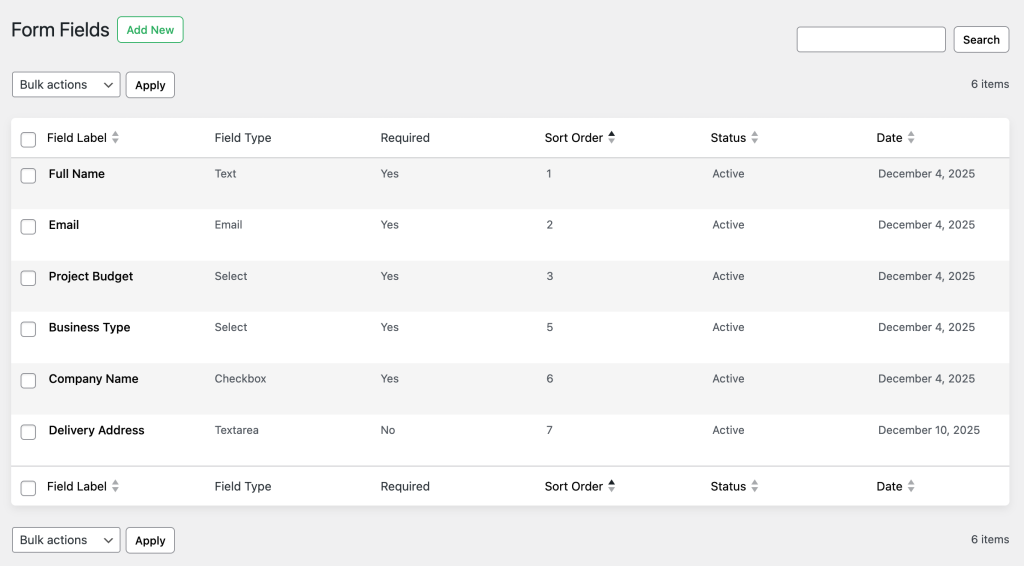
By popular demand, you can now create and manage form fields for your quote request forms. This powerful feature allows you to collect exactly the information you need from customers when they request a quote, replacing the default form fields with your own customized fields.
How It Works:
1. Create Form Fields
With this feature, you can add form fields to your quote request form with complete flexibility:
- Multiple Field Types: Choose from text, textarea, email, number, select dropdown, or checkbox fields
- Field Configuration: Set field labels, placeholders, required status, and display order
- Flexible Options: For select fields, add multiple options (one per line) to create dropdown menus
- Easy Management: Activate, deactivate, duplicate, or delete fields as needed
2. Replace Default Fields
When you create form fields, they replace the default form fields (Name, Email, Message) on the quote request form. This means:
- If you have no form fields or all form fields are inactive: The default form with Name, Email, and Message fields will be displayed
- If you have active form fields: Only your form fields will be displayed (plus Privacy Policy and User Registration if enabled)
Key Benefits:
- Collect Specific Information: Gather business-specific details such as company name, phone number, budget range, or project requirements
- Control Field Order: Arrange fields in the exact order you want them to appear using sort order values
- Required or Optional: Mark fields as required or optional based on your needs
- Better Data Collection: Get all the information you need upfront to provide accurate quotes
Example Use Case:
A B2B furniture store wants to collect specific information from wholesale customers. They create form fields for:
- Company Name (Text, Required)
- Phone Number (Text, Required)
- Business Type (Select: Retailer, Restaurant, Hotel, Office, Other)
- Project Budget (Select: Under $10,000, $10,000 – $50,000, $50,000 – $100,000, Over $100,000)
- Delivery Address (Textarea, Required)
- Special Requirements (Textarea, Optional)
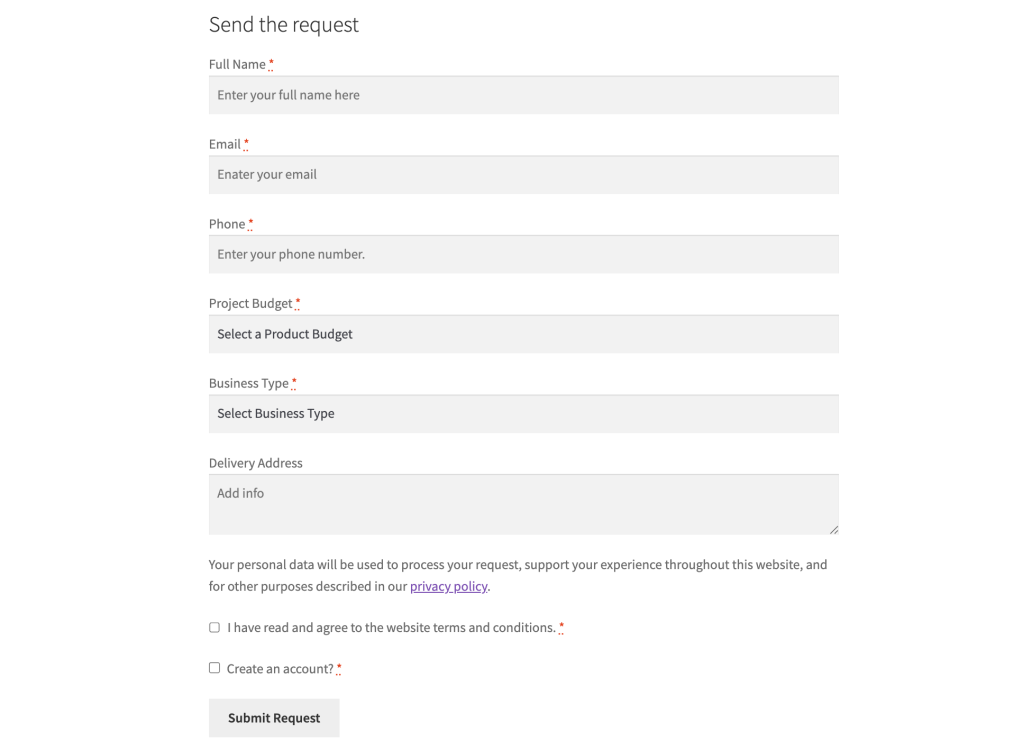
The quote request form now collects all necessary information upfront, allowing the store owner to provide more accurate quotes and better serve their B2B customers.
User Registration via Quote Form
We’ve introduced a new feature that allows customers to automatically create a WordPress account when they submit a quote request. This helps you build your customer database while providing a seamless registration experience during the quote request process.
How It Works:
1. Three Registration Options
You can choose from three registration options in the plugin settings:
- No: User registration is disabled. The “Create an account?” checkbox will not appear on the quote request form.
- Make it optional: Users can choose whether to create an account. A “Create an account?” checkbox appears on the form (optional, not required).
- Force user to register: Account creation is mandatory for all quote requests. The checkbox appears with a required asterisk (*).
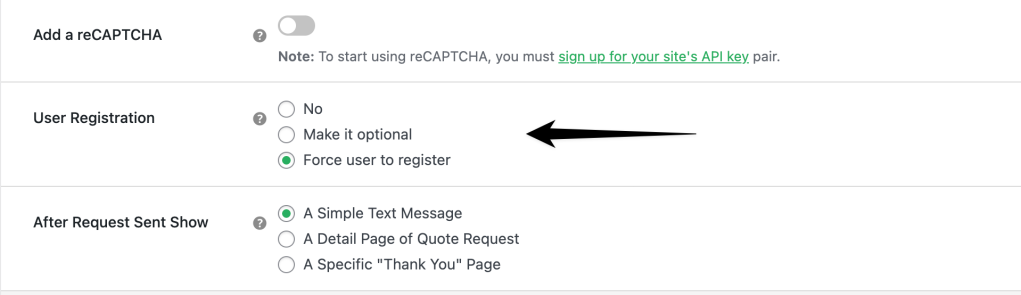
2. Automatic Account Creation
When a customer opts to create an account (or registration is forced), the system:
- Checks for existing users with the same email address
- Creates a new account if needed with:
- Username generated from the email address
- Automatically generated secure password (12 characters)
- User role set to “Customer”
- Display name and first name from the quote request
- Sends a welcome email with the generated password
Key Benefits:
- Automatic Account Creation: Customers can create accounts without a separate registration process
- Build Customer Database: Grow your customer base automatically as customers request quotes
- Improved Customer Experience: Seamless registration integrated into the quote request flow
- Flexible Options: Choose to make registration optional or mandatory
- Password Management: System automatically generates secure passwords and emails them to users
Example Use Cases:
- B2C Store: Use “Make it optional” for user choice
- B2B Store: Use “Force user to register” for full account-based quote flow
- Simple Store: Use “No” for a simple quote request without account creation
Quote Notes in View Requests
A new feature now lets you add internal notes or customer-facing notes to each quote request. This helps you better manage conversations, track follow-ups, and maintain detailed records throughout the quote process.
How It Works:
1. Two Types of Notes
You can add:
- Private note – visible only to administrators
- Note to customer – emailed to the customer automatically
2. Email Notifications
When adding a customer note:
- The note is saved
- An email is sent with note content and quote details
Key Benefits:
- Internal Documentation
- Customer Communication
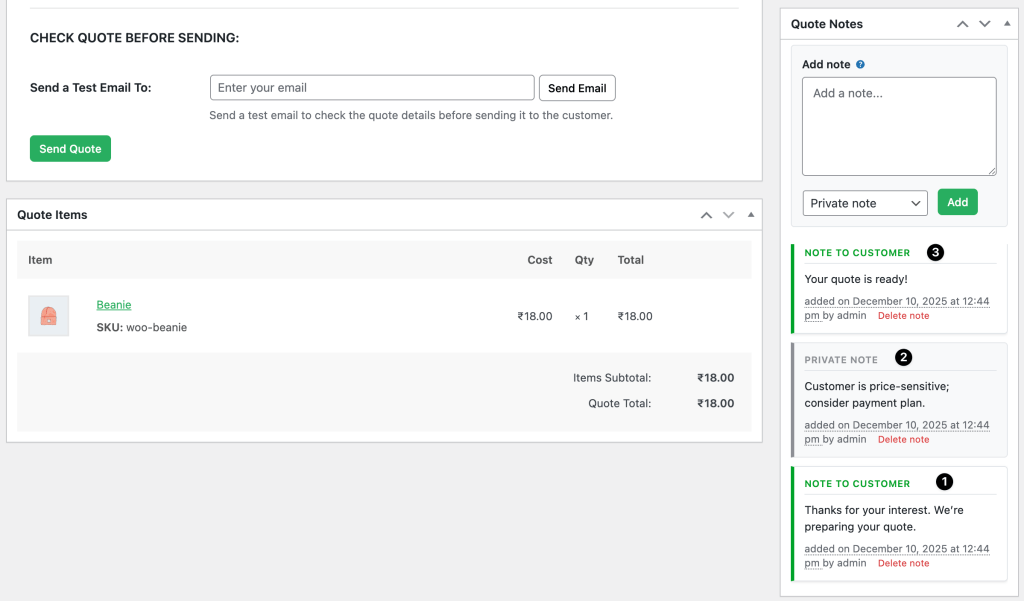
Example Use Case:
- Private Note: “Customer requested rush delivery. Check inventory.”
- Customer Note: “Thanks for your interest. We’re preparing your quote.”
- Private Note: “Customer is price-sensitive; consider payment plan.”
- Customer Note: “Your quote is ready!”
✨ Enhancements
This version includes enhancements to ensure smooth compatibility:
1. Compatible with WPC Force Sells for WooCommerce Plugin
2. Fully Compatible with WooCommerce 10.3.x
3. Fully Compatible with WordPress 6.9.x
Install WooCommerce Request Quote 1.1.1 Today!
This update brings improved functionality, better data collection, and seamless integration.
- Existing Customers: Update now
- New Users: Start transforming your quote process today
With features like customizable quote forms, automatic user registration, and internal quote notes, managing quotes has never been easier.
💡 Need Help Getting Started?
Here are some resources to guide you through installation and setup:
- How to Install and Activate a Dotstore Plugin – A step-by-step guide for users who need assistance installing our premium plugins.
- Getting Started with the Request Quote Plugin – Learn how to configure and use the plugin effectively.
- Watch the Video Tutorial – A quick and easy visual guide to getting started with the plugin.
🛠️ Have Questions or Need Support?
We’re here to help! If you have any questions or need assistance, reach out to us via our Support Portal.
With these powerful resources and the latest features in version 1.1.1, you’re fully equipped to enhance your store’s quoting capabilities. Don’t wait—install WooCommerce Request Quote today and experience the difference it can make!
🗣️👂Your feedback is priority number one! ❤️
Your feedback is our priority! We’d love to hear your thoughts, suggestions for new features, or ideas for improvements.
- Please suggest new features or improvements.
- Give us a shout on X (formerly Twitter), Linkedin, Facebook, and YouTube.
- Let us know what you love about the Request Quote plugin.
Curious about how WooCommerce Request Quote 1.1.1 can transform your store’s quoting process? Stay tuned for more updates and insights!