Table of Contents
Do you want to add a handling fee in Shopify? In this in-depth tutorial, I’ll walk you through step-by-step instructions to add handling fees to Shopify orders using the native settings and with the simple-to-use Dotstore Extra Fees Manager Shopify app.
![How to add a handling fee in Shopify [Tutorial] - featured image](https://www.thedotstore.com/wp-content/uploads/sites/1417/2026/03/How-to-add-a-handling-fee-in-Shopify-Tutorial-featured-image.png?w=1000)
Key Takeaways
- Fulfilling an order costs more than most customers realize. Packaging, labor, seasonal surcharges, and third-party fees quickly add up. Adding a small handling fee to Shopify orders helps businesses stay profitable without increasing product prices across the board.
- There are 3 different methods to add a handling fee in Shopify: using Shopify’s native 3rd party shipping rate settings to add a shipping handling fee, using a dedicated handling fee app like Extra Fees Manager by The Dotstore, and adding custom code to your site’s checkout page (for Shopify Plus users).
- Shopify’s built-in handling fee option is extremely limited. It only enables you to add a handling fee inside 3rd party shipping carrier-calculated rates. You can’t use it on native flat-rate shipping, free shipping, or per-product handling rules. What’s more, on the checkout page customers are shown the handling fee bundled with the shipping total, instead of as a separate line item.
- The Dotstore Extra Fees Manager app enables Shopify merchants to add fixed or percentage-based handling fees, product-level fees (fragile items, bulky products, custom-made goods), cart-level fees (small-order fees, high-value order surcharges), location-based fees, payment-method-based fees (COD, international cards, etc.), customer-type fees (wholesale vs retail), etc.
Trying to find out how to add a handling fee in Shopify?
If you run an ecommerce store, you know firsthand that the costs of fulfilling an order are almost never as straightforward as the product price and the shipping label. Costs for packaging materials, warehouse fees, seasonal labor fluctuations, and various additional expenses can quickly eat into your margins.
However, directly raising your product prices may not be the best move for your business. For instance, if:
- You sell on multiple marketplaces.
- Your customers are price-sensitive.
- You run paid ads that rely on competitive product pricing.
- Your product catalog includes many low-priced items with low margins.
Adding a small handling fee can keep your prices attractive and make sure you’re not undercharging once you factor in operational overhead.
In this post, we’ll unpack what handling fees are and their uses. Then we’ll show you step-by-step how to add handling fees to Shopify with the default feature and with the powerful Dotstore Extra Fees Manager app.
A quick note: Hi, we’re The Dotstore, makers of the Extra Fees Manager app! We’ve been creating ecommerce software since 2009, and today, more than 100,000 websites trust us to power their businesses. Available in both free and pro versions, Extra Fees Manager is a simple-to-use app that empowers merchants to add handling fees, surcharges, and other types of extra custom fees to Shopify with ease. Use it to add product-specific, cart total–based, location-based, customer-type, or payment/shipping method-based handling fees, and much more. Learn more about it or get it now.
What is a handling fee in Shopify?
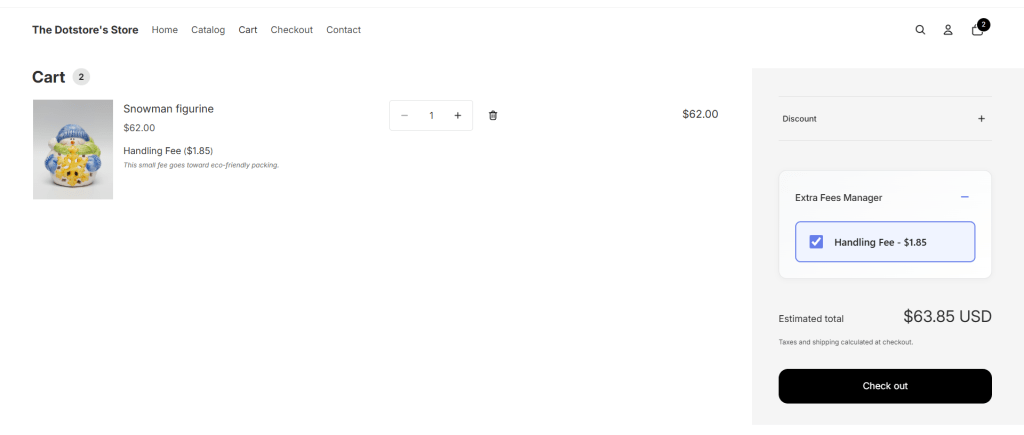
In Shopify stores, a handling fee is an extra charge merchants add to an order to cover additional, behind-the-scenes costs of preparing, packing, or processing the order. Like this:
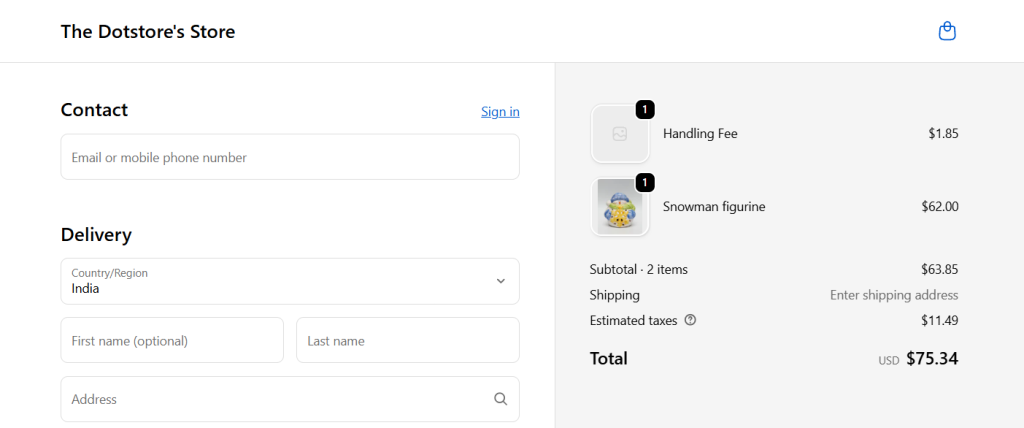
Handling fees are separate from individual product prices, shipping rates, and taxes. Their primary purpose is to help merchants recover operational expenses of fulfilling the order.
Why add handling fees in Shopify?
As a Shopify merchant, you know firsthand how small operational expenses can quickly pile up and eat into your profit margins. Adding a handling fee to an order can help transparently offset them and keep your operations sustainable.
Merchants typically use handling fees to recover:
- Packaging costs, e.g, for premium boxes, insulated packaging, or eco-friendly materials.
- Labor and fulfillment costs, e.g, for preparing fragile items, assembling and grouping product bundles.
- Third-party service fees, e.g., “processing” charges, “pick and pack” fees charged by warehouses, fulfillment centers, and specialty couriers.
- Payment method–specific costs, e.g., for credit card or cash-on-delivery (COD) orders.
How to add a handling fee in Shopify using the native settings
Shopify’s built-in shipping handling fee setting is found inside 3rd party carrier-calculated shipping rates (for example, if you use Printful’s live shipping rates). You can either add the handling fee as a fixed amount, a percentage of the shipping rate, or both.
Note the following limitations of Shopify’s native method:
- You can only add a shipping handling fee to Shopify.
- You can’t add handling fees to a flat rate shipping option.
- You can’t apply a handling fee only when a specific product tag or SKU is in the cart.
- You can’t show the handling fee as a standalone fee or a separate line item (it will be shown combined with the shipping total during the checkout process).
Tutorial: How to add a shipping handling fee in Shopify using the native settings
Here’s a step-by-step walkthrough of how to add a shipping handling fee to 3rd party carrier-calculated shipping rates in Shopify using the native settings:
- From your main Shopify admin panel, go to Settings → Shipping and delivery.
- Choose the shipping profile to apply the handling fee, and press “Manage rates”.
- Scroll to the shipping zone and rate that should carry the handling fee, press the three-dot menu (⋯) to the right of the rate, and select “Edit rate”.
- In the rate editor, locate the “Handling fee” section:
- To add a percentage surcharge, enter the percent (for example: 10 for 10%).
- To add a flat handling charge, enter the dollar value in the flat field (for example: 2.00).
- Note: You can use both flat and percentage handling fees. Shopify will first calculate the percentage against the original shipping rate, then add the flat amount.
- Press “Done”, then save the shipping profile.
Introducing a powerful Shopify handling fee app
The Dotstore’s Extra Fees Manager is a powerful app that empowers merchants to add handling fees, surcharges, and other types of extra custom fees to Shopify. It lets you create both fixed amount and percentage-based handling fees, and you can choose whether each fee is taxable or not.
You can use Extra Fees Manager to add:
- Product-specific handling fees that are applied only when certain items are in the cart. Think: handling fees for fragile goods, bulky items, custom-made products, etc.
- Cart total–based handling fees that charge extra when the cart value hits certain thresholds. Think: small-order fees or large-order surcharges.
- Location-based handling fees that add regional or international surcharges automatically based on customers’ shipping addresses. This is best suited for situations where fulfillment, packaging, or shipping costs vary greatly by region.
- Customer-type or payment/shipping method-based handling fees that treat different customer segments differently. Think: first-time customers, wholesale, or COD vs prepaid orders.
Handling fees are shown as standalone charges on the cart and checkout pages, instead of being bundled into the shipping rate (like with Shopify’s native feature). This improves transparency, which goes a long way towards building trust with customers.
Extra Fees Manager is built by us at The Dotstore. We’ve been creating ecommerce software since 2009, and our tools now power more than 100,000 websites. Because we deeply understand the ecommerce space, the app’s interface feels familiar and intuitive, and functions in line with real-world merchant workflows.
Once installed, Extra Fees Manager is quick to configure (a guided setup wizard guides you through the steps to add a custom fee), so you can have your first handling fee live in a few minutes.
Here’s a quick overview of its top features.
Key features
- Dynamic fee types. It supports both fixed and percentage-based handling fees.
- Add product-specific fees. It enables product-level targeting, which enables you to apply handling surcharges to a single SKU, a group of SKUs, or all products in a specific collection.
- Advanced conditional logic. You can build fee rules that respond to cart total, total quantity of items, number of unique products, specific SKUs or product types, collections, customer tags (e.g., wholesale vs. retail), shipping country or region, customer location, and several other cart-level conditions.
- Built-in scheduling for automatic start and end dates. Its scheduling option lets you set handling fees to activate or deactivate automatically, without you needing to manually adjust anything.
- Multi-currency support. In stores that sell internationally, it auto-adjusts the fee amount based on the customer’s currency, which saves customers from having to convert fees manually.
- Additional custom fee types: Dotstore Extra Fees Manager is a multi-purpose custom fees app. It works great for virtually any other types of add-on fees, including service fees, extended warranties, gift wrapping, tips, donations, etc.
How to add a handling fee in Shopify with an app
In this section, I’ll show you how to add a handling fee in Shopify using the powerful Extra Fees Manager app by The Dotstore. This method upgrades Shopify’s default features by enabling you to add handling fees on the product level, schedule start and end dates for handling fees, and add additional conditions to the handling fee.
Plus, you can embed the handling fee calculator on your Shopify store’s cart and checkout pages, which displays handling fees as standalone charges.
Tutorial: How to add a handling fee in Shopify with an app
Here’s a step-by-step walkthrough of how to add a handling fee in Shopify with an app:
- Add The Dotstore’s Extra Fees Manager app (available in free and pro versions) to your Shopify store.
- In your Shopify dashboard, navigate to Apps → Extra Fees Manager → Billing, and choose a free or paid plan. Note: without this, you won’t be able to create any custom fees.
- Next, navigate to Extra Fees Manager → Fees.

- Press the “Create Fee” button to add a handling fee to your Shopify store.
- Add a name for the handling fee.
- Configure the Shopify handling fee details:
- Handling fee type (fixed amount or a percentage of the order total).
- Handling fee amount.
- Tax status – whether taxable or not.
- Define whether this handling fee should be applied on the product level (to specific products) or the cart level (to the entire cart).
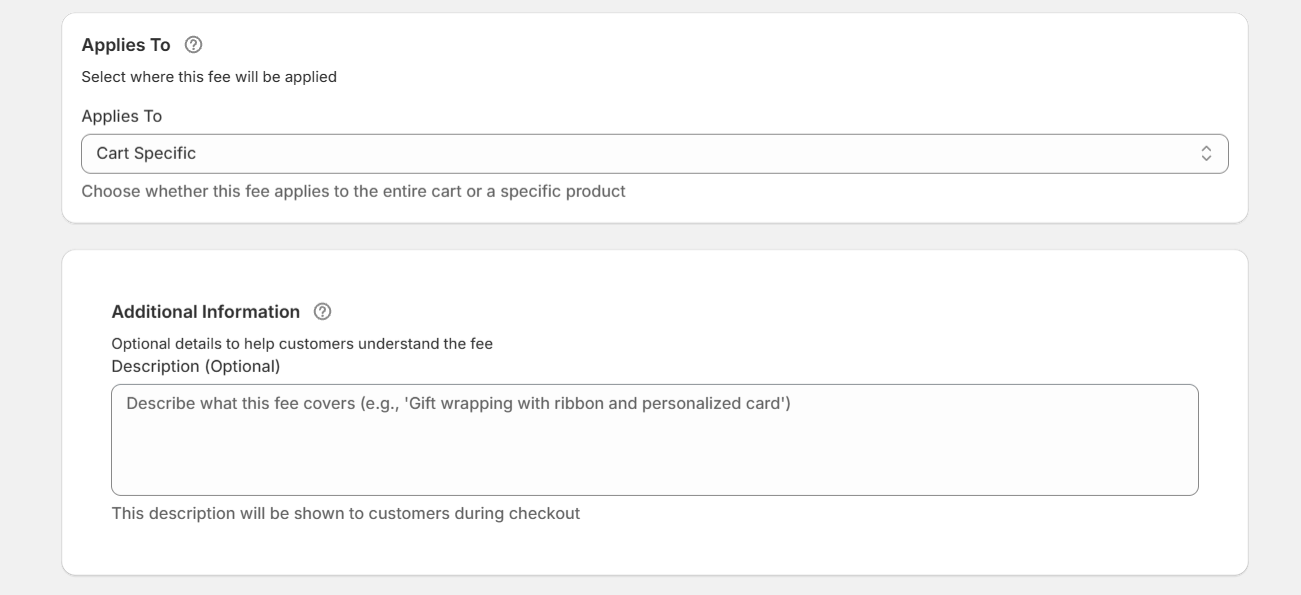
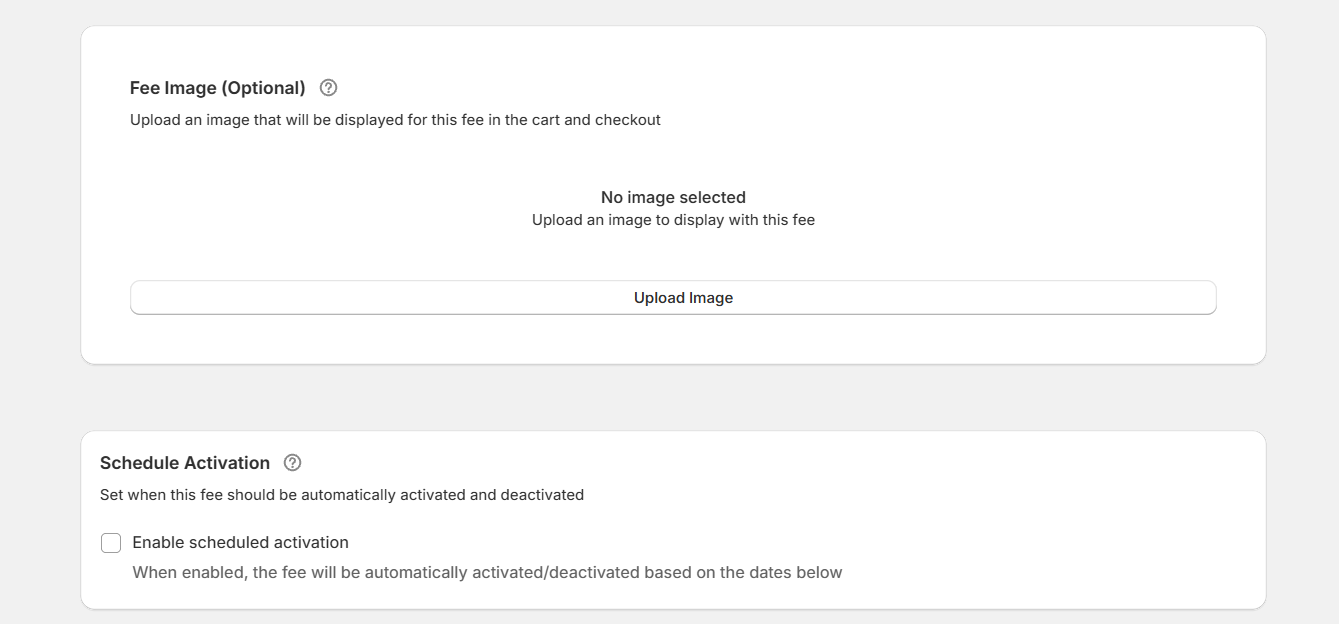
- Optional: add a brief description of the handling fee (to be shown to customers on the checkout page), a fee image (to be shown alongside the fee on the checkout page), and set the start and end dates for the handling fee.
- Activate the “Enable Conditional Rules” option to define conditions that determine how the handling fee is applied, if needed. Once enabled, you can define conditions like cart total, cart item quantity, number of products in the cart, specific products in the cart, specific product collections, customer type, customer location, and more.
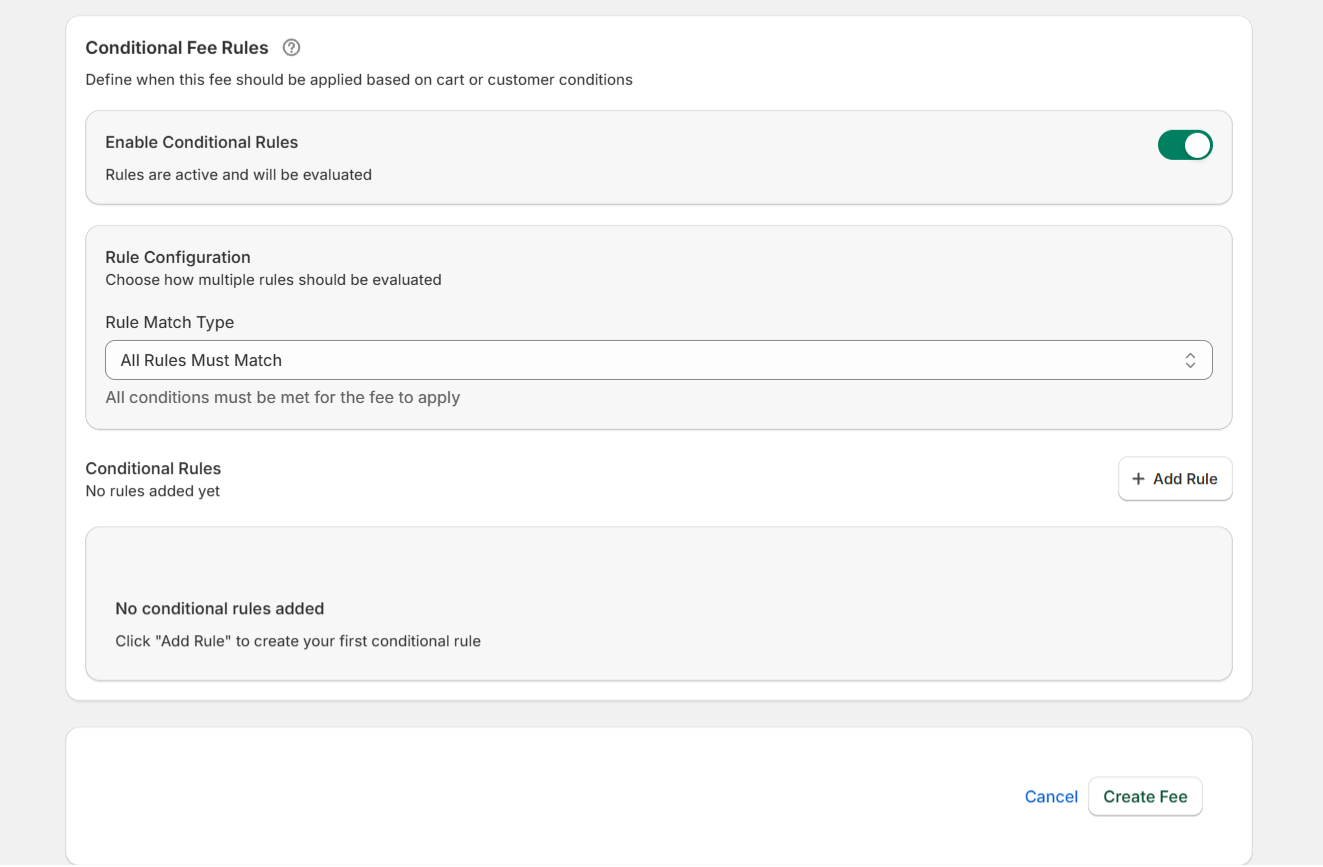
- Press “Create Fee” to save your settings.
Important: Embed the handling fee calculator on your Shopify cart page
Follow these steps to customize your theme and embed the handling fee calculator on your Shopify store’s cart page.
- In your Shopify dashboard, navigate to Apps → Extra Fees Manager.
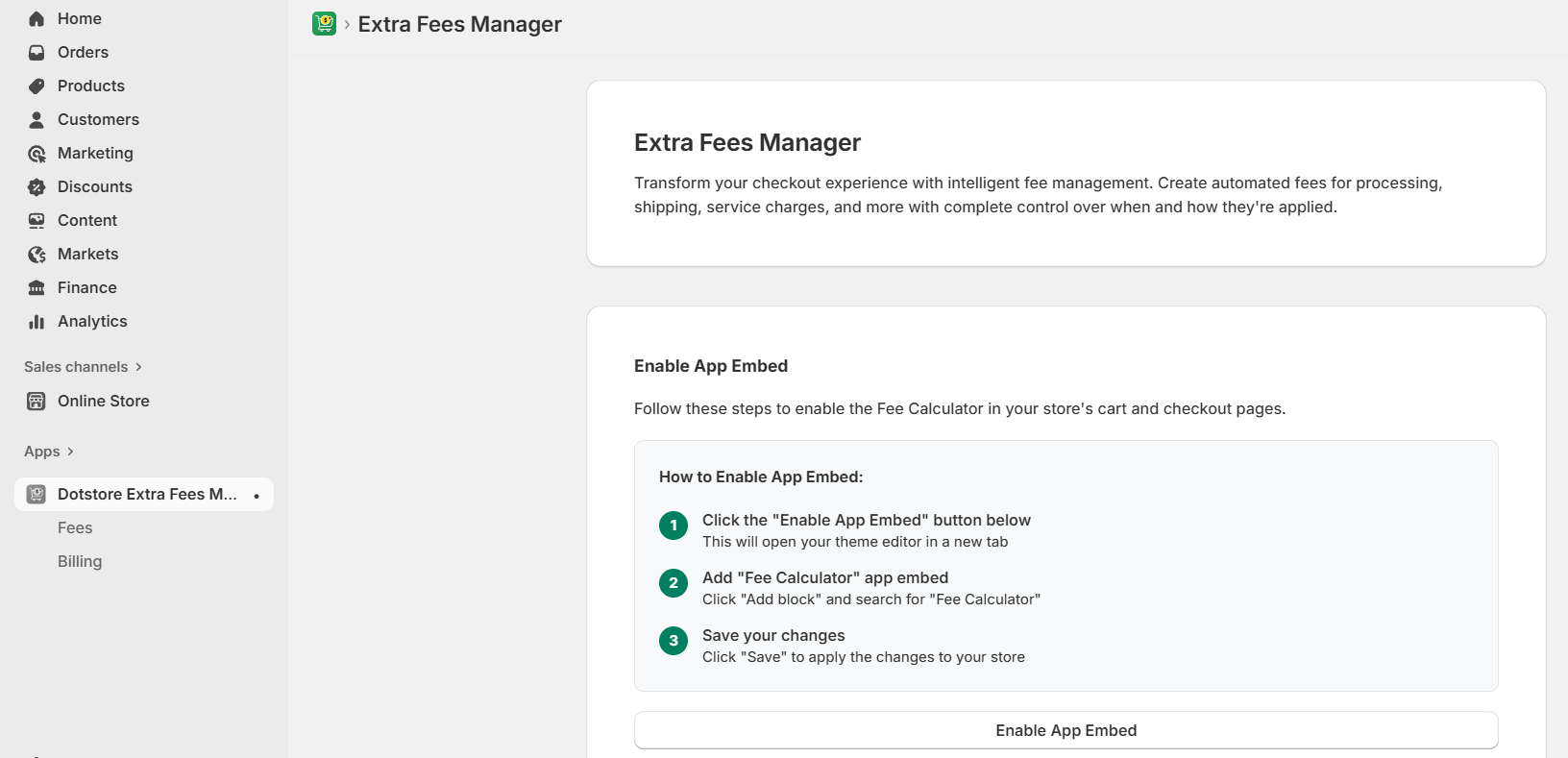
- In the “Enable App Embed” section, press the “Enable App Embed” button. This will open your theme editor’s main page in a new tab. Open your theme’s “Edit” page.
- Navigate to the app section. Locate the Dotstore Extra Fees Manager app, run a search for “Fee Calculator”, add it and save your changes.
FAQs about how to add a handling fee in Shopify
Can I add a shipping handling fee in Shopify?
Yes, you can add a shipping handling fee to shipping rates in Shopify. The settings are housed within the Settings → Shipping and delivery section of your admin dashboard. You can add a handling fee as a fixed amount or a percentage of the carrier’s shipping rate, or both.
With Shopify’s native method, the handling fee you enter is applied per shipping rate and gets blended into the final shipping charge customers see during the checkout process. For example, if you set a flat $4.99 shipping rate and you add a $2 handling fee, your customers will see a single shipping cost of $6.99 at checkout.
Can I add a handling fee for free shipping in Shopify?
Yes, you can add a handling fee to free shipping in Shopify, but you can’t do it with Shopify’s default settings alone.
Shopify doesn’t let you attach a handling fee directly to a free shipping rate because “free” means the shipping price must stay at $0. Any fee you try to add gets blended into the shipping total, and that immediately disqualifies it from being a true “free shipping” option.
If you want to offer free shipping while still charging a handling fee, you’ll need to use an app like Extra Fees Manager by The Dotstore. This lets you add a separate, clearly labeled charge without breaking the free shipping promotion.
Can I add a handling fee to Shopify?
Yes, you can add a handling fee to Shopify with 3 different methods:
- Using Shopify’s native shipping rate settings (limited but easy).
- Using a dedicated Shopify handling fee app like Extra Fees Manager by The Dotstore.
- Adding custom code to your site (for Shopify Plus users).
Ready to add a handling fee to the Shopify checkout page?
Adding a handling fee to Shopify orders helps cover operational costs and protects your profit margins.
Shopify’s native settings enable you to add basic handling fees. However, you can’t apply fees to specific products or set conditions that define how the handling fees are applied. Plus, the handling fee is bundled with the shipping fee, instead of shown as a separate charge.
The Dotstore’s Extra Fees Manager app lets you build a handling fee system that matches the way your store actually operates. You can add fixed or percentage-based handling fees, schedule them, target individual SKUs, set up conditions based on cart total, total quantity of items, number of unique products, specific SKUs or product types, collections, customer types (e.g., wholesale vs. retail), customer location, etc.
The handling fee is shown on the cart and checkout pages as a separate charge (not combined with shipping rates). Plus, the app is super easy to use, and its built-in setup wizard can guide you create your first handling fee within a few minutes.