Table of Contents
A sitewide percentage-off sale is easy to launch, but it can give away margin on orders customers would have placed anyway. A targeted coupon lets you choose which products qualify, who can redeem it, and how much each redemption costs you.
A useful example of coupons shows more than a discount code. Each of the eight below covers the purchase it should encourage, the cost per redemption, and the WooCommerce settings that keep the offer profitable.
| Quick answer: The eight most practical coupon types for a WooCommerce store are percentage-off codes, fixed-amount cart coupons, free shipping thresholds, BOGO offers, first-order coupons, abandoned cart coupons, tiered volume discounts, and referral coupons. Native WooCommerce coupons handle the first three well. The other five need extra logic: a purchase-history check, a pricing-rules plugin, a cart-recovery tool, or a referral system. Judge every coupon by the contribution it leaves after product cost, fulfillment, payment fees, and the discount itself, not by how many shoppers redeem it. |
Distribution alone isn’t a useful success measure. Approximately 53.1 billion coupons were distributed in the United States in 2024, yet only about 1.64% of all issued coupons were redeemed, according to Capital One Shopping’s coupon statistics.
1. When Should You Use a Percentage-Off Coupon?
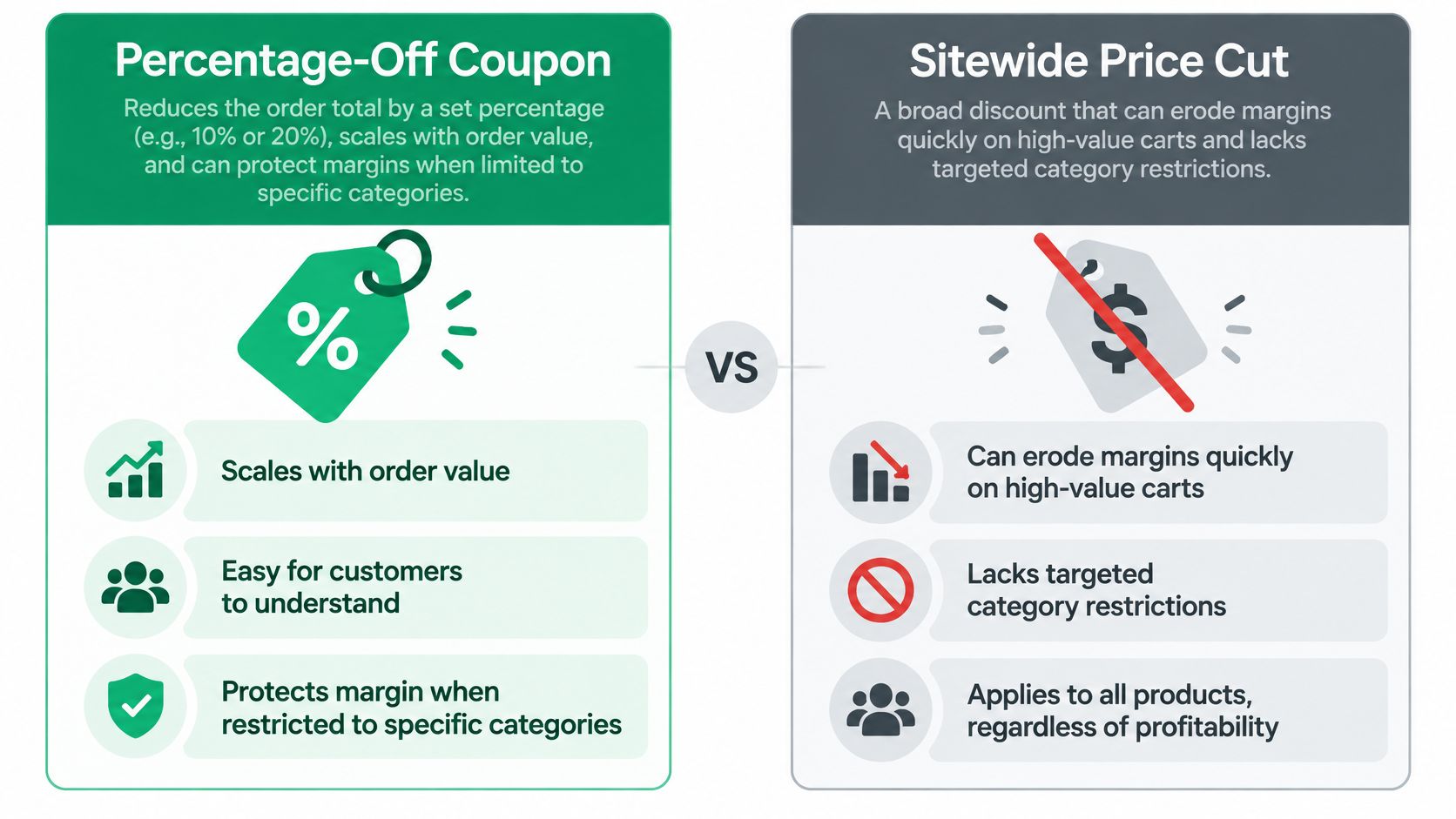
Use a percentage-off coupon when the eligible products share similar margins. An accessories promotion is easy to control, while a storewide offer covering both high-margin add-ons and tightly priced equipment isn’t.
For example, to sell accessories alongside a core product, restrict the coupon to the accessories category and exclude sale items. Customers can still build a mixed cart, but the main product stays at full price.
The comparison below shows the difference between targeting an eligible purchase and lowering prices across the store.
How do you set up a percentage coupon in WooCommerce?
- Go to Marketing > Coupons and click Add coupon.
- Enter the code, choose Percentage discount, and set the amount and expiry date.
- Under Usage restriction, add only the products or categories the campaign should move. Tick Exclude sale items when a second reduction would leave too little margin, and Individual use only if the code must not combine with other coupons.
- Under Usage limits, set a total limit and, where it fits, a per-user limit.
The WooCommerce percentage-discount setup guide covers each field.
Your discount cost is the eligible subtotal multiplied by the discount rate, so it grows with the basket. A 20% code costs you $12 on a $60 accessory order and $40 on a $200 one. Before publishing, test a cart that contains your lowest-margin eligible product, not just the product in the campaign banner.
2. When Is a Fixed-Amount Cart Coupon the Better Choice?
Choose a fixed-amount cart coupon when you need a predictable discount per order. It nudges customers past a spending threshold without letting the discount grow with the basket.
For example, a homewares store could offer $15 off bedding orders above a set value. The customer gets a clear benefit, and the store knows exactly what each redemption costs.
Fixed cart discount and Fixed product discount are different tools. The first spreads one discount across the eligible items in the cart. The second discounts every eligible item, so your cost multiplies as quantity rises.
How do you set a minimum spend that still leaves profit?
Work out the contribution at each basket value before you pick the minimum. In this illustration, bedding carries a 45% margin, fulfillment costs $8 an order, and payment fees are 3% of what the customer pays.
| Minimum spend | Margin before coupon | Left after $15 coupon, $8 fulfillment, and fees |
| $75 | $33.75 | $8.95 |
| $100 | $45.00 | $19.45 |
The same $15 coupon leaves less than half the contribution at a $75 minimum. Swap in your own margin and costs before you set the threshold.
- Product eligibility: WooCommerce checks minimum spend against the cart subtotal, so excluded products can help a cart qualify without adding enough margin.
- Tax setting: The check uses the displayed subtotal, which includes tax when your store shows tax-inclusive prices. Don’t advertise a merchandise-only threshold unless checkout evaluates it that way.
- Quantity behavior: Confirm you chose Fixed cart discount. With a per-item discount, Limit usage to X items caps how many items it applies to, but only when specific products are set on the coupon.
- Basket mix: Compare eligible basket composition before and during the campaign. A qualifying cart full of low-margin items can still lose money.
- Refund handling: Test a partial return so your team knows what’s left of the order economics.
3. How Do You Offer Free Shipping Without Losing Money?
Set the free shipping threshold high enough that the extra margin pays for delivery. Waiving the customer’s shipping charge doesn’t remove your carrier invoice, packaging, or handling work.
A lower-risk version is free standard delivery within one domestic zone once the basket reaches a set value. That’s safer than free delivery everywhere, especially if you sell bulky products.
Make the qualifying purchase easy to understand before checkout.
To size the threshold, divide the delivery cost by your margin. If delivery costs $9 and your margin is 40%, customers need to add at least $22.50 of eligible spend just to cover the subsidy.
How do you connect a free shipping coupon to a shipping method?
- Edit the coupon and tick Allow free shipping.
- Go to WooCommerce > Settings > Shipping, open the relevant zone, and add a Free shipping method.
- In the method’s settings, choose what free shipping requires: a valid coupon, a minimum order amount, either one, or both.
- Decide whether the minimum is checked before or after coupon discounts, and match your messaging to it.
The WooCommerce free-shipping guide covers each setting.
- Restrict geography: Keep expensive destinations out unless their economics support it.
- Check your other shipping rules: The coupon only enables the Free shipping method and doesn’t zero out other rates. Conditional shipping plugins can behave differently, so confirm express and other methods still charge as intended.
- Handle oversized goods: The coupon checkbox doesn’t exclude bulky items. Use shipping-class rules or an extension.
Show customers how much eligible spend remains, but don’t nudge them toward an add-on that costs more to ship than it contributes. Test mixed carts, remote addresses, and discounted baskets before launch.
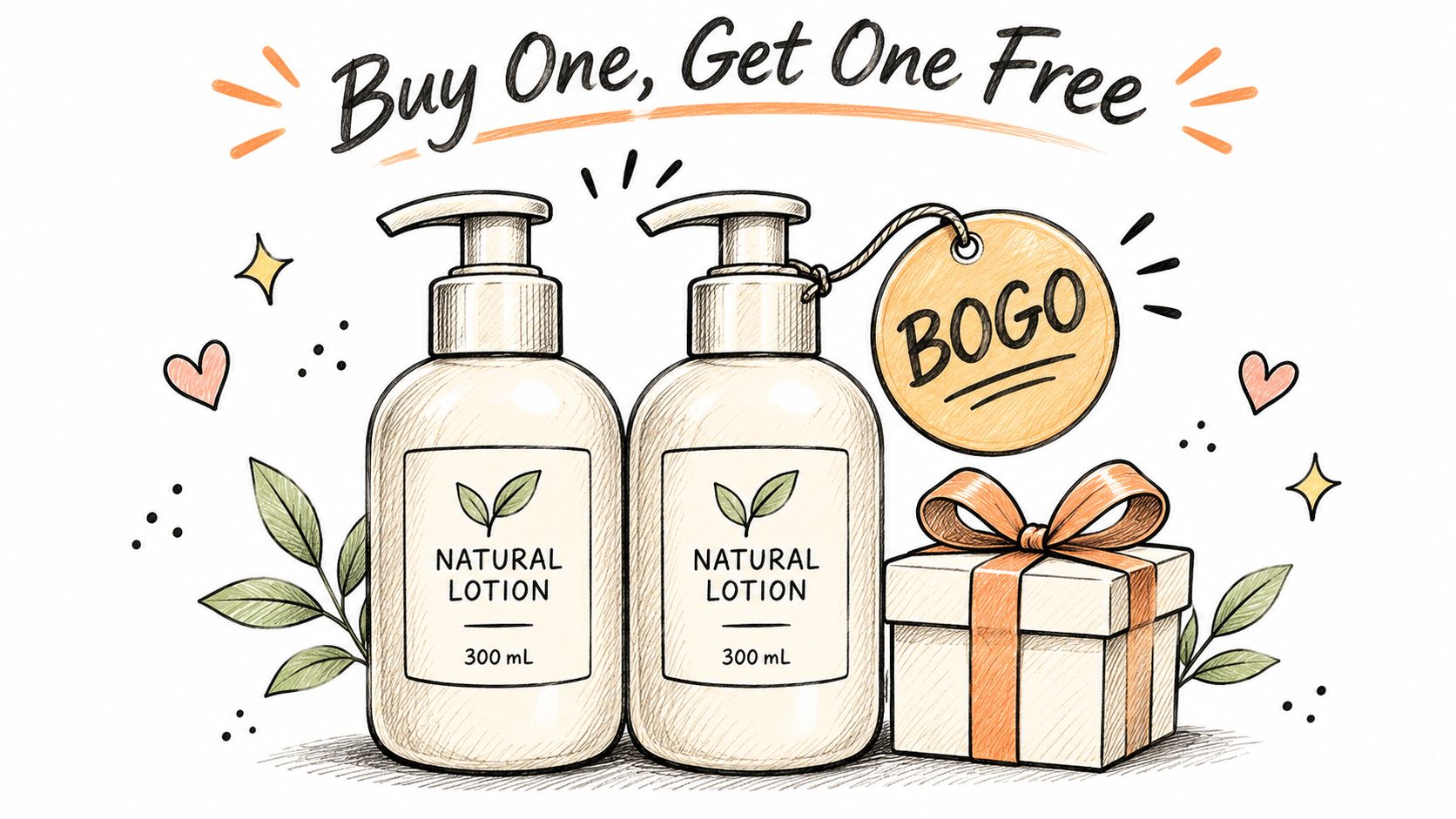
4. When Does a Buy One Get One (BOGO) Offer Make Sense?
A BOGO offer makes sense for products customers use in multiples, or when a complementary gift makes the paid product more attractive. Treat it as an inventory decision as much as a promotion.
A skincare store might give a travel-size lotion with a full-size purchase. That costs far less than giving away a second full-size bottle.
The free item’s retail price is what the customer sees. Your cost is its landed cost, plus any extra picking, packing, shipping, or payment expense, plus the sale you lose if the customer would have bought that item anyway.
Can you set up BOGO with native WooCommerce coupons?
No. Core coupons can’t make one product’s discount depend on another product being in the cart, which is what a buy-X-get-Y offer needs. You need a pricing-rules plugin. Dotstore’s Dynamic Pricing and Discount Rules supports buy X get X, buy X get Y, and conditional offers such as 50% off product B when product A is in the cart. The buy-X-get-Y setup guide walks through the configuration.
Whichever tool you use, set these explicitly:
- Define the reward: Select the exact product or variation.
- Cap repetitions: Set a maximum reward quantity per order.
- Prevent overlapping benefits: Exclude products already receiving incompatible discounts.
- Plan for returns: Decide what happens when a customer returns the paid item but keeps the gift.
A slow-moving product isn’t automatically a good giveaway. It still needs to be useful, in stock, and cheap to fulfill. Test what happens when shoppers remove the paid product, change variations, or increase quantities, and confirm the reward disappears or recalculates right away.
5. How Do You Limit a First-Order Coupon to New Customers?
Tie a first-order coupon to purchase history, not to a signup form. An email address isn’t proof of a new customer, so a welcome offer needs an eligibility check behind the code.
For a specialty-food store, a first-order coupon can lower the risk of trying an unfamiliar product. Limit it to an introductory assortment instead of an unrestricted discount across products with very different margins.
Does WooCommerce check first-order eligibility on its own?
Not fully. Core coupons can restrict use to Allowed emails and set a per-user limit, but they don’t check whether a customer has ordered before. Create the coupon in WooCommerce, then add customer-history logic with an extension. The first-order discount setup guide explains the approach.
- Verify purchase history: Don’t rely only on whether someone has a registered account.
- Limit reuse: Apply customer-specific restrictions and review suspicious address or identity patterns.
- Keep an expiry: State the deadline clearly, including your store’s time zone.
- Preserve access: Let customers get help without downloading an app.
Count the discount or shipping subsidy, plus any separate acquisition spend tied to that customer, as one cost. Track repeat purchases separately, because a discounted first order doesn’t prove a profitable customer relationship.
Access belongs in promotion design. In late 2023, U.S. House members led by Rep. Marilyn Strickland asked the FTC to investigate how digital-only store coupons affect seniors, lower-income shoppers, and people without reliable internet access. Use visible terms, accessible forms, and a customer-service fallback, and keep fraud checks proportionate.
6. Should You Send a Coupon to Recover an Abandoned Cart?
Not in the first message. Send a plain reminder first, because a shopper may have left to check delivery details, fix a payment problem, or finish something else, and none of those needs a discount.
For a gift store, the first recovery email could restore the cart and explain delivery options. A later email can offer a restricted coupon if the customer still hasn’t bought and the basket can support the cost.
Recovered revenue isn’t the same as incremental revenue. Some recipients would have come back without an incentive, so don’t count every redeemed recovery coupon as a sale you’d otherwise have lost.
How do you set up cart recovery coupons safely?
WooCommerce doesn’t send abandoned cart emails out of the box, so use a cart-recovery extension or an email platform connected to your store. Use customer-specific coupons, conversion suppression, and an expiry instead of a permanent public code.
- Suppress completed orders: Stop the sequence when the shopper buys.
- Bind eligibility: Restrict the coupon to that customer and, where supported, to qualifying cart contents.
- Exclude weak-margin baskets: Don’t automatically discount products that can’t absorb the incentive.
- Respect communication permissions: Configure consent and suppression for the regions you serve.
Measure the incentive against a comparable group that doesn’t receive it, and track contribution after discounts, refunds, fulfillment, and delivery subsidies. Watch for repeat abandonment too. If shoppers can reliably trigger a coupon by leaving checkout, abandoning the cart becomes the cheapest way to buy.
7. How Do You Set Up Tiered Volume Discounts That Stay Profitable?
Set each volume tier from the contribution you keep on the larger order. More units don’t always mean lower fulfillment costs, especially when an order needs extra cartons, freight handling, or manual prep.
A stationery supplier could offer better pricing as a business customer orders more of the same notebooks. Keep unrelated products out of the quantity count unless you want mixed-product qualification.
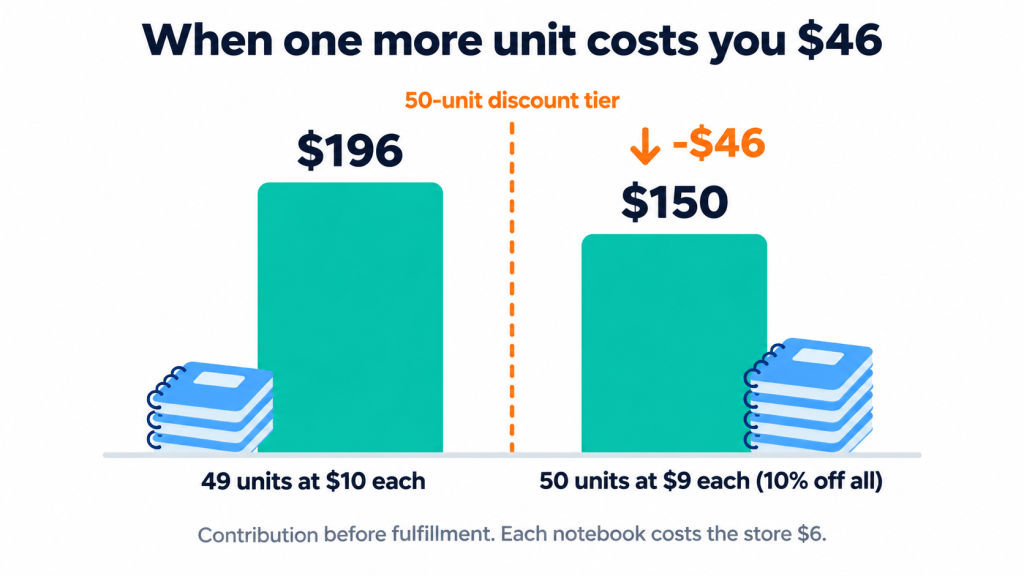
Calculate contribution across the whole qualifying basket. If crossing a threshold reprices every eligible unit, one extra item can cut your profit. In this illustration, notebooks sell for $10, cost $6, and orders of 50 or more get 10% off every unit.
| Units ordered | Price per unit | Contribution before fulfillment |
| 49 | $10.00 | $196 |
| 50 | $9.00 | $150 |
The 50th notebook costs the store $46 in contribution. Discounting only the units above the threshold avoids the drop.
How do you test each quantity threshold?
Core WooCommerce coupons don’t include tiered quantity pricing, so use quantity-based pricing rules instead of overlapping coupon codes. Dotstore’s Dynamic Pricing and Discount Rules supports tiered and bulk discounts by product, category, or across the store. Then check each of these:
- Counting method: Decide whether quantities count by product, variation, category, or eligible cart.
- Pricing method: Decide whether the discount applies to all qualifying units or only units within a tier, using the table above.
- Role overlap: Stop trade pricing and public promotions from combining by accident.
- Next threshold: Tell customers how many more eligible units they need, and show the resulting price.
Measure volume offers against a control group, not by redemptions. In a large field experiment at a German supermarket chain, researchers from MIT, Kellogg, and Erasmus University found that store-entry coupons raised the share of shopping trips that included the promoted brand from 0.33% to 1.61%. They attribute part of that gain to shoppers moving purchases away from competing stores. A large discounted order can also pull forward a restock the customer would have placed later.
8. How Do You Run a Referral Coupon Without Overpaying?
Budget every reward on the order as one cost: the friend’s discount, the referrer’s reward, and any ambassador commission. A single referral sale can carry all three.
For example, an outdoor-accessories store could give a referred customer an introductory discount and issue store credit to the referrer once the order clears its return window. Unique referral identifiers let the store attribute purchases without a public promotion code.
How do you separate referral tracking from reward payouts?
WooCommerce coupons can deliver the buyer’s discount, but attribution, reward balances, and payout conditions need a referral or affiliate system. A code on an order shouldn’t automatically trigger a reward.
- Qualify the buyer: Restrict the introductory benefit to eligible new customers.
- Delay rewards: Issue credit or commission only after the order meets your completion and refund conditions.
- Check self-referrals: Review shared billing, shipping, account, and payment details, without assuming every shared address is abuse.
- Handle reversals: Define what happens when an attributed order is refunded or charged back.
Code reliability matters more here because someone else is vouching for your offer. In a September 2025 Savings.com survey of 1,011 U.S. adults, 39% said they find online coupon codes unreliable. Give ambassadors the real eligibility terms, exclusions, expiry, and stacking policy, and explain which saving applied if another promotion wins at checkout.
Track publicly shared codes separately from genuine customer-to-customer referrals.
Which Coupon Type Should Your Store Use?
Use the table to pick the right example of coupons for the buying behavior you want to change, then check whether native WooCommerce can run it. Launch one type at a time so you can tell which offer caused the result.
| Coupon type | Best for | Margin risk | Native WooCommerce? |
| Percentage-off code | Targeted category promotions | High if broad or deep; lower when scoped | Yes |
| Fixed-amount cart coupon | Offers with a minimum spend or fixed budget | Small carts can lose money without a minimum | Yes |
| Free shipping threshold | Raising order value, reducing shipping-related abandonment | Delivery costs can erase the margin gain | Yes, with a Free shipping method |
| BOGO offer | Bundles, slow-moving stock, multi-unit products | Reward items cut margin fast | No, needs a pricing-rules plugin |
| First-order coupon | Customer acquisition | Repeat claims by existing customers | Partly: email and per-user limits, no order-history check |
| Abandoned cart coupon | High-intent carts left at checkout | Shoppers learn to wait for a discount | No, needs a cart-recovery tool |
| Tiered volume discount | Wholesale, B2B, bulk orders | Profit cliffs at tier boundaries | No, needs quantity pricing rules |
| Referral coupon | Acquisition through recommendations | Two rewards per order, code abuse | Discount only; tracking needs a referral system |
When Are Native WooCommerce Coupons Not Enough?
Native coupons are enough when your offers are code-based percentage, fixed cart, fixed product, or free shipping discounts with product, category, email, and usage limits. That covers examples 1 to 3 and the basic restrictions in example 5.
They stop when a discount depends on what else is in the cart or who the customer is: a reward item triggered by another product, prices that change by quantity tier, or discounts by user role, location, or payment method. That’s where a pricing-rules plugin earns its place.
Dotstore’s Dynamic Pricing and Discount Rules handles product, category, cart, quantity-tier, BOGO, user-role, location, and payment-method rules, with a start and end date for each rule. It has a free version on WordPress.org and a Pro version, so check the product page for which rule types each includes.
Know its limits before you add it. It’s a pricing-rules tool, not a cart-recovery or referral-tracking system, so examples 6 and 8 still need dedicated tools. It can also apply several discounts to one order, so test its rules alongside your coupons before launch. If you need conditional checkout fees too, the Extra Fees plugin covers those, and both plugins are in the All Access Bundle.
What Should You Check Before Launching a Coupon?
Run every coupon through these checks before it goes live. Each one catches a common way an offer loses money.
- Cost per redemption: What discount, reward, delivery subsidy, and extra fulfillment cost does the order create?
- Contribution floor: Does the lowest-margin eligible basket still leave an acceptable contribution?
- Usage protection: Are customer limits, campaign limits, exclusions, and expiry configured?
- Stacking behavior: Which coupons, sale prices, role prices, and automatic discounts can coexist?
- Eligibility clarity: Can customers see qualifying products, minimum spend, geographic limits, and deadlines before checkout?
- Return behavior: Do partial refunds, removed qualifying products, and referral reversals produce the intended result?
- Measurement: Can you tell attributed orders from incremental purchases?
Test the coupon as a guest and as a returning customer, with mixed eligible and excluded products. Check shipping selection, tax display, mobile checkout, and the error message shown when the offer doesn’t apply, then save these test cases so future changes don’t break existing rules.
Dotstore builds WooCommerce tools for discount rules, shipping conditions, checkout fees, and fraud prevention. Browse the plugins for your next coupon campaign, and subscribe to the newsletter for promotion strategies and WooCommerce tutorials.
Frequently Asked Questions About WooCommerce Coupons
What’s a good example of coupons for a new WooCommerce store?
A fixed-amount cart coupon with a minimum spend, such as $15 off orders over $100, is the safest example of coupons for a new WooCommerce store. It caps the discount per order, and native WooCommerce supports it without a plugin.
What types of coupons does WooCommerce support?
WooCommerce supports three coupon discount types: percentage discount, fixed cart discount, and fixed product discount, and any of them can include free shipping. BOGO offers, tiered quantity pricing, and role-based discounts need a pricing-rules plugin.
What’s the difference between a fixed cart and a fixed product discount?
A fixed cart discount takes one amount off the whole eligible cart, while a fixed product discount takes that amount off every eligible item. For example, $5 off six units costs $5 as a cart discount and $30 as a product discount.
Does WooCommerce minimum spend include tax?
Yes, when your store displays prices including tax, because WooCommerce checks minimum spend against the displayed cart subtotal. The check also counts products excluded from the coupon, so test the threshold under your real tax settings.
Can you create a BOGO offer without a plugin?
No, native WooCommerce coupons can’t create a true BOGO offer, because they can’t make one product’s discount depend on another product being in the cart. You need a pricing-rules plugin, such as Dotstore’s Dynamic Pricing and Discount Rules.
How do you stop customers from reusing a first-order coupon?
To stop first-order coupon reuse, check each customer’s order history, because WooCommerce’s per-user limits and allowed-email rules don’t catch a returning customer using a new email address. Add order-history logic with an extension, and review orders that share addresses or payment details.
Can customers stack multiple coupons in WooCommerce?
Yes, WooCommerce lets customers apply multiple coupon codes to one order unless you tick Individual use only on the coupon. That setting doesn’t block sale prices or plugin discounts, so use Exclude sale items and test every active offer together.