Table of Contents
Websites around the world went offline in October 2026 because of PHP2Shell, two critical security flaws in PHP, the language every WordPress and WooCommerce site runs on.
Under certain server conditions, the flaws let an attacker run code on a web server without logging in, so organizations took sites offline until they could install the fix.
PHP released the fix on October 21, 2026, in PHP 8.5.12, 8.4.27, 8.3.36 and 8.2.35.
If you run a WooCommerce store, it stays exposed until the PHP serving it runs one of those versions (or newer) or a vendor’s patched build. A WordPress or WooCommerce update won’t install it.
This guide explains what happened in plain language, shows you how to check your store, and gives you 6 steps to close the gap before Black Friday.
What is PHP2Shell?
PHP2Shell is the name for two vulnerabilities in PHP itself, so they can affect every PHP application, including WordPress, WooCommerce, Magento and Drupal.
- CVEs: CVE-2026-109618 and CVE-2026-109619, both rated 9.2 out of 10 (critical) on the CVSS v4.0 scale by PHP’s security team.
- Impact: an attacker can run code on your server with the same access as your website.
- How attacks arrive: a crafted multipart/form-data request, the format browsers use for file uploads. PHP processes it before any site code runs, so your store is exposed even if it never accepts uploads.
- Affected versions: PHP releases going back more than a decade.
Why are websites shutting down worldwide?
Details of the flaws leaked on October 20, before the fix was released. PHP shipped it a day earlier than planned, at 14:00 UTC on October 21. Cybersecurity agencies in the UK, the Netherlands and Japan advised organizations that couldn’t patch quickly to consider taking sites offline.
Sites taken offline included government services in the Netherlands, Finland, France, Denmark and Canada, London’s Metropolitan Police and some Wikimedia systems. These were precautions. They don’t mean those sites were breached.
Is your WooCommerce store affected by PHP2Shell?
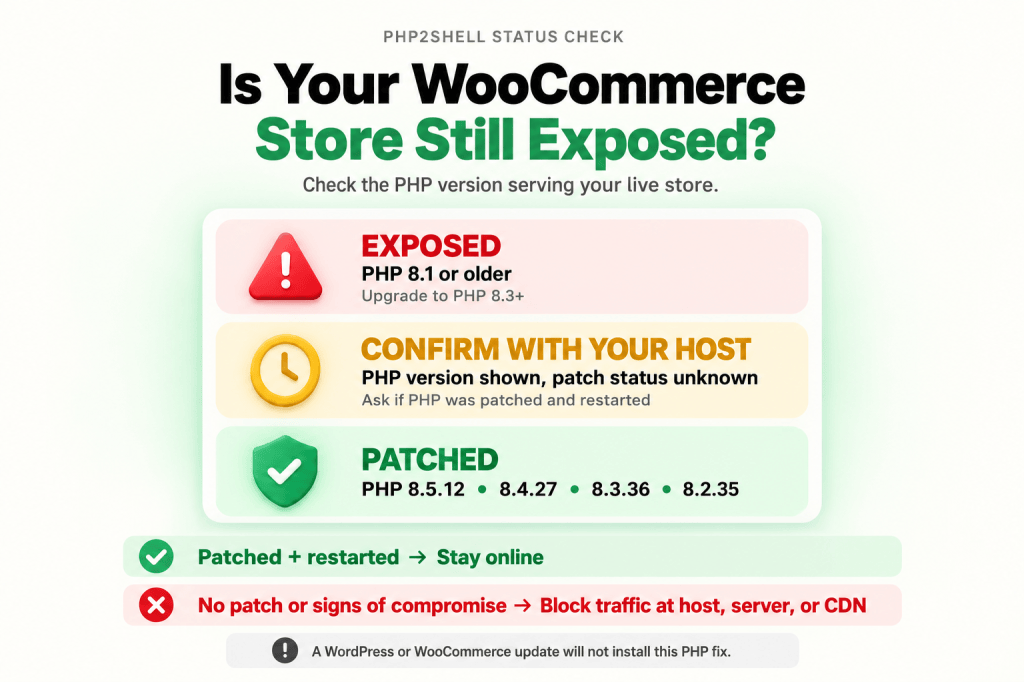
Yes, until your host confirms the PHP serving your store is patched.
| Your PHP version | Fixed in | What to do |
| 8.3, 8.4 or 8.5 | 8.3.36, 8.4.27 or 8.5.12 | Ask your host to confirm the patch. |
| 8.2 | 8.2.35 or later | Confirm the patch, then move to 8.3 or newer. PHP 8.2 stops receiving security fixes on December 31, 2026. |
| 8.1 or older | No official release | Ask your host whether it installed a backported build, then upgrade to 8.3 or 8.4. PHP published source-only patches for 7.4, 8.0 and 8.1, and some hosts and Linux vendors ship patched builds, but these versions no longer get PHP releases. |
Why won’t a WordPress or WooCommerce update fix PHP2Shell?
The flaw is in PHP, which runs underneath WordPress. WordPress, WooCommerce and plugin updates, including Dotstore’s, only change code that runs on top of PHP.
- Automatic updates won’t help: Wordfence has warned that WordPress’s automatic updates won’t install the PHP fix.
- Security plugins can’t block it: plugin firewalls, including ones set to load before WordPress, are PHP code. PHP processes the malicious request before any PHP script runs.
How do you protect your WooCommerce store from PHP2Shell?
Step 1: Find out who manages your PHP
- Managed WordPress or WooCommerce hosting: your host patches PHP. You confirm.
- Shared hosting (cPanel, Plesk, hPanel): your host installs the patched builds. You can switch PHP versions in your panel but can’t install the fix.
- A VPS or dedicated server you manage: you or your developer must update PHP and restart it.
If an agency built your store, ask who owns the hosting account.
Step 2: Check your store’s PHP version
Go to WooCommerce > Status > Server environment, or Tools > Site Health > Info > Server. Note the full number, such as 8.3.36.
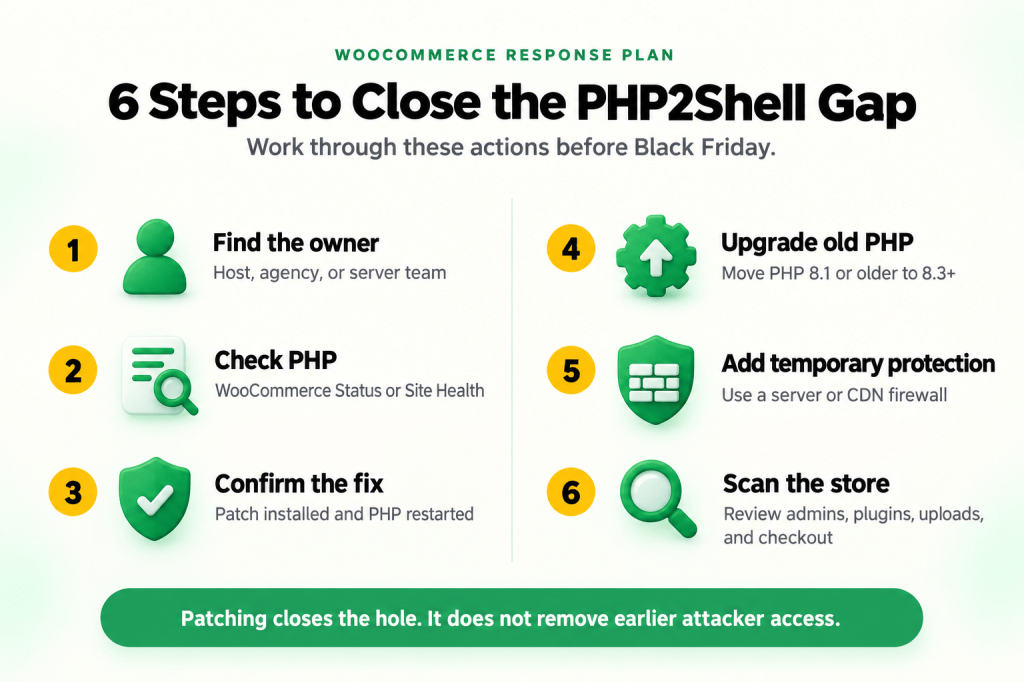
Step 3: Ask your host to confirm the patch
Send your host this message, and check their status page:
| Subject: PHP2Shell patch status for [yourstore.com] Please confirm: 1. Which PHP version serves my site’s web requests right now? 2. Is it patched for CVE-2026-109618 and CVE-2026-109619 (PHP 8.5.12, 8.4.27, 8.3.36, 8.2.35, or your own backported build)? 3. Have the PHP processes been restarted since the patch was installed? 4. If it isn’t patched yet, what protection is in place now, and when will the fix be live? 5. Does this cover every site on my account, including staging copies and subdomains? |
Step 4: Upgrade if you’re on PHP 8.1 or older
Move to PHP 8.3 or 8.4. WooCommerce recommends 8.3 or newer and is tested up to 8.4.
- Create a staging copy of your store.
- Update WordPress, WooCommerce and your plugins on staging.
- Check each plugin’s changelog or documentation for PHP 8.3 or 8.4 compatibility.
- Switch staging to PHP 8.3 or 8.4. In cPanel, use MultiPHP Manager or Select PHP Version. In Plesk, go to Websites & Domains > PHP.
- Test product pages, cart, checkout, payment gateways, shipping rates, coupons and order emails.
- Switch the live site and place a test order.
Step 5: Lower your risk until the patch is live
Two measures cut your exposure while you wait. Neither one replaces the update. PHP’s release notes say updating is the only complete fix.
Turn off session upload progress (VPS or dedicated server only): set session.upload_progress.enabled = 0 in your php.ini file. Then restart PHP-FPM, or Apache if your server uses mod_php. Hosts including InstaWP applied this setting while they waited for patched builds. WordPress and WooCommerce don’t use the feature, so file uploads and checkout keep working.
Route traffic through a web application firewall (WAF): Cloudflare has deployed rules that block known PHP2Shell exploit methods. They only apply if your domain is proxied through Cloudflare. Ask your host whether it runs its own firewall rules too.
On shared or managed hosting, you can’t change this setting yourself. Ask your host whether it’s in place.
Step 6: Check for signs of compromise
Patching doesn’t remove anything an attacker installed before the fix. Check for:
- Unknown admin accounts: go to Users > All Users and filter by Administrator.
- Plugins you didn’t install: review Plugins > Installed Plugins.
- PHP files in your uploads folder: files ending in .php rarely belong in wp-content/uploads. Ask your host or developer to check.
- Changes to checkout or payment pages: unfamiliar scripts, fields or redirects.
- Unfamiliar auto_prepend_file settings: this setting, in a
.user.ini,.htaccessor php.ini file, loads a PHP file before every page. Wordfence uses it legitimately to load wordfence-waf.php. If it points to any file you don’t recognize, ask your host or developer to investigate.
Run these checks on staging copies and old subdomains too. If they share your hosting account, an attacker can use them to reach your live store.
Ask your host for a malware scan. If anything looks wrong, change admin passwords, rotate your payment gateway API keys and bring in a security specialist.
Should you take your WooCommerce store offline due to PHP2Shell?
Yes, if your store can’t run patched PHP today, or if you find signs of compromise. A firewall lowers your risk for the few hours before a confirmed patch goes live. It doesn’t make unpatched PHP safe for days, because PHP says updating is the only complete fix.
| Your situation | Response |
| Your host confirms PHP is patched and restarted | Stay online. Complete step 6. |
| Your host has mitigations in place and the patch will be live today | Stay online. Add a WAF and watch the host’s status page. |
| You can’t get patched PHP running today, even with a WAF in place | Block traffic at the server or host level until the patch is live. |
| You see signs of compromise | Take the store offline at the server or host level and get expert help. |
If you go offline, do it at the server, host or CDN level. A WordPress maintenance page still runs on PHP, so it doesn’t block the attack.
Why PHP2Shell fix belongs on your Black Friday readiness list
PHP2Shell landed about five weeks before Black Friday (November 27, 2026), with Diwali and Singles’ Day sales even sooner. Add these three items to your peak-season checklist.
1. Upgrade PHP before your code freeze
If you freeze technical changes in November, upgrade PHP before the freeze. PHP 8.2 support ends during holiday returns season, so a critical flaw found in January would leave 8.2 stores unpatched. Do it alongside your BFCM tracking readiness checks.
2. Write a one-page emergency plan
Researchers at Calif and Wiz used AI models, including OpenAI’s GPT-5.6 Sol, to help find these bugs, and Amazon reported an exploit attempt four days before the patch shipped. Government agencies could go offline without losing sales. In late November, your store would lose orders.
Write down:
- Your host’s emergency contact and status page address
- Who can take the store offline, and how
- What triggers that decision, and who decides
- How you’ll tell customers: site banner, email or social post
3. Choose hosting on patch speed
Some hosts patched within hours of the release. Many shared hosts waited for packages from CloudLinux, the operating system behind many shared servers. Some VPS plans left patching to the customer. Ask your host:
- How fast do you patch critical PHP vulnerabilities?
- How do you tell customers when the patch is live?
- Which PHP versions do you still patch, and until when?
Vague answers are a reason to switch at renewal.
Frequently Asked Questions
Is PHP2Shell being exploited right now?
Attack attempts have been reported, but security firms disagree on how widespread they are. Treat any unpatched server as at risk.
Is customer payment data at risk from PHP2Shell?
Possibly, if your server was attacked before it was patched. The main risk is card-skimming code added to your checkout pages.
Why does my PHP version still look unpatched after my host fixed it?
Your host may have backported the fix without changing the version number. Ask your host which build is running.
Does Cloudflare protect my store from PHP2Shell?
Partly, and only if your domain is proxied through Cloudflare. You still need patched PHP.
Will upgrading PHP break my WooCommerce store?
It can if a plugin or theme is outdated. Test on a staging copy first, and switch back if something breaks.
Should I tell my customers about PHP2Shell?
Only if you find signs of a breach. Then data protection laws, such as the EU’s GDPR, may require you to notify regulators and customers.