Table of Contents
WooCommerce has no built-in conditional logic for payment methods, so once you enable Cash on Delivery it shows for everyone. To make it conditional, use the woocommerce_available_payment_gatewaysfilter and unset( $gateways[‘cod’] ) when your condition is met, whether that is cart total, country, postcode, product, shipping method, or user role. Guard the code against the admin, and trigger update_checkout when the postcode changes so the option refreshes. For no-code rules, the Conditional Payments plugin handles all of it from the admin.
Key Takeaways
- Cash on Delivery keeps many customers buying, especially where card trust is low, but it carries real risk (fake orders, refused deliveries, return-to-origin costs), so the fix is making it conditional rather than removing it outright.
- WooCommerce treats payment methods as global, so once you enable COD it shows for every customer, cart, and address, with no native way to restrict it.
- Match the restriction to the risk: hide COD by country/state, postcode, cart total, product or category, shipping method (like local pickup), or user role.
- The code route uses the woocommerce_available_payment_gateways filter to unset COD when your condition matches, guarded with is_admin() and a WC()->customer check.
- WooCommerce refreshes gateways on country and state change but not on postcode, so postcode rules need an update_checkout trigger on the postcode field to refresh.
- The Conditional Payments for WooCommerce plugin builds and stacks these rules from the admin, with fees and custom unavailable messages, scaling better than hand-coded snippets.
Cash on Delivery keeps a lot of customers buying, especially in markets where card trust is low. It also carries real risk: fake orders, refused deliveries, and return-to-origin shipping costs you pay twice. The answer is rarely to remove COD outright, since that loses genuine buyers. The better move is to make it conditional, available where it is safe and hidden where it is not.
This guide is scoped to that: showing, hiding, and restricting COD by condition. If you want to turn COD off completely or stack it with fraud tools, see how to disable Cash on Delivery in WooCommerce. To control every payment method, not just COD, see conditional payments for WooCommerce.
Why WooCommerce has no built-in conditional COD
Out of the box, WooCommerce treats payment methods as global. You enable Cash on Delivery under WooCommerce > Settings > Payments, and from then on it appears for every customer, every cart, and every address. There is no native setting to say “show COD only for these products” or “hide it above this order value.”
That gap is why you need either a code snippet or a plugin. Both work by intercepting the list of available gateways at checkout and removing COD when your rule applies.
When to restrict COD, and by which condition
Match the restriction to the risk you are managing. The common conditions store owners use:
- By country or state. Hide COD where you do not offer it or where fraud is high, and keep it where it converts.
- By postcode or PIN code. Block COD for return-to-origin zones with high refused-delivery rates, a frequent need in India.
- By cart total. Hide COD above a maximum so a high-value order is not paid on delivery, or below a minimum if small COD orders are not worth the risk.
- By product or category. Disable COD on high-value, fragile, or custom items where a refused delivery hurts most.
- By shipping method. Hide COD on local pickup, since there is nothing to collect on delivery.
- By user role or login status. Offer COD only to logged-in or repeat customers, not first-time guests.
If a condition is borderline, charging a COD fee can be a softer alternative to blocking it outright. See how to add a fee to a payment method.
Method 1: The code approach
All conditional COD runs through one filter, woocommerce_available_payment_gateways. It hands you the list of gateways, and you remove COD when your condition matches. This snippet hides COD for orders over 200.
add_filter( ‘woocommerce_available_payment_gateways’, ‘ds_conditional_cod’ );
function ds_conditional_cod( $gateways ) {
if ( is_admin() || ! WC()->customer ) {
return $gateways;
}
if ( isset( $gateways[‘cod’] ) && WC()->cart->get_cart_contents_total() > 200 ) {
unset( $gateways[‘cod’] );
}
return $gateways;
}
Two guards matter. The is_admin() check keeps COD visible on the admin Payments screen, and the WC()->customer check avoids a fatal error when the customer object is not yet loaded.
To change the rule, swap the condition inside the if:
- Country: WC()->customer->get_billing_country() !== ‘IN’
- Postcode: in_array( WC()->customer->get_shipping_postcode(), $blocked_pincodes, true )
- Shipping method: read WC()->session->get( ‘chosen_shipping_methods’ )[0] and match local_pickup
- Product or category: loop WC()->cart->get_cart() and check the item or has_term()
- User role: check wc_current_user_has_role() or whether the user is logged in
The postcode refresh gotcha
WooCommerce automatically re-evaluates the gateway list when the customer changes country or state, but not when they change the postcode. So a postcode-based rule looks broken until the page refreshes. Fix it by triggering a checkout update on the postcode field.
jQuery( function ( $ ) {
$( document.body ).on( ‘blur’, ‘#billing_postcode, #shipping_postcode’, function () {
$( document.body ).trigger( ‘update_checkout’ );
} );
} );
Code is fine for one or two fixed rules. It gets hard to maintain once conditions multiply or you want to combine them.
Method 2: No-code with the Conditional Payments plugin
When the rules grow, or you would rather not touch functions.php, a plugin does the same job from the admin. The Conditional Payments for WooCommerce plugin lets you build rules without code.
- Go to WooCommerce > Settings > Payments > Conditions and add a new rule.
- Set the conditions: country, postcode, cart subtotal, products or categories, shipping method, user role, and more, combined as needed.
- Choose the action, Disable payment method, and select Cash on Delivery.
- Optionally add a COD fee instead of disabling it.
- Save, then test with the plugin’s debug mode.
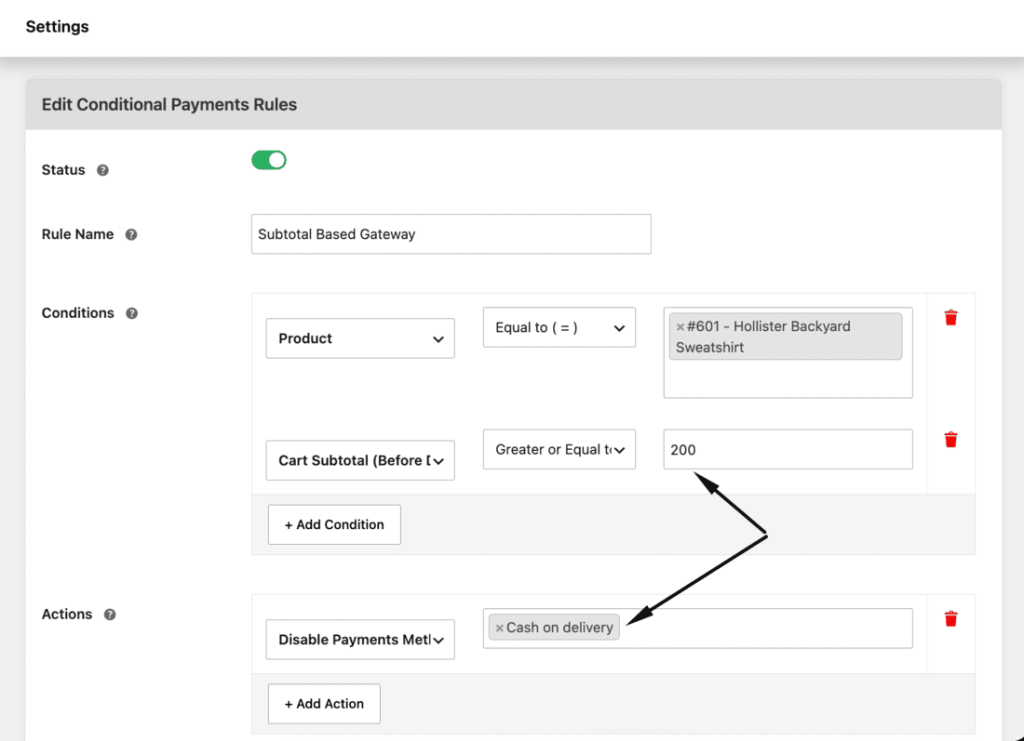
Because it stacks multiple conditions per rule and shows a custom unavailable message, it scales far better than hand-coded snippets when you manage several COD rules at once.
Best practices
Keep these in mind so conditional COD helps without blocking real buyers:
- Restrict on clear risk signals, not guesses, so you keep COD where it converts.
- Always include the is_admin() guard, or COD disappears from your admin screen.
- Add the postcode refresh JavaScript whenever a rule depends on the postcode.
- Consider a COD fee as a softer option than hiding it for borderline cases.
- Test each rule with a real checkout, changing address and cart to confirm COD appears and hides correctly.
Conclusion
Conditional COD lets you keep the payment method that drives sales while cutting the orders that cause losses. WooCommerce has no native logic for it, so you either filter the gateways with woocommerce_available_payment_gateways in code, remembering the admin guard and the postcode refresh, or set rules without code. For anything beyond one or two fixed conditions, the Conditional Payments for WooCommerce plugin manages COD rules, fees, and messages from one screen.
Conditional Payments For Woocommerce
Reduce risk and supercharge your conversions with strategic payment limitations.
14-day, no-questions-asked money-back guarantee.
Frequently asked questions
Does WooCommerce support conditional payment methods by default?
No. Once a method like Cash on Delivery is enabled, it shows for every order. You add conditional logic with the woocommerce_available_payment_gateways filter or a plugin.
How do I enable COD only for specific products?
In the gateway filter, loop the cart items and unset COD unless an allowed product or category is present, or set a product-based rule in a conditional payments plugin.
Can I restrict Cash on Delivery by postcode or PIN code?
Yes. Check the customer’s postcode in the filter and remove COD for blocked zones. Add the update_checkout trigger on the postcode field so the option refreshes when it changes.
How do I disable COD above a certain order amount?
Compare WC()->cart->get_cart_contents_total() to your limit inside the filter and unset COD when it is exceeded, or set a cart-total condition in the plugin.
Can I charge a fee for COD instead of disabling it?
Yes. A COD surcharge is often a better lever than blocking the method. See how to add a fee to a payment method, or use the plugin’s fee action.
Why does COD not hide when the customer changes their address?
WooCommerce refreshes the gateways on country and state change but not on postcode change. Trigger update_checkouton the postcode field to force the refresh.