Table of Contents
Do you want more control over how flat rate shipping is calculated in WooCommerce? In this guide, you’ll learn how the latest update to Flat Rate Shipping for WooCommerce introduces smarter cart-based shipping rules that better reflect real-world order handling.
Key Takeaways
- WooCommerce’s default flat rate shipping is often too basic for stores that sell multiple products, mixed carts, or physical goods that require separate handling.
- Flat Rate Shipping for WooCommerce now allows you to create shipping rules based on cart line items, so shipping can change based on how many different products are in the cart, not just quantity.
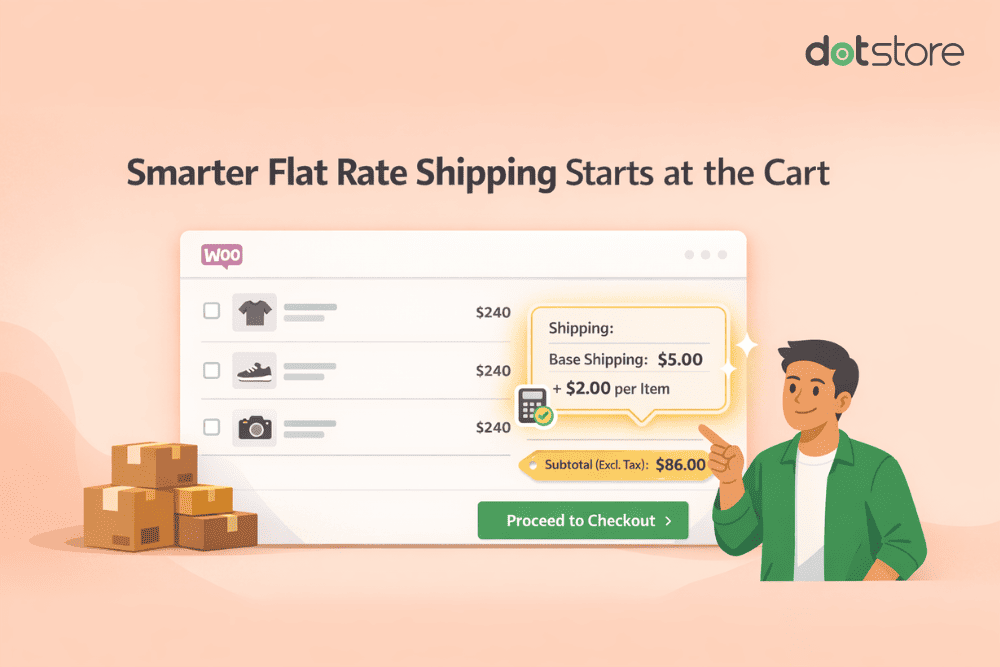
- The new per cart line item shipping feature lets you charge a base shipping fee and automatically add costs for each additional product, making shipping prices more accurate and fair.
- The cart subtotal (excluding tax) condition ensures shipping rules are applied using product value only, preventing tax from triggering or blocking shipping logic.
Shipping rules in WooCommerce often start simple.
A flat fee.
A free shipping threshold.
But as a store grows, those basic rules start to fall apart.
Customers buy multiple products.
Taxes vary by region.
Shipping costs increase with packaging complexity.
And suddenly, “flat rate shipping” isn’t flat anymore.
That’s exactly the problem we focused on in the latest release of Flat Rate Shipping for WooCommerce.
This update introduces smarter cart-based logic, more predictable subtotal conditions, and several reliability improvements — all designed to help store owners charge shipping more accurately without making checkout confusing.
Let’s walk through what’s new, why these changes matter, and how they solve real shipping problems WooCommerce stores face every day.
Why This Update Matters
WooCommerce gives you a solid foundation for shipping, but it treats many things too broadly.
For example:
- A cart with one product and a cart with five different products can be charged the same shipping fee
- Product quantity and product count are often treated as the same thing
- Shipping rules based on cart value can behave unpredictably once tax is involved
- Advanced shipping logic can break when checkout, currency, or third-party plugins change
Over time, these limitations lead to:
- Undercharging shipping
- Overcomplicated rule setups
- Inconsistent checkout behavior
- Customer confusion
This release focuses on making shipping logic closer to real-world fulfillment, while keeping configuration simple.
Advanced Flat Rate Shipping Methods
Boost your WooCommerce store’s revenue with flexible shipping options. Your business deserves the best!
14-day, no-questions-asked money-back guarantee.
1. Shipping Rules Based on Cart Line Items
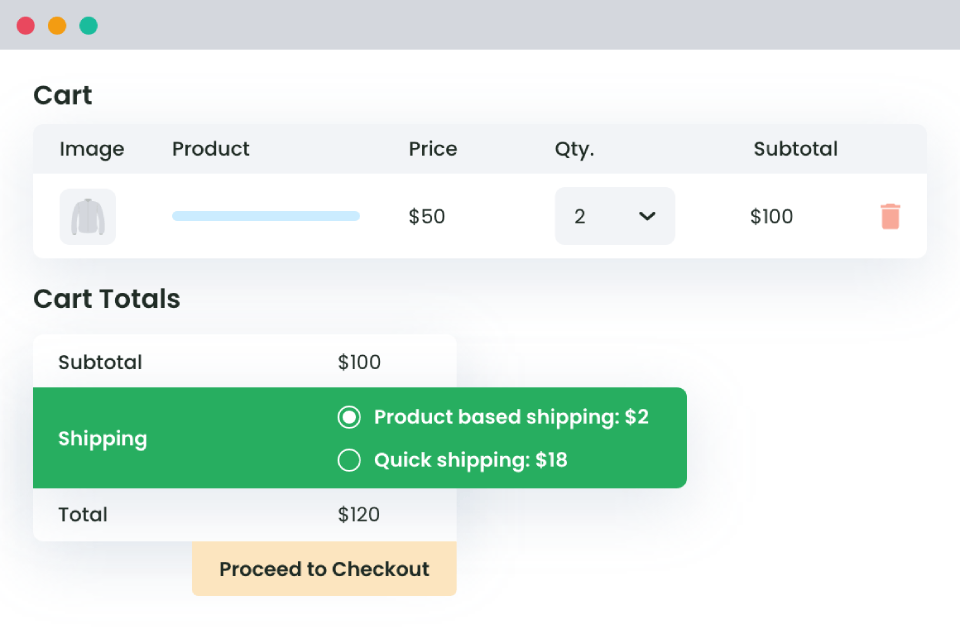
One of the most requested improvements was the ability to base shipping rules on how many different products are in the cart — not how many units.
With this release, you can now create shipping rules based on cart line items.
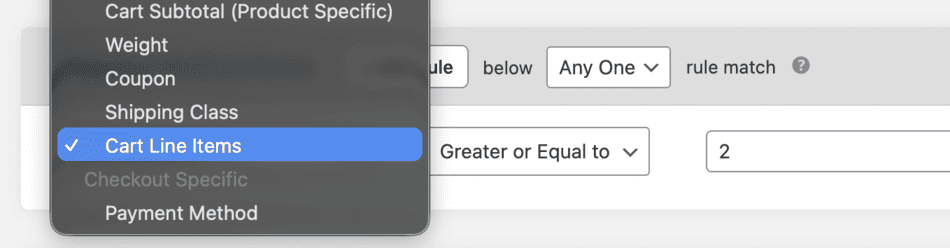
A cart line item represents a unique product, regardless of quantity. So:
- 1 product × quantity 5 = 1 cart line item
- 3 different products × any quantity = 3 cart line items
This distinction matters a lot in practice.
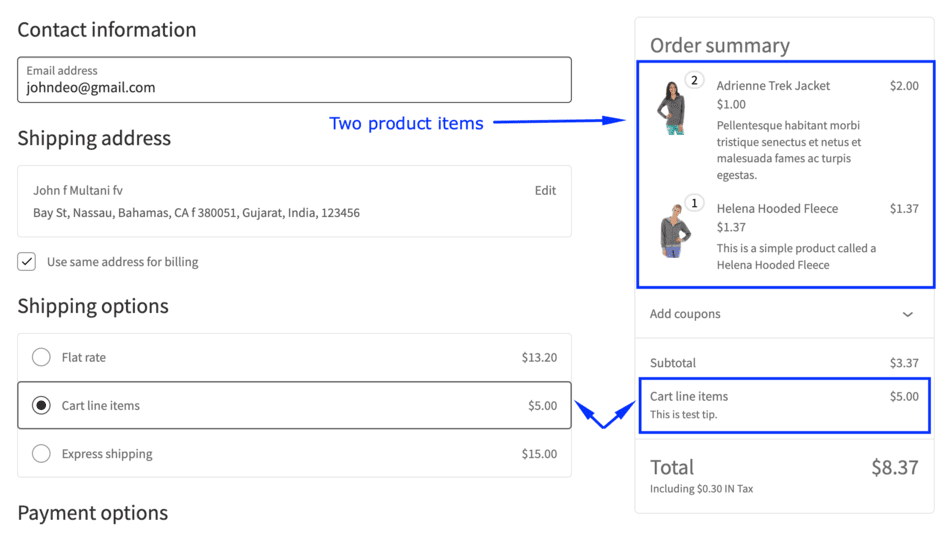
Many stores pack, label, or handle products separately even when customers order multiple units. A mixed cart often costs more to ship than a single-product cart, even if quantities are similar.
Now you can:
- Apply shipping only when the cart contains multiple products
- Create different shipping methods for single-item vs mixed-item carts
- Keep quantity-based rules separate from product-count logic
The result is simpler rules and more accurate shipping costs.
2. Per Cart Line Item Shipping Charges
Flat shipping fees work well until they don’t.
A single flat fee often undercharges shipping when customers buy multiple products, especially if those products need individual handling or packaging.
To solve this, this release introduces per cart line item shipping charges.
Instead of charging one flat amount per order, you can now:
- Set a base shipping charge for the first product
- Add an additional fee for every extra cart line item
The calculation is straightforward and predictable.
For example:
- Base shipping: $10
- Additional item fee: $5
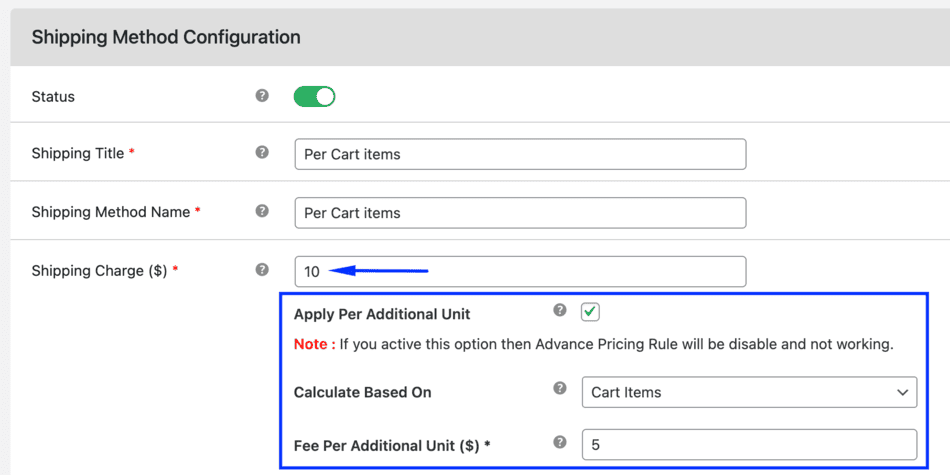
A cart with three different products results in:
- $10 for the first item
- $5 for the second
- $5 for the third
Total shipping: $20
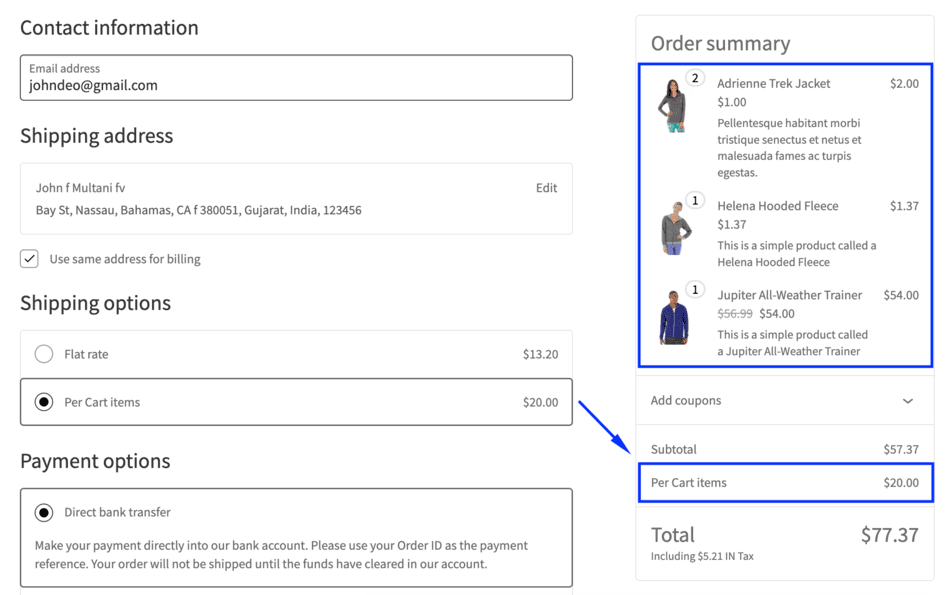
Importantly, product quantity is ignored. Only unique products are counted.
This approach closely mirrors real shipping costs and works especially well for:
- Physical goods
- Mixed-product orders
- Stores that pack products separately
- Catalogs with varied sizes or handling requirements
3. Cart Subtotal (Excluding Tax) Condition
Shipping rules based on cart value sound simple — until tax enters the picture.
In many WooCommerce setups:
- Taxes are calculated dynamically
- Tax rates vary by country or region
- Prices may be shown including or excluding tax
This can cause shipping rules to trigger unexpectedly.
To address this, the update introduces a Cart Subtotal (Excluding Tax) condition.
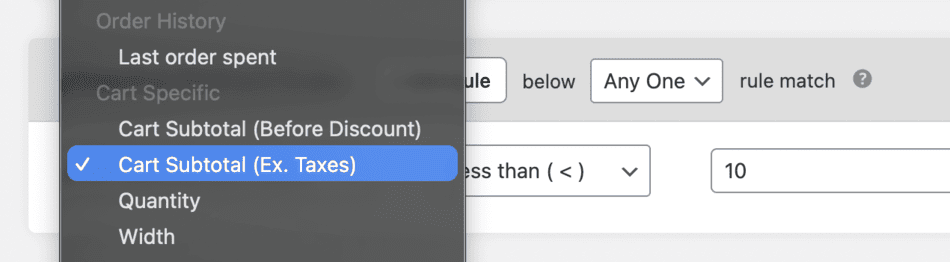
This rule checks:
- Only the product subtotal
- Before any tax is added
- Regardless of how prices are displayed on the frontend
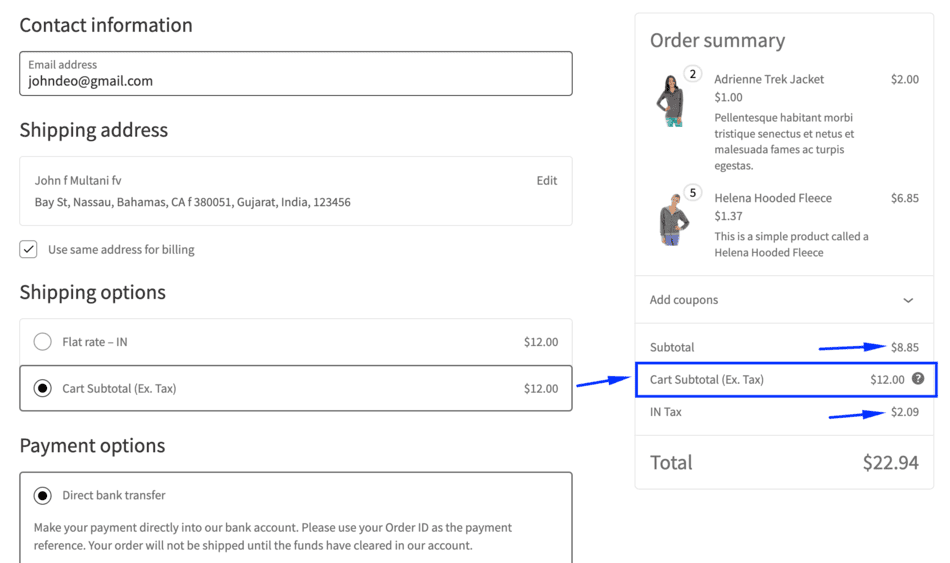
That means:
- Taxes never affect shipping eligibility
- Shipping rules behave consistently across regions
- Free shipping thresholds and surcharge rules remain predictable
For store owners selling internationally or operating in tax-heavy regions, this removes a major source of confusion and inconsistency.
Stability, Compatibility, and Reliability Improvements
Alongside new features, this release includes a strong focus on stability.
Several edge cases and compatibility issues have been addressed to ensure smoother behavior across modern WooCommerce setups.
Notable fixes and enhancements include:
- Improved compatibility with WooCommerce block-based checkout
- Resolved calculation issues in category subtotal–based advanced rules
- Fixed edge cases in product quantity conditions
- Improved handling of large (three-digit) shipping values
- Better PHP 8.0 compatibility
- Improved compatibility with Autoship Cloud
- New filter support for longer tooltip text
- Improved compatibility with membership and free shipping progress bar plugins
- UI and performance improvements across the admin experience
- Fully compatible with WooCommerce 10.4.x and WordPress 6.9.x
These changes help ensure that shipping rules remain reliable as your store grows and evolves.
What This Means for WooCommerce Store Owners
With this update, Flat Rate Shipping for WooCommerce becomes significantly more flexible and future-proof.
You can now:
- Charge shipping based on how customers actually build their carts
- Separate quantity logic from product-count logic
- Apply subtotal-based rules without tax interference
- Rely on stable behavior across checkout, currencies, and integrations
Most importantly, you gain better control over shipping costs without adding friction to checkout.
Get Started with the Latest Version
If you’re already using Flat Rate Shipping for WooCommerce, simply update the plugin to access all new features.
If you’re looking for a more practical way to handle real-world shipping scenarios in WooCommerce, this release brings you much closer to that goal.
👉 Explore the plugin
https://www.thedotstore.com/flat-rate-shipping-plugin-for-woocommerce/
Frequently Asked Questions (FAQs)
1. What is Flat Rate Shipping for WooCommerce?
Flat Rate Shipping for WooCommerce is a plugin that allows store owners to create advanced shipping rules based on cart contents, quantities, subtotals, and conditions. It extends WooCommerce’s default flat rate shipping by offering more precise control over how shipping charges are calculated at checkout.
2. What’s new in the latest Flat Rate Shipping for WooCommerce update?
The latest update introduces three major features:
- Shipping rules based on cart line items
- Per cart line item shipping charges
- A cart subtotal (excluding tax) condition
It also includes multiple bug fixes, performance improvements, and full compatibility with WooCommerce 10.4.x and WordPress 6.9.x.
3. What are cart line items in WooCommerce shipping?
Cart line items represent the number of unique products in the cart. Product quantity is ignored. For example, one product with a quantity of five counts as one cart line item, while three different products count as three cart line items.
4. How is per cart line item shipping calculated?
Per cart line item, shipping applies a base shipping charge for the first item and adds an additional fee for every extra cart line item. This ensures shipping costs scale with the number of products being shipped, not just order quantity.
5. What does “cart subtotal excluding tax” mean?
Cart subtotal excluding tax refers to the total product value in the cart before tax is added. Shipping rules using this condition ignore tax amounts completely, ensuring consistent behavior regardless of tax settings or regional tax rates.
10. Who should use Flat Rate Shipping for WooCommerce?
This plugin is ideal for:
- Stores selling physical products
- WooCommerce shops with mixed-product carts
- Businesses that need predictable shipping costs
- Store owners who want advanced shipping logic without complex setup
Advanced Flat Rate Shipping Methods
Boost your WooCommerce store’s revenue with flexible shipping options. Your business deserves the best!
14-day, no-questions-asked money-back guarantee.