Table of Contents
Many WooCommerce stores add extra fees at checkout to cover handling costs, payment processing charges, or specific order conditions. However, this can sometimes lead to cart abandonment. In many cases, the issue is not the fee itself but how and when it appears during checkout.
This article explains why unexpected fees affect customer decisions and how WooCommerce stores can present necessary fees more clearly without hurting conversions.
Key Takeaways
- Extra fees themselves are not the real problem. Customers usually abandon checkout when the final price changes suddenly or without clear explanation.
- When fees appear at the right moment and are labeled clearly, customers are more likely to continue with the purchase.
- Showing fees too late, using unclear labels, or applying the same fee to every order often creates confusion.
- Fees tied to specific conditions such as payment method, products in the cart, or order value help customers understand why the charge exists.
- Checking when fees appear, how they are labeled, and how totals change during checkout can help store owners improve pricing transparency and reduce cart abandonment.
By the time a shopper reaches the checkout page on a website, they have already accepted the product price and decided to buy. They now expect to see the total cost and complete the purchase.
When a store adds a fee at checkout in WooCommerce, the total price changes.
Even if the fee is small, the change can cause hesitation. Customers may pause to understand why the price increased or what the additional charge represents.
Some will review the order again. Others may leave the checkout without completing the purchase.
For WooCommerce stores, this situation is common when additional charges appear late in the checkout process.
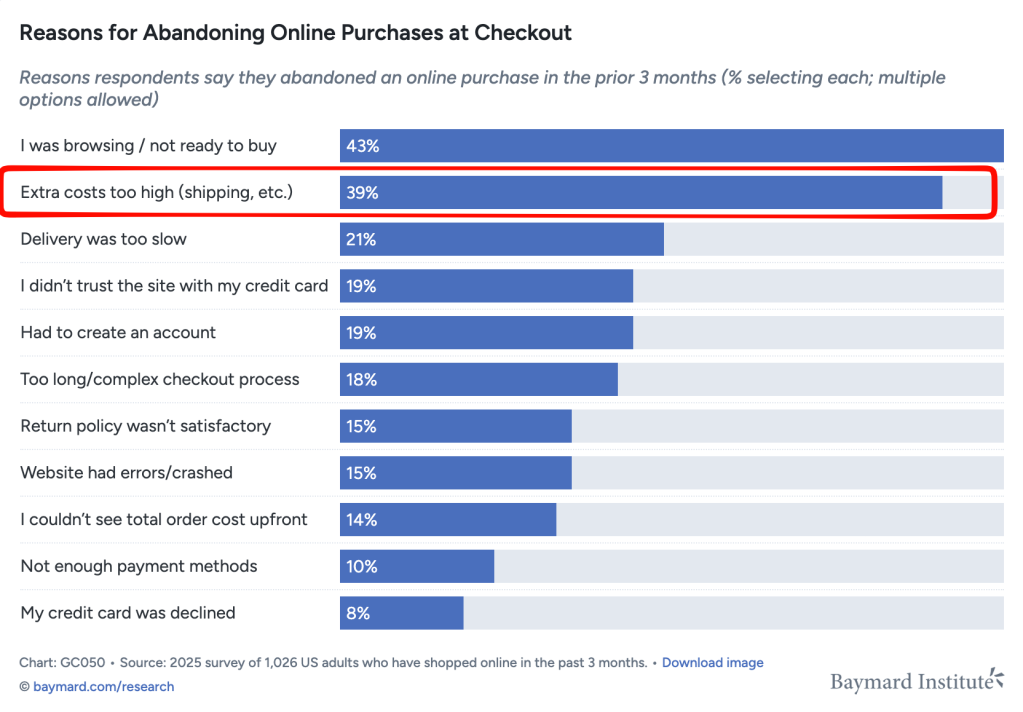
Fees are not unusual in ecommerce. Stores often use them to cover handling costs, payment processing charges, or specific order conditions.
However, when the final price changes unexpectedly, the checkout experience can feel less predictable to customers.
Many WooCommerce store owners search for ways to add fees at checkout without losing sales, but the real issue is often how those fees appear to customers.
Quick test: Is your WooCommerce checkout losing sales because of extra fees?
You can quickly review your checkout experience with a few simple checks.
Ask yourself:
- Do extra fees appear only at the final checkout step?
- Does the total price increase after the customer selects a payment method?
- Are some charges labeled in a way that customers may not immediately understand?
- Have customers asked about additional charges before completing an order?
If the answer to two or more of these questions is yes, your checkout may be creating unnecessary friction.
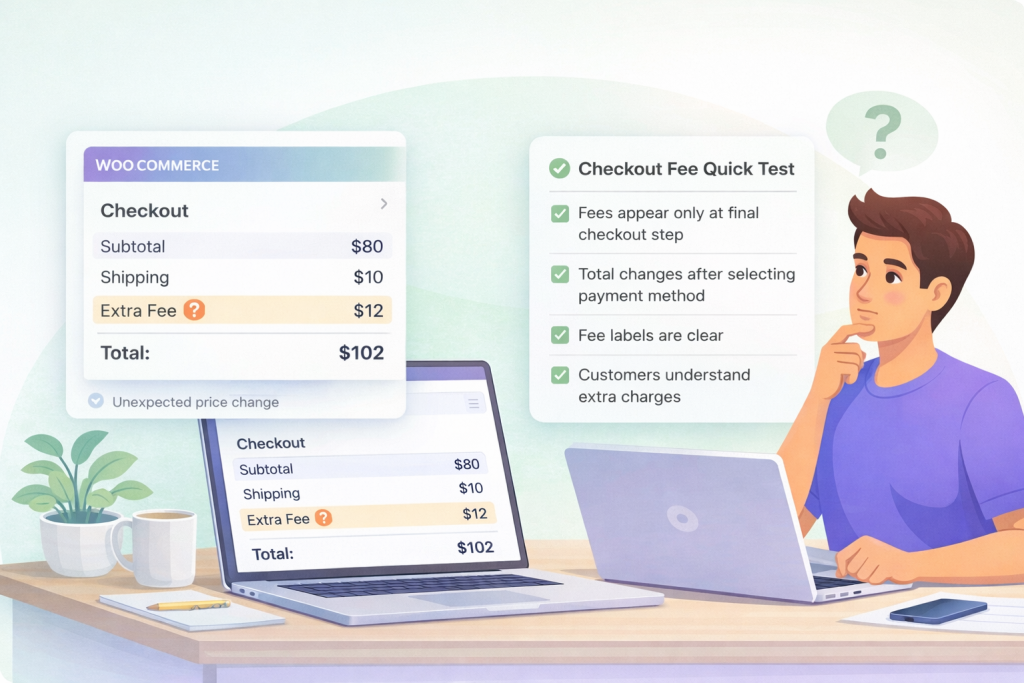
When the final price changes unexpectedly, some customers pause to review the order or leave checkout entirely.
Common types of WooCommerce extra fees at checkout
Many WooCommerce stores add fees to cover specific costs or order conditions. These charges are often necessary for the business to remain sustainable.
Some of the most common examples include:
Cash on Delivery (COD) handling fee: Stores that offer COD often apply a small fee to cover the additional handling and payment collection process. This charge usually applies only when the customer selects the COD payment method. You can add a WooCommerce cash on delivery fee to your store in ten minutes or less.
Small order handling fee: Some stores add a fee to very small orders where the margin is too low to cover packaging and processing costs.
Payment gateway surcharge: Payment processors charge transaction fees for certain payment methods. Some stores apply a small surcharge to offset those costs.
Packaging or fragile item fee: Products that require extra protection during shipping may include an additional packaging charge.
However, when customers see them only at the final checkout step, the sudden change in the order total can create hesitation.
For this reason, the way a fee appears during checkout often matters more than the fee itself.
Unexpected vs transparent checkout fees: what customers actually see
| Checkout Situation | Unexpected Checkout Experience | Transparent Checkout Experience |
|---|---|---|
| Product added to cart | Product price: $50 | Product price: $50 |
| Shipping cost | Shipping: $5 | Shipping: $5 |
| Fee visibility | Fee appears only at the final step | Fee appears when the payment method is selected |
| Fee label | Handling Fee (unclear reason) | Cash on Delivery Handling Fee |
| Order total | Total suddenly changes to $62 | Total shows $62 with explanation |
| Customer reaction | Customer pauses or leaves checkout | Customer understands the charge |
Customers rarely leave because a fee exists. They leave when the final price changes unexpectedly. The difference is how the fee is presented during checkout.
Common WooCommerce checkout fee mistakes that cause cart abandonment
Here are some common mistakes that create confusion for customers during checkout.
- One common mistake is showing the fee only at the final step of checkout. When the order total suddenly changes, customers may pause to review the order again.
- Another issue is unclear fee labels. Labels such as “Extra Fee” or “Service Charge” do not explain why the charge exists.
- Some stores also apply the same fee to every order, even when the charge only applies to certain payment methods or products.
- Fees can also create friction when the price changes after a payment method is selected, which makes the final total feel less predictable.
In many cases, the fee itself is reasonable. The problem is how the fee appears during checkout.
How to add extra fees at checkout without hurting conversions
Many WooCommerce stores add extra fees to cover packaging, payment processing, or operational costs. The key is to apply fees only when they are relevant and label them clearly.
Here are a few common examples.
Fragile product packaging: A store selling glass items may add a packaging fee only when fragile products are in the cart. The fee appears in checkout as “Fragile Item Packaging Fee.”
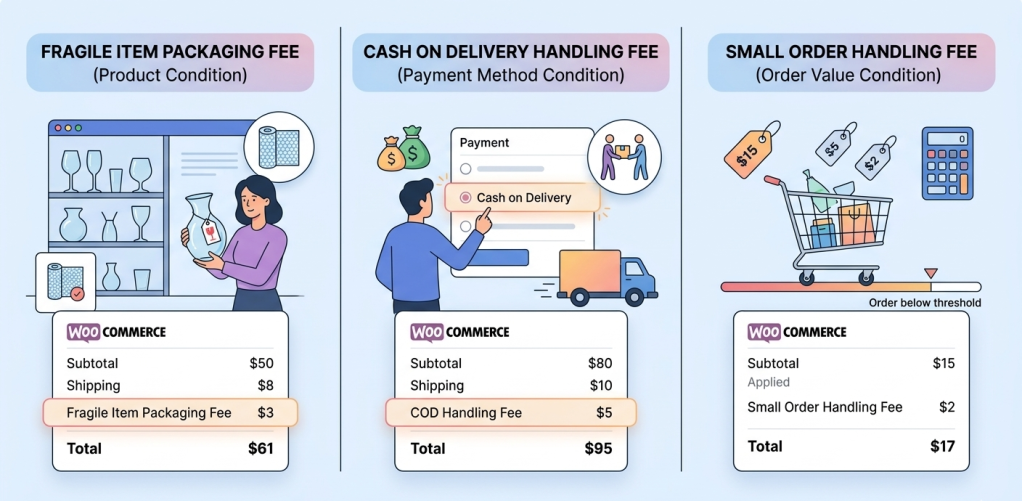
Cash on Delivery handling: Stores that offer COD often add a small fee when that payment method is selected. The charge appears only after the customer chooses COD and is labeled “Cash on Delivery Handling Fee.”
You should also checkout this practical, step-by-step guide and make COD fees work for your WooCommerce store.
Small order handling: Some stores apply a fee when the order value is below a certain amount to cover packaging and processing costs.
In each case, the fee is tied to a clear condition. Customers can see why the charge appears and when it applies. Fees should appear when the condition is triggered.
Clear labels also reduce confusion. Descriptions such as “Fragile Item Packaging Fee” or “Cash on Delivery Handling Fee” explain the reason for the charge.
Many WooCommerce stores use tools that add fees based on conditions such as payment method, cart value, or products in the cart. When fees follow clear rules and appear at the right moment, the final price is easier for customers to understand.
How WooCommerce Stores control extra fees and payment methods at checkout
When stores need to charge additional fees, the main challenge is deciding when the fee should appear and when it should not.
Checkout issues often happen when a fee is applied without clear conditions. For example, a store might apply the same handling fee to every order even though the charge only applies to specific payment methods or order situations.
When fees are tied to clear conditions, the pricing becomes easier for customers to understand.
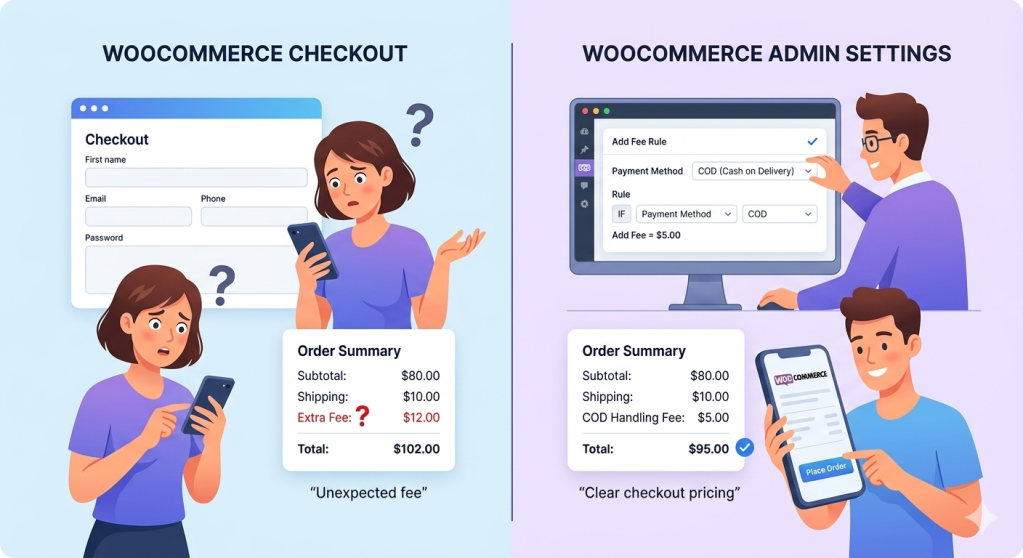
Many WooCommerce stores handle this by applying fees only when a specific condition is met. For example, a store may add a Cash on Delivery handling fee only when the customer selects the COD payment method, or apply a packaging fee only when fragile products are in the cart.
Tools such as the WooCommerce Extra Fees Plugin allow store owners to create conditional fee rules directly in WooCommerce checkout. Fees can be triggered by factors such as payment method, cart value, or products in the order.
Another situation occurs when certain payment methods create additional cost or risk for the store. Instead of adding extra charges, some stores choose to limit when those payment methods are available.
Plugins like Conditional Payments for WooCommerce allow store owners to control payment method availability based on conditions such as cart value, products in the cart, or customer location.
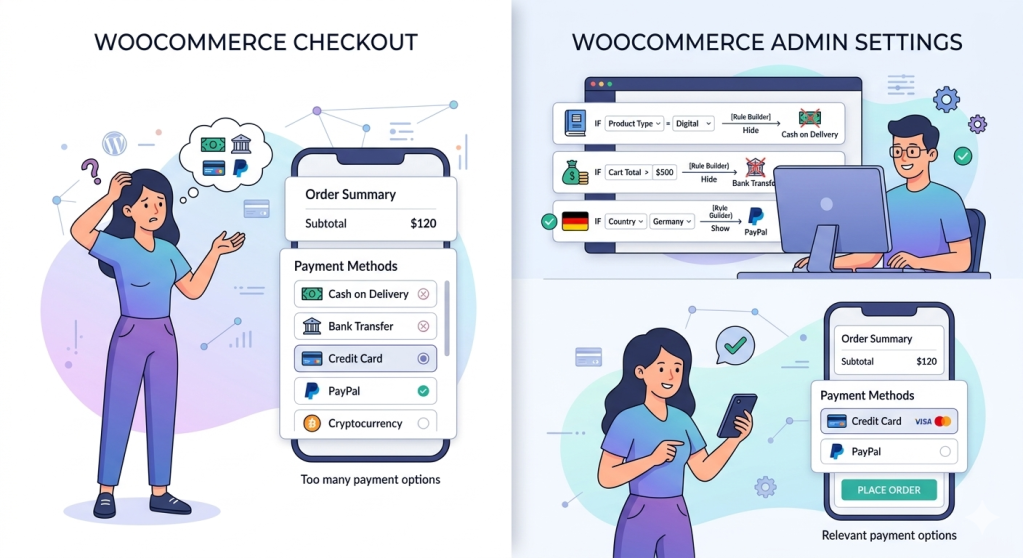
For example, a store may choose to hide Cash on Delivery for very large orders or restrict certain payment methods for specific products.
By controlling both when fees appear and when payment methods are available, WooCommerce stores can keep checkout pricing clearer and reduce unexpected changes in the final order total.
WooCommerce Extra Fees
Make profits from every confirmed sale through smart, conditional fees.
14-day, no-questions-asked money-back guarantee.
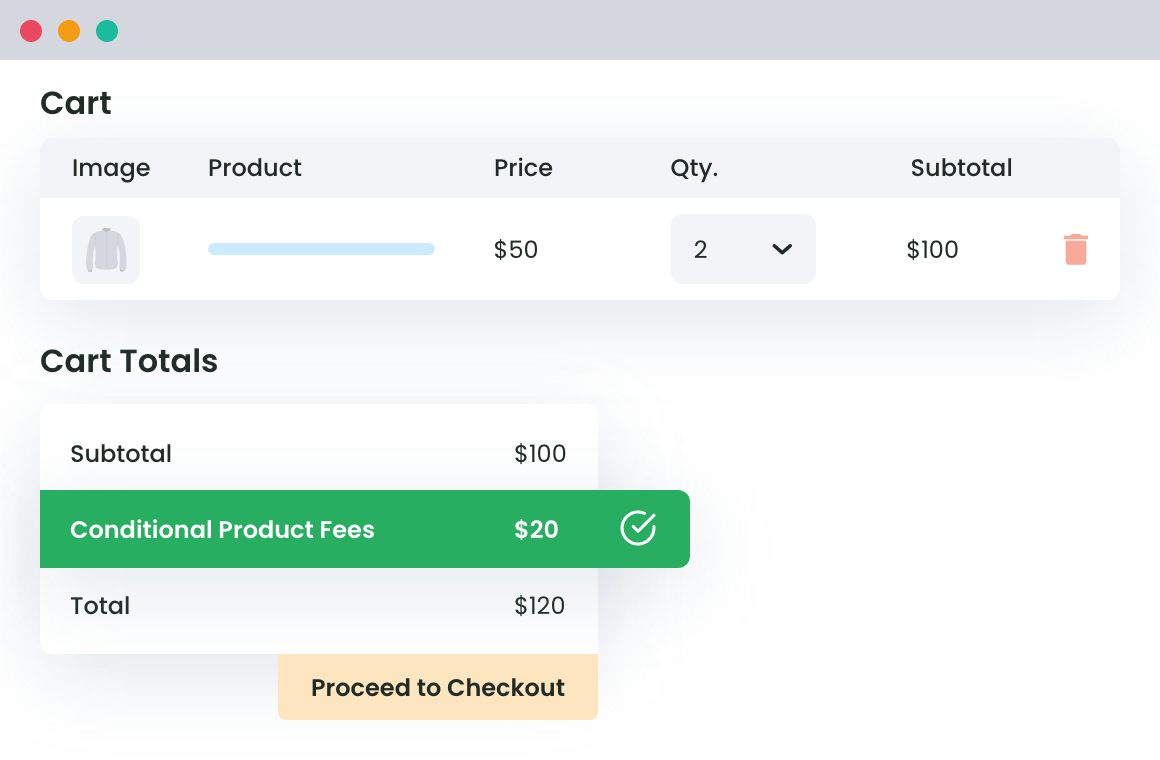
Reviewing how fees and payment methods behave in your own checkout can quickly reveal whether pricing feels predictable to customers.
Review your WooCommerce checkout pricing
If your store uses additional fees, it helps to review how they appear during checkout.
Step 1: Open your WooCommerce checkout and look at the order summary from a customer’s perspective.
Step 2: Check when extra charges appear and whether the labels clearly explain the reason for the fee.
Step 3: Also review how the total price changes when customers select different payment methods or add specific products to the cart.
Step 4: If the final order total changes suddenly or a charge appears without explanation, the checkout experience may feel less predictable to customers.
Make small adjustments to when fees appear, how they are labeled, or which payment methods are available as this will make the final price easier to understand during checkout.
Ready to add extra fees at checkout without surprising customers?
Additional fees are common in ecommerce and are often necessary for operational costs such as payment processing, packaging, or special order conditions. Problems usually occur when these charges appear unexpectedly during checkout.
WooCommerce stores that apply fees only when relevant and label them clearly can make the final price easier for customers to understand.
Reviewing how fees and payment methods behave during checkout can help ensure that the total price feels predictable before the customer completes the purchase.
WooCommerce Extra Fees
Make profits from every confirmed sale through smart, conditional fees.
14-day, no-questions-asked money-back guarantee.