Table of Contents
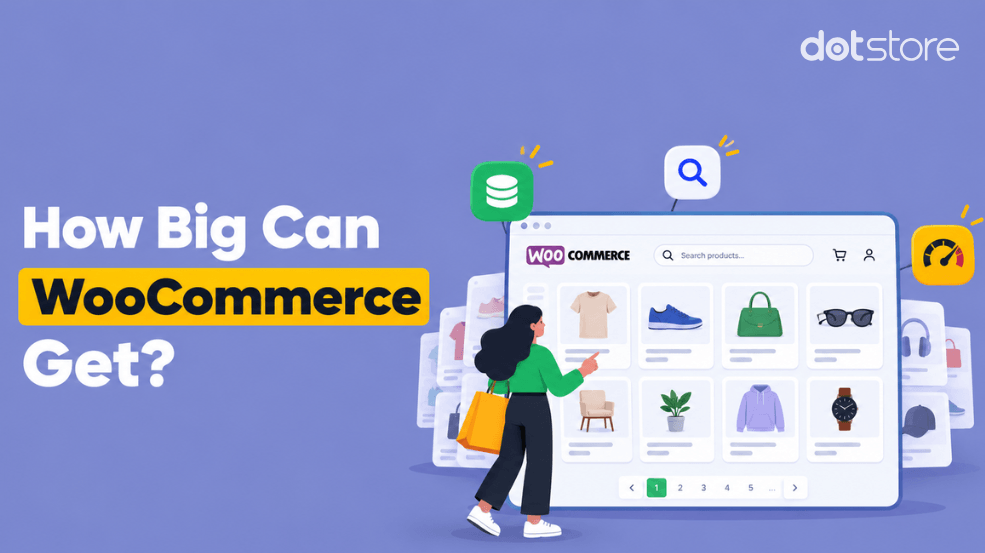
Find out how many products WooCommerce can handle, the top factors that affect scalability, and how to keep large catalogs running smoothly.
Key Takeaways
- There is no built-in fixed product limit within WooCommerce.
- How many products WooCommerce can handle depends on the web hosting plan, database optimization, caching, traffic, product complexity, plugins, and other factors.
- Product count alone doesn’t effectively measure platform scalability. Product variations, concurrent traffic, third-party integrations, search and filtering systems, etc., impact performance too.
- There are countless examples of real-life WooCommerce stores with hundreds of thousands and 1 million+ products.
- A robust web hosting plan, HPOS, caching, database optimization, purpose-built search, and other tactics are required to practically scale a WooCommerce store.
If you’re planning to create a WooCommerce store with hundreds of thousands or millions of products (like this Reddit user), it’s worth looking into whether or not the platform can handle your specific business requirements before you build it.
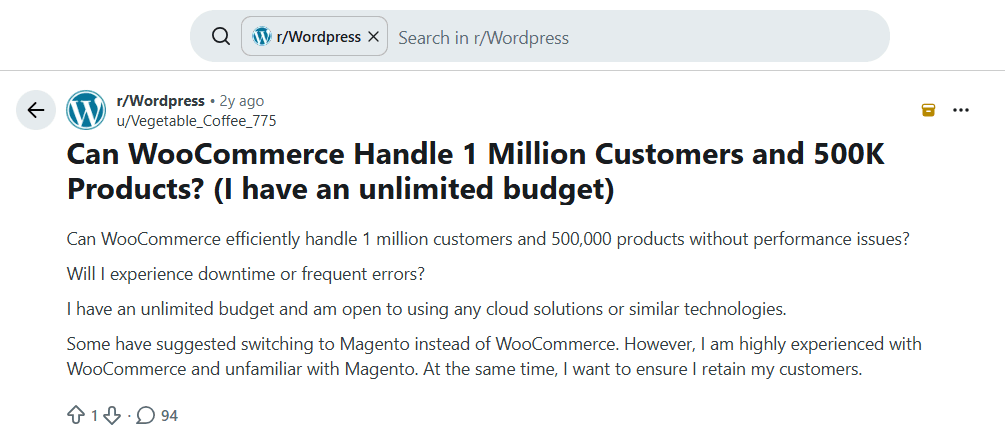
In this guide, we’ll look at how many products WooCommerce can reliably handle at different scales and what limits its practical capacity.
We’ll also review real-world examples of high-volume WooCommerce stores, actionable advice that you can implement to ensure large catalogs run smoothly, and compare WooCommerce with Shopify and BigCommerce in terms of scalability.
By the end, we hope to sufficiently answer the question: how many products can WooCommerce handle before site performance starts to suffer?
Thinking about how to scale your WooCommerce store? Add the features you need as your store grows with Dotstore’s catalog of WooCommerce plugins for pricing, shipping, product filtering, checkout optimization, and more.
WooCommerce Checkout Conversions Plugins
Unlock Your Store’s Full Potential by Streamlining the Checkout Process
14-day, no-questions-asked money-back guarantee.
Let’s get started.
How many products can WooCommerce handle?
WooCommerce has no fixed product limit. The practical number of products a WooCommerce store can handle depends on its infrastructure: web hosting, database performance, caching, theme, traffic, product complexity, search and filtering systems, plugins, and website optimizations.
What actually limits WooCommerce product capacity?
What determines how many products WooCommerce can handle reliably before site performance starts to suffer? Below, we’ll discuss the top factors.
- Hosting resources. Shared website hosting (splitting CPU and memory with other websites) can work fine for smaller stores. As your store starts to scale, you’ll need more cores to speed up queries as well as more RAM to handle more concurrent requests.
- Database performance. Each product in your store generates multiple database rows for its attributes, metadata, and variations. For context, a catalog with 100,000 products can create millions of rows, and as the number climbs, filtering, searching, and category browsing take much longer.
- Product complexity. Product variants multiply your effective catalog size. For instance, a product with 20 color and size combinations creates 20 separate variation records in your database. In addition, product listing pages must join multiple tables to work out price ranges and attribute availability. Many admins find that editing a product with a huge number of variations can result in admin timeouts.
- Plugins and third-party integrations. Badly-coded plugins add queries, requests, and conflicts to your site. Similarly, ERP, inventory, and marketplace syncs read and write to your database. At scale, they can significantly slow down your WooCommerce website.
- Theme quality. Bloated themes load heaps of scripts and styles on every page. Across large catalogs, the excess weight can have a significant impact. Pick a lightweight purpose-built WooCommerce theme.
- Traffic. Website traffic impacts server performance. The Cart and Checkout pages tend to be the heaviest, as they are dynamic and don’t support page caching like regular website pages. Also, session handling adds overhead as the number of concurrent visitors increases.
- Search and filtering systems. WordPress’s native search feature isn’t sufficient for large catalogs. Layered filtering (size, color, brand, price range) generates complex queries, which get worse under concurrent load.
- Caching. Large stores need multiple caching layers: page caching, object caching (Redis or Memcached), and a CDN for static assets.
Practical scale benchmarks at different WooCommerce store sizes
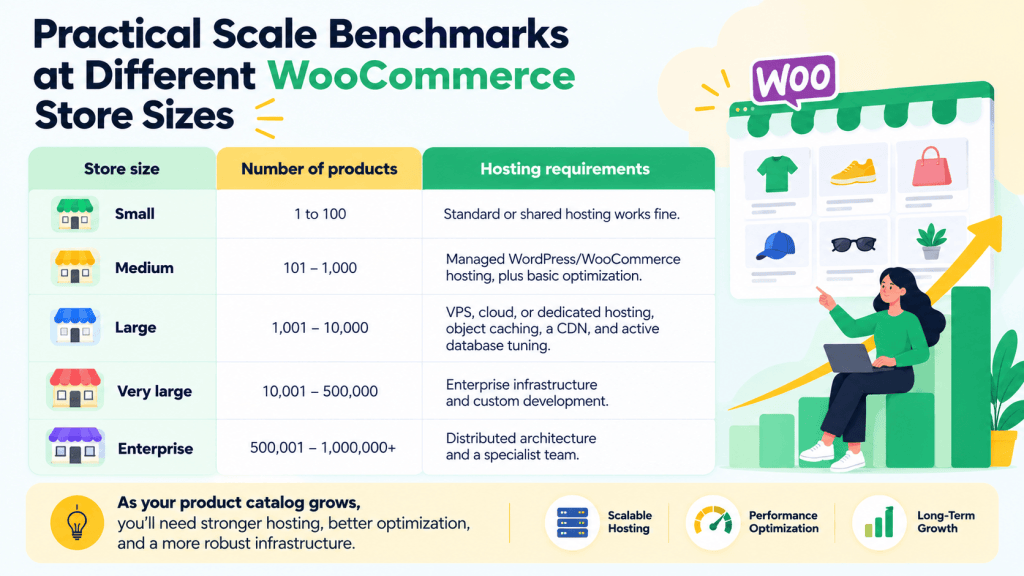
Here’s a rough estimate of how WooCommerce scalability changes across different store sizes. As noted, website traffic, product variants, optimizations, and other factors significantly impact the exact metrics.
| Store size | Number of products | Hosting requirements |
| Small | 1 to 100 | Standard or shared hosting works fine. |
| Medium | 101–1,000 | Managed WordPress/WooCommerce hosting, plus basic optimization. |
| Large | 1,001–10,000 | VPS, cloud, or dedicated hosting, object caching, a CDN, and active database tuning. |
| Very large | 10,001–500,000 | Enterprise infrastructure and custom development. |
| Enterprise | 500,001–1,000,000+ | Distributed architecture and a specialist team. |
Technical resource guidelines for WooCommerce stores
Traffic, plugins, variations, queries, and catalog complexity determine the exact specs for your WooCommerce store. Below, we’ll examine typical websites at different scales to help you estimate how to set up your store’s infrastructure.
Resource guidelines
| Resource | Stores with 10K–500K products | Stores with 500K+ products |
| CPU | 4–8+ cores | 16+ CPUs, high-performance processors (often spread across roles) |
| RAM | 8–16 GB | 32 GB+ |
| Storage | SSD | 1 TB+ NVMe SSD |
| Database | Tuned MySQL 8.0+ or MariaDB | Dedicated database server, read replicas |
| PHP | PHP 8+ | PHP 8.1+, with 10–15+ PHP workers |
| Search | Default is often fine | Dedicated search (Elasticsearch or Algolia) |
| CDN | Recommended | Essential |
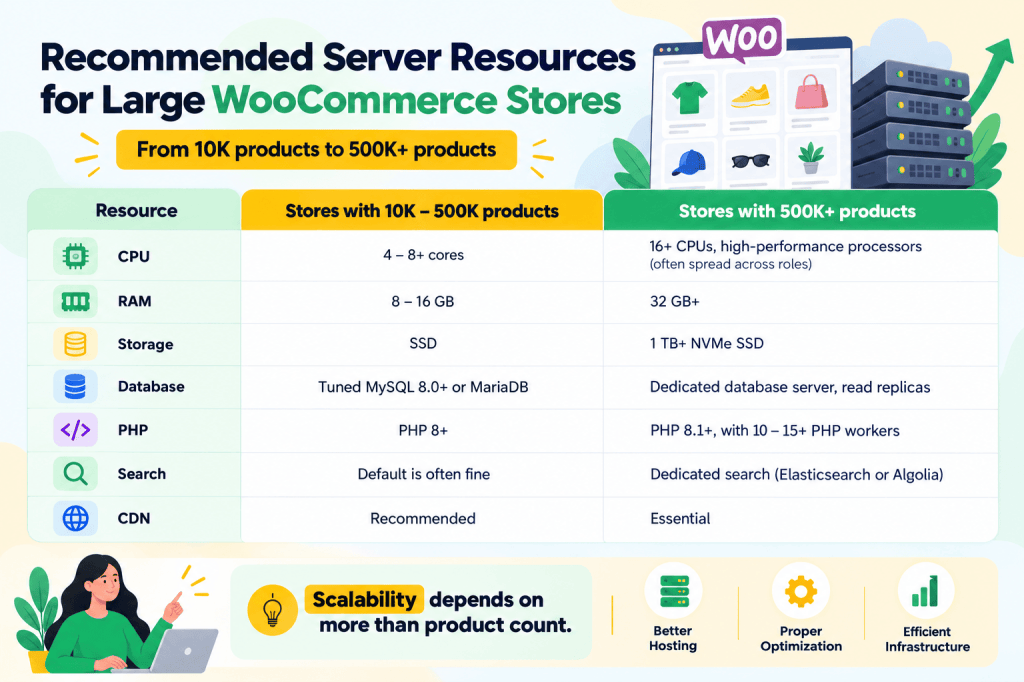
Note: Enterprise stores typically run web, database, caching, and search on separate layers, most often on cloud platforms like AWS, Google Cloud, or Azure.
What can go wrong on large scale WooCommerce catalogs?
Problems can appear when the amount of product data starts putting more pressure on your site’s database, server, search, plugins, or day-to-day store management.
Here are the most common issues to watch for as your product catalog grows.
- A sluggish admin. Opening product lists, editing products, updating inventory, and performing bulk actions may take longer as the amount of product data increases.
- Slower product searches and filters. An increase in the time taken to process filtering, sorting, and related-product requests, especially when customers filter products based on multiple attributes.
- Database bloat. WooCommerce stores rely heavily on the WordPress database to store and retrieve product information. Piled up old transients, post revisions, orphaned metadata, and leftover plugin tables can slow down your site.
- Timeouts on imports and syncs. It’s common for large catalogs to need regular updates from suppliers, marketplaces, ERP systems, or inventory platforms. Large CSV imports may take longer, fail partway through, or time out if your server’s PHP execution time or memory limits are insufficient.
- Downtime during traffic spikes. The Cart and Checkout pages don’t support regular caching. Events like product launches or sales that draw a large number of site visitors can overwhelm an under-resourced server.
How to make WooCommerce handle more products
Here are six actionable tips to maximize your WooCommerce store’s performance, no matter the number of products in your catalog.
- Pick a robust hosting plan. Website hosting is arguably the highest-impact factor. Stores with a high product count need managed WooCommerce, VPS, or cloud hosting to avoid admin lags, slow-loading pages, and downtime during spikes.
- Turn on High-Performance Order Storage (HPOS). Navigate to WooCommerce → Settings → Advanced → Features and enable HPOS to speed up order queries as your order history grows.
- Add page caching and a CDN. Offload static files to a CDN and use a caching plugin like WP Rocket or LiteSpeed Cache.
- Optimize your database. Schedule regular cleanups to add indexes to the heavily queried tables, clear out expired transients, old revisions, and orphaned metadata. Use tools like Query Monitor to find slow queries and Redis or Memcached to reduce repeated database queries.
- Offload search. Use purpose-built search and filtering plugins like FacetWP or HUSKY Products Filter Professional (WOOF).
- Optimize product variants. Define attributes globally where possible. Split products with an enormous number of combinations into separate products.
Real-life high-volume WooCommerce stores
Here are real-life examples of large brands that run on WooCommerce:
- Kellox.no. Norway’s largest importer of motorized products for land and sea runs over 800,000 SKUs on WooCommerce, with custom pricing agreements for wholesale customers.
- True Value. A hardware co-op uses WooCommerce to manage a catalog of thousands of products across its partner stores in the U.S.
- Golden Corral. The restaurant chain runs online ordering for its nearly 375 locations.
- All Blacks Shop. New Zealand’s rugby team store handles heavy traffic spikes around major sporting events.
- Mint Mobile. Sells phones and subscription plans to nearly four million subscribers.
- Universal Yums. The snack subscription brand has shipped over 10 million boxes.
- Nalgene and La Marzocco. Both run large catalogs with plenty of variations and configurations.
Shopify vs WooCommerce vs BigCommerce scalability
How does WooCommerce scalability stack up against hosted platforms like Shopify and BigCommerce?
Although WooCommerce gives site admins nearly unlimited customization control and lower platform costs, admins are 100% responsible for website performance. Shopify and BigCommerce handle the majority of the website infrastructure responsibilities at the cost of flexibility and relatively high ongoing fees.
| Parameter | WooCommerce | Shopify | BigCommerce |
| Product limit | No built-in limit. The practical limit depends on your hosting plan and optimization tactics. | Large catalogs supported. | Large catalogs supported. |
| Variants per product | No built-in cap. However, heavy variations can strain the database. | Up to 2,048 variants and 3 options per product. | Up to 600 variants per product, plus modifiers. |
| Who handles infrastructure | You (or your managed host). | Shopify. | BigCommerce. |
| Handling traffic spikes | Needs proactive planning and the right host. | Can be absorbed. | Can be absorbed. |
| Customization | Total control over code, hosting, and checkout. | Limited by platform and plan. | Less flexible than WooCommerce. |
| Cost as you grow | No platform subscription or revenue share. Hosting and plugin costs separate. | Subscription, plus a surcharge if you use a third-party payment gateway. | Subscription tiers, with some fee changes in 2026. |
FAQs about WooCommerce scalability
Does WooCommerce have a product limit?
No, there is no built-in limit to the number of products you can add in WooCommerce. However, in practice, factors like web hosting, caching, themes, plugins, database performance, traffic, product variants, and others determine how many products a WooCommerce store can handle.
Can WooCommerce handle 50,000 products?
Yes, WooCommerce can handle 50,000 products reliably, provided you have appropriate hosting, object caching, a CDN, image optimization, regular database cleanups, and other necessary website optimizations.
Can WooCommerce handle 100,000 products?
Yes, there are documented examples of real-life WooCommerce stores with 100,000+ products, which prove that WooCommerce scalability can extend well beyond typical small and medium-sized catalogs.
However, catalogs that size need infrastructure and optimization like dedicated or high-end cloud hosting, object caching, a CDN, a dedicated search and filtering system, and expert development support.
Can WooCommerce handle 1 million products?
Yes, WooCommerce can handle a million products. But although it is technically possible, it doesn’t automatically mean it is appropriate for a standard WooCommerce setup.
Sites with 1 million products or more typically need distributed infrastructure (separate web, database, caching, and search layers) and a dedicated team to maintain it.
There is no fixed product limit in WooCommerce
If you only have one takeaway from this guide, let it be this: how many products can WooCommerce handle depends on much more than product count alone. Product variations, website traffic, plugins and themes used, along with various other factors, impact website performance.
WooCommerce scalability is less about hitting a fixed product limit and more about building an infrastructure that can reliably support your store’s workload.
WooCommerce’s platform is highly scalable. It can power hundreds or millions of products, depending on your web hosting plan, database optimizations, search and filtering system, themes and plugins, and overall store architecture.
This makes it an excellent ecommerce platform no matter if you have hundreds of thousands or millions of SKUs.
Thinking about how to scale your WooCommerce store? Get the tools to handle more complex products, pricing, shipping, filtering, and customer requirements with Dotstore’s robust WooCommerce plugin catalog.
WooCommerce Checkout Conversions Plugins
Unlock Your Store’s Full Potential by Streamlining the Checkout Process
14-day, no-questions-asked money-back guarantee.