Table of Contents
High-value cart abandonment is when your biggest orders reach checkout and never get paid for. New 2026 research from WooCommerce and Stripe shows it gets worse as carts get bigger.
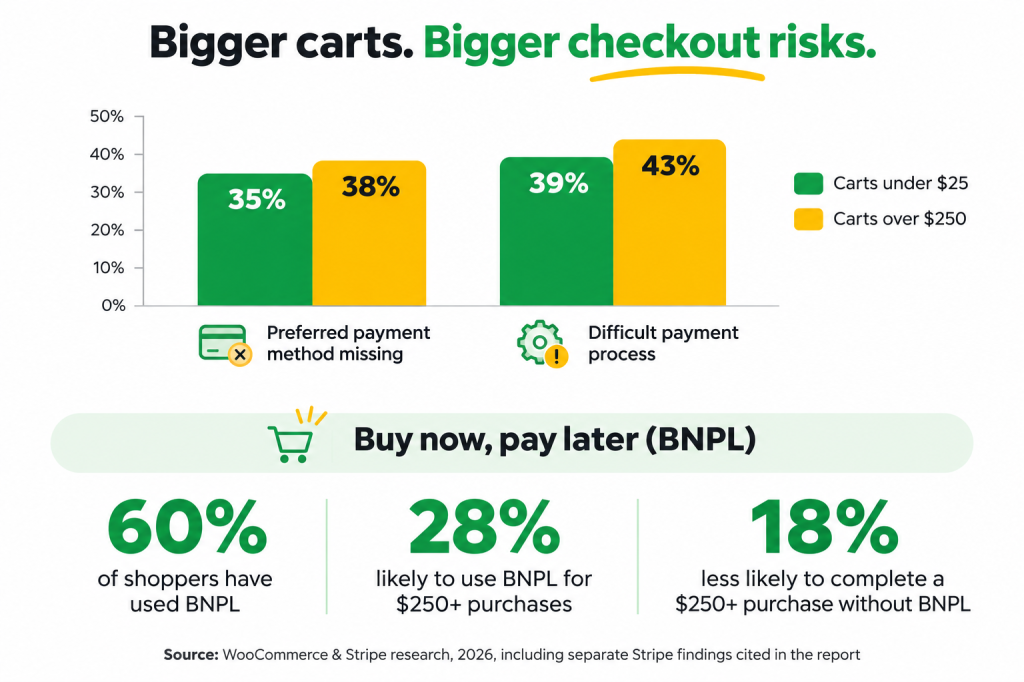
When a shopper’s preferred payment method is missing, 35% abandon carts under $25 and 38% abandon carts over $250. A difficult payment process pushes abandonment from 39% to 43% across the same range.
The same report shows delivery problems (71%) and pricing and costs (66%) drive abandonment more often than payment issues (63%). So adding more payment buttons will not save your largest orders on its own.
You need a checkout that changes with the cart: fast and fee-free for small orders, clear about delivery for every order, and ready with financing and safer payment options for large ones.
This guide turns the report’s numbers into 7 checkout rules you can set up in WooCommerce.
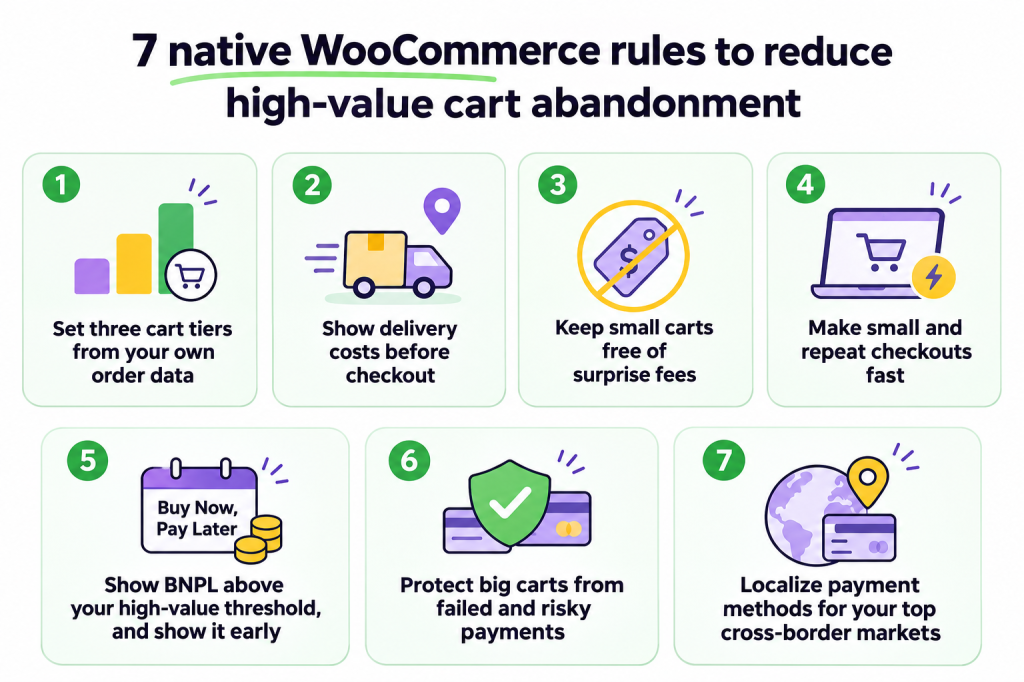
Quick answer: To reduce high-value cart abandonment in WooCommerce, set checkout rules by cart value.
- Set three cart tiers from your own order data.
- Show delivery costs and High-value cart abandonment is when your biggest orders reach checkout and never get paid for. New 2026 research from WooCommerce and Stripe shows it gets worse as carts get bigger. When a shopper’s preferred payment method is missing, 35% abandon carts under $25 and 38% abandon carts over $250. A difficult payment process pushes abandonment from 39% to 43% across the same range.the free-shipping gap before checkout.
- Keep small carts free of surprise fees.
- Make small and repeat checkouts fast with wallets and fewer fields.
- Show buy now, pay later (BNPL) above your high-value threshold, and show it early.
- Limit risky methods like cash on delivery above a set subtotal.
- Localize payment methods for your top cross-border markets.
What does the 2026 WooCommerce and Stripe report say about checkout abandonment?
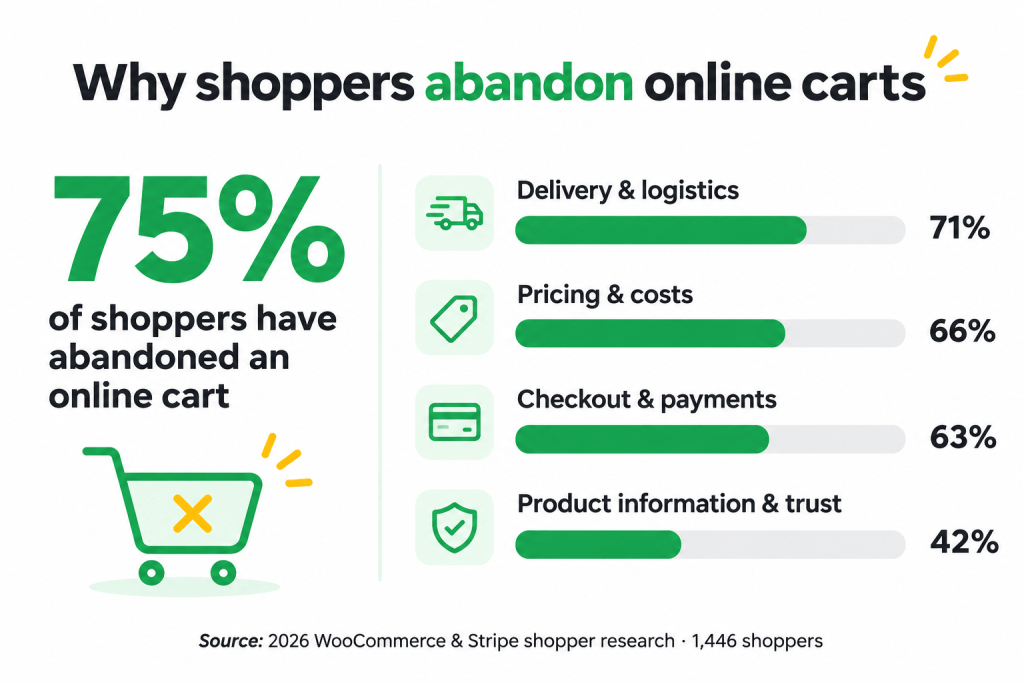
Three in four shoppers (75%) have abandoned an online cart. Of those, 63% name a checkout or payment problem as a reason. Payment issues rank third, though. Delivery and logistics (71%) and pricing and costs (66%) rank higher.
Shoppers could name more than one reason, so the shares add up to more than 100%.
Inside the checkout and payment group, the report names four specific problems:
- Failed transactions (28%): the single biggest checkout reason. Shoppers had the money, but the payment did not go through.
- Too many steps (21%): every extra field or screen gives a shopper another moment to leave.
- Preferred payment method missing (21%): one in five walked away because they could not pay their way.
- Device or browser problems (14%): the checkout broke or felt clumsy on their device.
About this data: the survey covered 1,446 online shoppers in the US, Canada, the UK, Ireland, France, Germany, Singapore, and Australia, with a ±2.6 point margin of error. WooCommerce commissioned it with Stripe, and it closes with a pitch for Stripe’s payment tools. It does not cover India, Latin America, the Middle East, or Africa, where cash on delivery is common.
Treat it as a strong signal for those eight markets, then check it against your own store data. You can read the full WooCommerce and Stripe consumer research report.
Why do high-value carts get abandoned more often?
Bigger carts carry more risk for the shopper, so every bit of friction weighs more. Stripe’s global research, cited in the report, shows the same two checkout problems cause more abandonment at $250 than at $25.
Three things change as the cart grows:
- More money, more doubt: a shopper spending $300 checks trust, delivery dates, and returns more carefully than one spending $12. Any surprise at checkout gives that doubt a reason to win.
- Cards hit limits: a large charge can exceed a card limit or trigger an extra bank security check. The shopper then needs a second way to pay, and leaves if there is none.
- Financing starts to matter: 60% of shoppers have used BNPL. 28% say they are likely to use it for purchases of $250 or more, and 18% are less likely to finish a $250+ purchase if BNPL is missing. That is close to one in five big orders.
Most WooCommerce stores still show one checkout to every cart. A $15 order and a $500 order see the same payment list, the same shipping options, and the same fees.
How should your WooCommerce checkout change by cart value?
Split your carts into three tiers and give each one a different job. Small carts need speed and zero surprise costs. Large carts need financing, a backup way to pay, and lower risk. Mid-range carts sit in between, and that is usually where your free-shipping threshold belongs.
| Cart tier | What the shopper needs | Payment methods to show | Delivery | Fees | Biggest risk |
| Small (under about $25) | Speed | Cards and wallets (Apple Pay, Google Pay) first. Keep BNPL out of sight. | Show the cost early and how far they are from free shipping | None added at checkout | Surprise costs, too many steps |
| Mid ($25 to $250) | Clarity | Cards, wallets, and local methods for cross-border buyers | Free-shipping threshold often sits here | Only clearly labelled optional extras, such as express delivery or gift wrap | Delivery cost, missing preferred method |
| Large ($250 and up) | Confidence and flexibility | Cards, wallets, and BNPL, plus bank transfer for very large or B2B orders. Limit cash on delivery. | Free or clearly stated, with a delivery date and tracking | Avoid payment surcharges | Failed payments, missing BNPL, card limits |
The $25 and $250 lines come from the report. Your store’s lines may sit elsewhere. Rule 1 below shows how to find them.
How do you reduce high-value cart abandonment with native WooCommerce settings?
You can set up a good part of each rule with WooCommerce’s own settings and your payment gateway. Start here, because native settings cost nothing. Each rule ends with a plain verdict on when the native way is enough.
Rule 1: Set three cart tiers from your own order data
The report’s $25 and $250 lines are a starting point. A store selling $8 stickers and a store selling $900 bikes need different lines.
- Go to WooCommerce > Analytics > Orders and set the date range to the last 12 months.
- Note your average order value, then click Download to export the orders as a CSV file.
- Sort the file by order total. Mark the bottom 25% of orders as small, the middle 50% as mid, and the top 25% as large.
- Add up the revenue in each tier. This shows you how much money sits in the large tier you are about to protect.
This is enough when: always. Every store can do this with native tools, and every later rule depends on it.
Rule 2: Show delivery costs before checkout
Delivery and logistics is the top abandonment reason at 71%. Shoppers should never meet the shipping cost for the first time on the last screen.
- Turn on the cart shipping calculator in WooCommerce > Settings > Shipping > Shipping settings.
- Add a free-shipping threshold to each zone. Go to WooCommerce > Settings > Shipping, open a zone, add Free shipping, and set it to require a minimum order amount.
- Place that minimum a little above your average order value. Mid-tier shoppers then have a clear reason to add one more item.
- On WooCommerce 9.9 or later, turn on Hide shipping rates when free shipping is available in the same Shipping settings screen, so qualifying shoppers see one clear option.
- State delivery times on product pages, especially for large-tier products.
This is enough when: you ship to a few zones with one or two flat rates. Where it stops: native flat rates cannot change by subtotal bands, such as $8 under $50 and $4 from $50 to $100. The native hide setting is a single switch, so it cannot keep local pickup or express delivery visible for big orders, or hide rates by product, role, or cart value.
Rule 3: Keep small carts free of surprise fees
Pricing and costs drive 66% of abandonment. A $2 fee on a $15 cart feels larger than it is, and it lands at the worst moment.
- Do not add payment or handling fees to small carts by default. WooCommerce core has no fee setting, so a fee only exists if you or a plugin added one.
- If you need to protect margin on small orders, use the free-shipping threshold or a product bundle instead of a fee.
- If you must charge a fee, show it on the product or cart page with a clear label, not only at the final step.
- Check local rules before adding any payment surcharge. Surcharges on most consumer card payments are banned in the EU and UK, and other regions have their own limits.
This is enough when: you charge no fees. Most stores should keep small carts fee-free.
Rule 4: Make small and repeat checkouts fast
21% of shoppers who abandoned blamed too many steps. Younger shoppers lean hard on speed: 49% of 18 to 29 year olds use one-click checkout, against 35% of all shoppers.
- Turn on guest checkout in WooCommerce > Settings > Accounts & Privacy.
- Turn on Apple Pay and Google Pay in your payment gateway. WooPayments and the official Stripe extension both offer them. Check whether they show on product pages, the cart, and checkout.
- Use the block-based Checkout and hide optional fields you do not need, such as company name or a second address line.
This is enough when: you sell physical products and your gateway supports wallets. Where it stops: stores selling downloads or services still ask every buyer for a full billing address, which adds steps a digital buyer does not need.
Rule 5: Show BNPL above your high-value threshold, and show it early
18% of shoppers are less likely to finish a $250+ purchase without BNPL. The report also advises showing installment pricing on the product page and in the cart, before checkout.
- Add BNPL through your gateway. WooPayments, Stripe, and PayPal offer installment options in many countries, and Klarna and Afterpay have their own plugins. Availability depends on country and currency.
- Turn on the provider’s installment message for product and cart pages, so shoppers see the split price early.
- Check the provider’s minimum and maximum order amounts. The provider sets them, and they may not match your large tier.
This is enough when: the provider’s limits roughly match your large tier. Where it stops: WooCommerce cannot hide a payment gateway below a cart value you choose. A separate BNPL gateway can show on a $12 cart, adding clutter where it does not help.
Rule 6: Protect big carts from failed and risky payments
Failed transactions are the top checkout reason at 28%. At $250+, a difficult payment process drives 43% abandonment.
- Give large carts at least two different ways to pay, such as card plus wallet, BNPL, or bank transfer. A declined card should never end the order.
- Ask your payment provider which tools it offers to cut false declines and retry soft failures. Many have them, and some are off by default.
- Limit cash on delivery by shipping method in WooCommerce > Settings > Payments > Cash on delivery, using Enable for shipping methods.
This is enough when: your catalog is low-risk and you do not offer COD. Where it stops: WooCommerce cannot cap COD at an order value, and it cannot show bank transfer only for large orders.
Rule 7: Localize payment methods for your top cross-border markets
59% of shoppers bought from another country in the past year, and 80% say paying their preferred way matters when buying internationally. Stripe’s separate research found 30% are more likely to complete a purchase when local methods are offered.
- Find your top 1 to 3 foreign markets from your orders export or WooCommerce > Analytics > Customers.
- Turn on the local methods those shoppers use through your gateway, such as iDEAL in the Netherlands or PayNow in Singapore.
- Show prices in the shopper’s currency if your gateway or a currency plugin supports it.
This is enough when: one gateway covers all your markets and shows local methods by location on its own. Where it stops: with several gateways, every shopper sees every gateway. You cannot hide a Dutch-only gateway from US shoppers, or hide COD outside your home country, without code.
When do native WooCommerce settings stop being enough?
Native settings stop at rules. The moment you want a payment method, shipping rate, or fee to change by cart value, country, product, or customer type, WooCommerce needs custom code or a plugin. Most stores hit this wall first with payment methods.
You may not need every tool below. Pick by the gap you hit in the seven rules.
| Gap you hit | Rule | Dotstore plugin | What it adds |
| Payment methods cannot change by cart value, country, product, or role | 5, 6, 7 | Conditional Payments | Show or hide any gateway by cart subtotal, quantity, or weight, billing or shipping country, city, or postcode, product or category, shipping method, user role, and day or time |
| Shipping rates cannot change by subtotal bands | 2 | Flat Rate Shipping | Shipping cost rules by cart subtotal, quantity, weight, product, category, user role, and location |
| Native free-shipping hiding is one switch for every case | 2 | Hide Shipping Method | Hide all or only specific methods when free shipping is available, plus conditional hide rules in the premium version |
| Fees cannot be conditional, optional, or shown early | 3 | Extra Fees | Fees by cart subtotal, country, product, quantity, or user, plus optional fees as a cart-page checkbox and fees shown on the product page |
| Digital buyers still fill in a full billing address | 4 | Checkout for Digital Goods | Removes unneeded billing fields for virtual and downloadable products, and adds a quick checkout button to shop and product pages |
What does a cart-value payment rule set look like?
This starter set in Conditional Payments covers rules 5, 6, and 7. Swap in your own tier lines from Rule 1.
- Keep small carts clean: hide your BNPL gateway when the cart subtotal is below your large-tier line.
- Cap cash risk: hide cash on delivery when the cart subtotal is above your COD limit, or for postcodes with high refusal rates.
- Add a large-order fallback: show bank transfer only when the subtotal is above your large-tier line, or when the user role is wholesale.
- Localize: show a local gateway only for its billing country, and hide COD when the shipping country is outside your home market.
- Never show an empty list: set a custom message for any case where no payment method qualifies, then test every tier with the plugin’s debug mode.
What should you know before you add these tools?
- Gateway rules act on whole gateways. Check how your processor lists its methods in WooCommerce > Settings > Payments. If cards, wallets, and BNPL sit inside one gateway, a rule shows or hides the whole group. Use your processor’s own settings for methods inside it.
- Fees can work against you. Conditional Payments and Extra Fees can both add fees. Use that for clearly labelled optional extras or large-order services, not surprise charges on small carts. Check surcharge rules in your region first.
- Digital quick checkout needs a digital-only cart. If a cart mixes physical and digital products, the normal checkout fields return.
- The native hide switch may be enough. If you only need to hide paid rates when free shipping applies, use the WooCommerce 9.9 setting and skip a plugin.
- Features differ between free and premium versions. Check each product page for the current split and the live pricing page for costs.
How do shopper location and product category change your checkout rules?
Location changes which payment methods feel safe to a shopper. Category changes which method they reach for first. Layer both on top of your cart tiers instead of building separate checkouts.
Location: localize for a few markets, not all of them
Cross-border buying is common in every market the survey covered, but at very different rates:
| Market | Bought from another country in the past year |
| Singapore and Australia | 79% |
| UK, Ireland, France, and Germany | 69% |
| US and Canada | 52% |
For cross-border purchases, digital wallets (35%) influence completion most, followed by BNPL (15%) and one-click checkout (12%). In Asia Pacific, the wallet share rises to 40% and one-click to 20%.
The report names local methods shoppers expect, such as iDEAL in the Netherlands, girocard in Germany, Cartes Bancaires in France, PayNow in Singapore, BPAY in Australia, and Interac in Canada.
- Start with 1 to 3 markets where you already see foreign orders, traffic, or customer questions.
- Treat local payment methods as a launch requirement, next to currency, shipping, and duties.
- Show each shopper their own options. A Dutch shopper should see iDEAL. A US shopper should not.
- Keep cash on delivery where it works. The survey skipped COD-heavy regions such as India and the Middle East. If you sell there, keep COD and cap it by order value and postcode, as in Rule 6.
Category: match the method to what people buy
Cards lead in every category, but their share varies, and the gap shows where other methods matter.
| Category | What the report found | Rule to lean on |
| Software | 26% prefer digital wallets; 63% prefer cards | Rule 4: wallets and quick checkout |
| Fitness (equipment, supplements, workout apps) | 21% prefer digital wallets | Rule 4: wallets up front |
| Electronics and furniture | 12% prefer BNPL | Rule 5: BNPL above your threshold, shown early |
| Computer hardware, motor vehicles, jewelry | 10% prefer BNPL | Rules 5 and 6: BNPL plus a large-order fallback |
| Groceries | 76% prefer cards | Rule 4: keep checkout short |
How do you know your checkout rules are working?
Compare checkout completion by cart tier before and after each change. Change one rule at a time, so you know which one helped. The report itself recommends tracking conversion by country, payment method mix by market, and payment failure rate by region.
| Metric | Where to find it | What to look for |
| Checkout completion by cart tier | GA4 checkout and purchase events, split by order value | The large-tier gap narrows |
| Payment failure rate | WooCommerce > Orders, filtered by Failed status | Fewer failed orders, mostly in the large tier |
| Payment method mix by tier and country | Orders export (payment method column) | Large-tier and foreign buyers using the methods you added |
| Average order value | WooCommerce > Analytics > Orders | Rises after a free-shipping threshold or BNPL change |
| Conversion rate by country | GA4, split by country | Rises in the markets you localized |
Quick checklist
- Export 12 months of orders and set your small, mid, and large tiers
- Turn on the cart shipping calculator and set a free-shipping threshold above your average order value
- On WooCommerce 9.9 or later, hide paid rates when free shipping applies
- Remove or move any fee that hits small carts at the final step
- Turn on guest checkout, Apple Pay, and Google Pay
- Add BNPL and its installment message on product and cart pages
- Give large carts at least two ways to pay, and cap cash on delivery
- Turn on local payment methods for your top 1 to 3 foreign markets
- Track completion, failures, and payment mix by tier every month
Frequently asked questions
What is high-value cart abandonment?
High-value cart abandonment is when shoppers leave checkout with a large order unpaid. Stripe research cited in the 2026 report shows it rises with cart value: 38% abandon $250+ carts when their preferred payment method is missing, against 35% under $25. Large carts face more doubt, card limits, and a need for financing.
Why do customers abandon expensive carts at checkout?
Expensive carts raise the stakes, so small problems weigh more. The top checkout reasons are failed payments (28%), too many steps (21%), and a missing payment method (21%). For purchases over $250, 18% of shoppers are less likely to finish if buy now, pay later is not offered.
What is a good free shipping threshold for WooCommerce?
Set it a little above your average order value, so mid-sized carts have a reason to add one more item. Find your average in WooCommerce > Analytics > Orders. Check the threshold against your shipping costs and margins, then watch whether average order value rises.
Should I offer buy now, pay later on small orders?
Usually not as a visible option. BNPL matters most for larger purchases: 28% of shoppers are likely to use it at $250 or more. On small carts it adds a choice with little benefit. Show it above your high-value threshold, with installment pricing on product and cart pages.
Can I hide a payment method based on cart total in WooCommerce?
Not with core settings alone. WooCommerce has no built-in rule to show or hide a gateway by cart total. You need custom code or a plugin such as Conditional Payments, which shows or hides gateways by cart subtotal, country, product, shipping method, or user role.
How do I limit cash on delivery for large orders?
WooCommerce limits cash on delivery by shipping method only, under WooCommerce > Settings > Payments > Cash on delivery. It cannot cap COD at an order value. To hide COD above a set subtotal or for specific postcodes, use a conditional payments plugin.
Which payment methods do international shoppers expect?
It depends on the country. Digital wallets influence cross-border purchases most (35%), followed by BNPL (15%) and one-click checkout (12%). Local methods matter too, such as iDEAL in the Netherlands or PayNow in Singapore. 80% say paying their preferred way matters when buying internationally.
Is the 2026 WooCommerce and Stripe report reliable?
It is a useful signal with limits. It surveyed 1,446 shoppers in eight countries, with a ±2.6 point margin of error. WooCommerce commissioned it with Stripe, and some figures come from separate Stripe research. It skips India, Latin America, the Middle East, and Africa, so test its findings on your own store.