Table of Contents
If you sell to more than one country, you know this problem of WooCommerce dynamic pricing. Black Friday will soon be around, so you put products on sale for shoppers in the US and Europe. A few weeks later you undo it all and set up a year-end sale. Then Lunar New Year for your customers in Asia. Every time, you log in, change prices by hand, swap banners, and hope you did not forget to turn off the last sale.
Key Takeaways
- One global sale does not work, because shopping seasons happen at different times in different countries. More than half of online shoppers now buy from stores in other countries, so this is not a small group.
- The trick is to add conditions to each offer. Then many sales can run at the same time, and each shopper only sees the one meant for them.
- Four conditions do most of the work: where the shopper is, who they are, when the sale runs, and what is in their cart.
- Set up every sale in advance with a start and end date. Get the time zone and end date right, or a sale can end too early or run too long.
- Set shipping rules for each sale, and turn on fraud and spam protection before the busy days start.
- Skip all of this if you sell to just one country or run only one big sale a year.
This is the hidden cost of running a global store. Your customers celebrate at different times, so their big shopping days do not line up. A shopper in Singapore and a shopper in Manchester are ready to buy on totally different dates, and neither cares about the other’s holiday. Doing all this by hand is tiring and easy to get wrong. Miss a date and you lose sales. Forget to end a sale and you give away money.
If you handle each holiday live, in the moment, instead of setting them all up ahead of time and letting them run on their own, it would be a problem. WooCommerce dynamic pricing helps you build every regional sale in advance and let each one switch on and off by itself. This guide shows you how, step by step.
| In a rush? Here is the whole method in five steps: – Pull your order data and list the countries you actually sell to. Keep only the seasons that matter to those regions (Black Friday for the US and Europe, Singles’ Day and Lunar New Year for Asia, and so on). – Build one dynamic pricing rule per sale and schedule each with a start and end date, in the right time zone, so it turns on and off by itself. – Add a condition to each rule so it only reaches the right people: country, customer role (e.g. exclude wholesale), cart value, or product category. – Set shipping and banners to match each sale’s dates and region, so a shopper sees the right delivery options and the right artwork. – Test as different customers before the season, then leave it alone. Overlapping sales run side by side without clashing because each has its own conditions. Full calendar example and step-by-step setup below. |
Why doesn’t one global sale work for international shoppers?
Offering discounts in sales helps boosts WooCommerce revenue. One global sale does not work because it ignores three things that change from country to country.
- When the shopping season happens.
- Whether the sale means anything to that shopper.
- And how the price looks in their money.
Here is each one.
When are peak shopping seasons around the world?
Big shopping seasons happen all through the year, and many move to different dates each year. Lunar New Year is in late January or February. Ramadan and Eid move earlier every year. Different regions have their own festivals in their own months. Singles’ Day is on November 11 and is huge across Asia; shoppers spent around $202 billion during it in 2024, several times more than US shoppers spend during Cyber Week.
Black Friday and Cyber Monday come at the end of November. Boxing Day and year-end sales run through late December.
If you only run sales for the holidays in your own country, you go quiet during the exact weeks when many of your customers are ready to buy.
Also read: Top 10 WooCommerce Holiday Promotion Plugins
Why does an irrelevant promotion hurt future campaigns?
A sale tied to a holiday your shopper actually celebrates feels like you get them. The same message sent to someone who does not celebrate it feels like spam. And the cost is bigger than one ignored email.
Every sale that does not fit lowers the chance they open your next one. Over time, you teach part of your list to ignore you, so even your good sales work less well.
Language matters the same way. About 75% of shoppers prefer to buy in their own language, and 59% of people who do not speak English rarely or never buy from English-only sites.
You may not translate your whole store right away, but a sale that ignores a shopper’s language and context starts at a disadvantage.
Why does currency and framing change how a discount is perceived?
A price shown only in US dollars feels different to someone who thinks in euros, yen, or rupees. The deal might be the same, but if they have to do the math in their head, it feels less like it was made for them. How you show the price is part of the offer, not just decoration.
None of these problems get fixed by working harder during the sale. They get fixed by setting the sale up the right way beforehand.
How do you run multiple seasonal campaigns at the same time?
You run many sales at once with dynamic pricing: you add conditions to each offer, instead of showing one sale to everyone.
Once each offer has conditions, several can run at the same time without clashing, because each shopper only sees the one that fits them. One store, many sales, each shown to the right people.
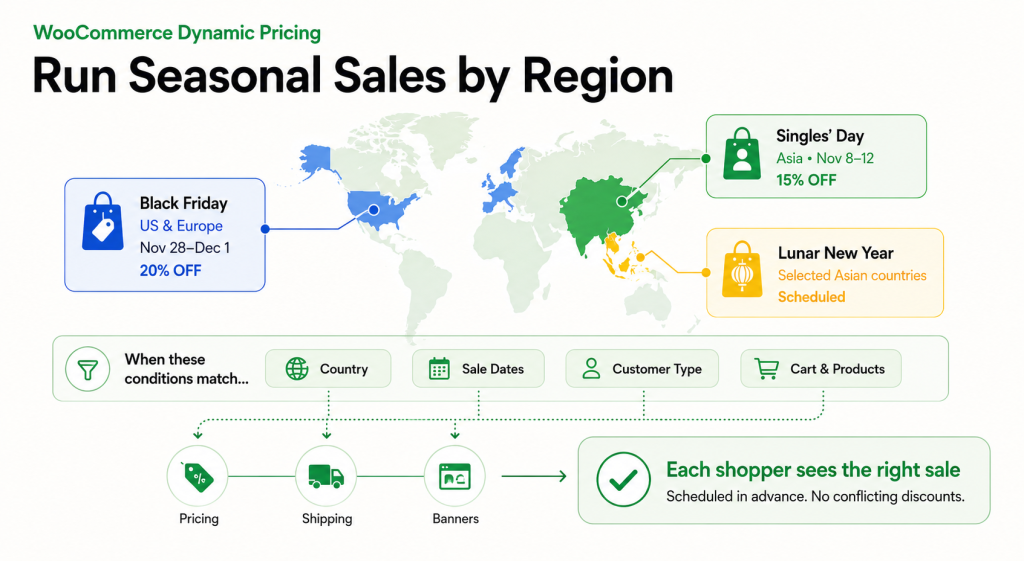
The conditions come down to a few simple questions about the shopper and their cart.
Where are they? This is the main one for regional sales. A Lunar New Year discount can show only in the countries that celebrate it, while a Black Friday deal shows only in North America and Europe. They never clash, because a shopper is only in one place.
Who are they? This lets you give different prices to different groups in the same country. Wholesale buyers, repeat customers, or members can get their own offer, while everyone else sees the normal price.
When is it? Every sale gets a start and end date, so it turns on and off by itself. This is what lets you set it up early and walk away.
What is in their cart? You can start an offer only when the cart reaches a certain value, or only when it holds certain products. This is how you push bundles, raise cart size, or clear old stock.
A dynamic pricing tool, like Dotstore’s Dynamic Pricing and Discount Rules, lets you combine these conditions on one offer. Set up this way, you can run a Lunar New Year sale, a loyalty offer, and Black Friday all at once. Each one shows to the right people on the right dates.
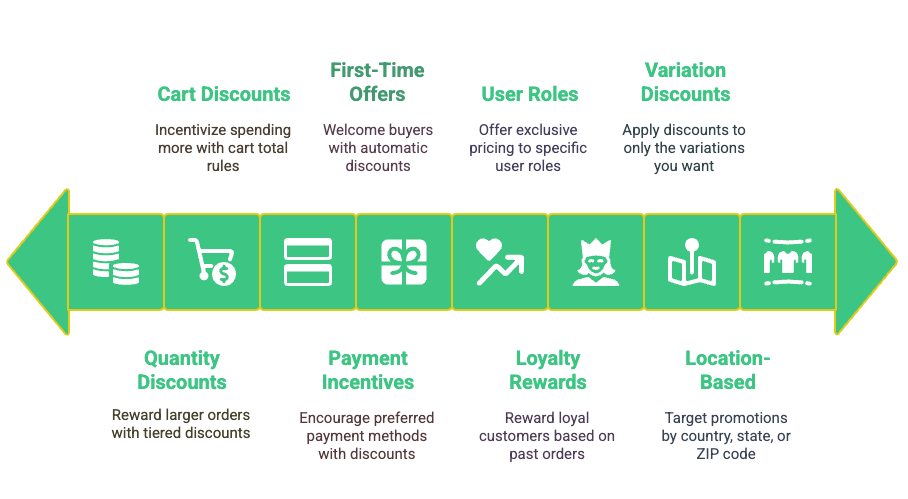
Read more: A Detailed Guide to The WooCommerce Dynamic Pricing and Discount Rules Plugin
How to set up simultaneous seasonal campaigns in WooCommerce
To set up simultaneous seasonal campaigns in WooCommerce, you do five things: plan your calendar from your order data, schedule each sale in advance, target each one by location and customer, set shipping per region, and add banners for each sale.
You do not need a developer. Here are the steps.
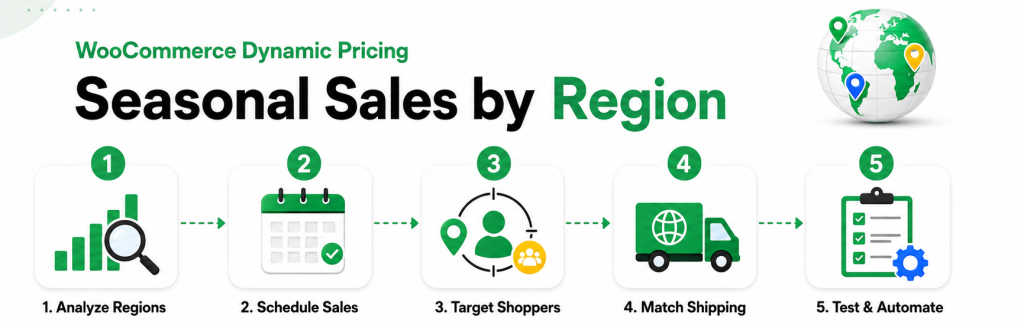
Step 1: Map your seasonal calendar from your own order data
First, look at where your customers are. Check your orders from the last year and group them by country. This tells you which seasons are worth running and which ones to skip.
If a lot of your sales come from one region, its big shopping season goes on your calendar. If almost nothing comes from a region, skip it.
For each season you keep, write down four things: the dates, the region, the type of discount, and the banner you will need. This becomes your setup checklist. Doing it on paper first means you set up your store once, calmly, instead of scrambling mid-season.
While you are here, pick the type of discount too. A flat percentage is simple. A discount that grows with cart size lifts your order value. A discount on one category is good for clearing stock. It is easier to decide this now than in the middle of a sale.
Step 2: Schedule every discount in advance
This is the biggest time-saver. Instead of logging in on the morning of each sale, you set a start and end date for every sale ahead of time. Each one then turns on and off by itself. A scheduling tool handles this, so you can set up the whole year in one sitting and then leave it alone.
Two things to get right.
First, time zones. Pick the right time zone for each sale’s start and end. A sale for Asia should follow a local time zone there; a Black Friday sale for the US should follow a US time zone. Get this wrong and the sale ends too early for the shoppers you wanted.
Second, do not forget the end date. It is easy to start a sale and forget to stop it. Because scheduled sales end on their own, you avoid a discount running an extra week and costing you money.
Step 3: Target each discount by location, role, and cart
Scheduling handles when. Conditions handle who. In your pricing rules, you tie each discount to a location, a customer type, a cart value, or a product category.
For example: a regional offer set for certain countries never shows to shoppers outside them. A wholesale discount tied to your B2B customers stays hidden from regular shoppers, so you do not give bulk prices to everyone. A discount that grows with cart size lifts order value without changing your normal prices.
Each rule works on its own, which is why two or three can run at once without anyone seeing the wrong price.
This is also where you set priority. If two offers could apply to the same shopper, decide which one wins, or set the conditions so they never overlap. A minute of thought here saves a messy checkout later.
| Worked example: how to run Black Friday and Singles’ Day at once To run Black Friday and Singles’ Day at the same time, you build a separate rule for each, set by country and date. Then you add one more rule that keeps wholesale buyers out of both, so they do not get the public discount on top of their trade price. You build three rules: Rule 1, Singles’ Day. Countries: your Asia list (say China, Singapore, Malaysia). Dates: November 8 to 12, on an Asia time zone. Discount: 15% off, or a rate that grows with cart size. Applies to: everyone except wholesale. Rule 2, Black Friday. Countries: your Western list (say US, UK, Germany, Canada). Dates: November 28 to December 1, on a US time zone. Discount: 20% off, or a discount on one category. Applies to: everyone except wholesale. Rule 3, wholesale. Because both public rules leave wholesale out, your B2B buyers keep their normal trade price and never get a double discount. If you would rather reward them, make a small wholesale-only offer instead. The result: on November 10, a shopper in Singapore sees the Singles’ Day price, a shopper in Berlin sees no sale yet, and a wholesale buyer anywhere sees their usual trade price. On November 29, this flips: Berlin sees Black Friday, and the Singapore sale has already ended on its own. You set all three up once, weeks earlier, and never touch them again. |
Step 4: Adjust shipping rules for each region and campaign
A busy season hits your shipping as hard as your prices, and shipping is where a lot of profit quietly leaks. Conditional shipping rules, like those in Dotstore’s Hide Shipping Method and Flat Rate Shipping plugins, let you show, hide, or change shipping options based on where the customer is, what is in their cart, or when the sale runs.
A few ways to use this: offer free shipping over a certain cart value during a sale in one region, while keeping normal rates elsewhere. When orders spike, set flat rates by weight or destination so a rush does not eat your margin.
And if a courier cannot keep up during a busy window, hide that option for those dates instead of promising a delivery speed you cannot meet.
The idea is simple: shipping becomes part of each sale, not one fixed setting that ignores the season.
Step 5: Show region-specific banners on a schedule
The sale moves the product, but the banner earns the click. Scheduled banners, like those in a banner management tool, let you show sale artwork only during that sale’s dates. Someone visiting during a festival sees that festival’s banner.
The same person visiting later during Black Friday sees a Black Friday banner. You make each banner once, set its dates, and let them rotate on their own.
Small things matter here. Leading with the holiday your customer actually celebrates, and using images that fit their market, is what makes a sale feel made for them instead of borrowed. It costs nothing extra once the banners are ready.
Step 6: Add fraud and spam protection before the traffic spike
A busy season brings more of everything, including the bad stuff. More traffic usually means more fake orders and more spam signups. It is worth turning on fraud checks, with a tool like Dotstore’s Fraud Prevention plugin, before the rush, so your team spends the busy days serving real customers instead of cleaning up fake orders.
Also, if you sell during Black Friday, your GA4 tracking has to be working before the traffic arrives, not after.
What does a full year of regional campaigns look like?
A full year of regional sales is just a set of scheduled offers that never overlap, each set up once and left to run. Here is one realistic year.
| Sale | Region | Dates (example) | Discount type | Shipping rule | Who sees it |
| Early loyalty offer | All regions | Before the public sales | Small members-only rate | Normal rates | Repeat customers only |
| Singles’ Day | Asia | Nov 8 to 12 (Asia time zone) | Grows with cart size | Free over a set cart value | Retail only, no wholesale |
| Black Friday / Cyber Monday | North America, Europe | Nov 28 to Dec 1 (US time zone) | Percentage or category deal | Free over a set cart value | Retail only, no wholesale |
| Christmas / year-end | Most regions | Dec 15 to Jan 1 | Category clearance | Flat rate by weight | All retail |
| Lunar New Year | Countries that celebrate it | Late Jan to Feb (moves yearly) | Sitewide or grows with cart | Region-specific rates | Retail, set countries |
| Valentine’s Day | North America, Europe, and beyond | Feb 7 to 14 | Discount on gift categories | Free over a set cart value | All retail |
Because each row has its own dates and conditions, they never clash, and finished sales turn off by themselves.
When do you not need simultaneous seasonal campaigns?
You do not need this if you sell mostly to one country, have a small product range, or run just one big sale a year.
If almost all your orders come from one country, run your home sales well and skip the extra work. This setup only pays off once a second region brings in real money.
If you have few products, or run one sitewide sale a year, changing prices by hand is fine. This system helps when you have several regions, several seasons, and enough products that manual changes are a chore.
And remember, pricing rules are not the whole job of going global. Currency conversion, local taxes, translated pages, and local payment methods are separate problems. Scheduled discounts fix the sales part well, but if a shopper cannot pay in their own currency or read your store in their language, fix that first.
Common mistakes when running overlapping seasonal campaigns
Rules that clash. If two discounts could hit the same shopper, decide which one wins, or set conditions so they never overlap. Otherwise shoppers get a bigger discount than you meant, or an error at checkout.
Skipping the test. Rules that look right in the settings can act up in a real cart. Before the season, place test orders as different customer types and, if you can, from different regions. Check each shopper sees the right price, shipping, and banner.
Time-zone mistakes. As in Step 2, a sale set to end at midnight in the wrong time zone can close too early for the shoppers you wanted. Check the time zone on every sale.
Ignoring the quieter markets. It is tempting to put everything into Black Friday, but a well-timed sale for a regional festival or Lunar New Year reaches shoppers when many competitors are not even looking, often with less discount pressure.
Promising shipping you cannot deliver. Do not advertise fast shipping you cannot provide during a rush. Match your shipping rules and your promises to what you can actually do, so the season ends in good reviews, not refunds.
The bottom line on serving global shoppers
Running many seasonal sales at once means treating every region’s big season as a real chance, not an afterthought. You stop losing sales in markets that do not share your holidays, and you stop teaching your customers to ignore you with badly timed sales. Once it is set up, the busy season is about watching results, not changing prices by hand at midnight.
The stores that handle a global season well are rarely the ones working hardest during it. They are the ones who sat down before the rush, planned it out, and did the setup while everyone else was still deciding what to discount.
WooCommerce Dynamic Pricing and Discount
Apply advanced discount conditions to drive more revenue with our intuitive and easy-to-use plugin.
14-day, no-questions-asked money-back guarantee.
Frequently Asked Questions
Can you run multiple discount campaigns at once in WooCommerce?
Yes. If each campaign has its own conditions (location, date, customer role, or cart value), several run at once and each shopper sees only the one that matches them. Set rule priority to control which wins if two overlap.
How do I schedule a WooCommerce sale to start and end automatically?
Add a start and end date to the discount rule, and matching dates on the shipping method and banner. All three switch on and off on their own, so you can build a sale weeks ahead and never log in to launch it.
How do I set different discounts for different countries in WooCommerce?
Add a location condition to each pricing rule so it only applies to the countries you choose. Because a shopper is only in one country, a Black Friday rule for the US and a Lunar New Year rule for Asia never overlap.
What happens when two shipping rules apply to one order?
You decide in advance how the conflict resolves: apply the highest rate, the lowest, combine them, or let the customer choose. Setting this before the season prevents surprise charges at checkout.
How do I stop wholesale customers from getting a public discount?
Exclude your wholesale or B2B role from the public sale rules. Retail shoppers get the discount while wholesale buyers keep their trade price and never receive a double discount.
Do you need to know code to run seasonal sales in WooCommerce?
No. Creating discount rules, scheduling them, targeting regions, and setting shipping all happen through dropdowns in the plugin dashboards. No code at any step.
When should you set up your seasonal sales?
Several weeks before your earliest peak, in a quiet stretch. That leaves time to place test orders as different customer types and fix any rule conflicts before real traffic arrives.
If you want to set up your season once and let it run, Dotstore’s Dynamic Pricing and Discount Rules, Hide Shipping Method, Flat Rate Shipping, Banner Management, and Fraud Prevention plugins each handle a piece of the setup above.