Table of Contents
Searching for a way to add a WooCommerce product attachment to your online store? In this tutorial, we’ll discuss how to add extra product information using a workaround of the default WooCommerce features and with the simple-to-use Product Attachment for WooCommerce plugin by the Dotstore.
![How to add WooCommerce product attachments [Tutorial] - featured image](https://www.thedotstore.com/wp-content/uploads/sites/1417/2026/03/How-to-add-WooCommerce-product-attachments-Tutorial-featured-image.png?w=1000)
Key Takeaways
- A WooCommerce product attachment is a file or link added to share extra information (think: size charts, manuals, spec sheets, compliance certifications, etc.) directly on product or order pages.
- Product attachments help inform shoppers’ buying decisions, increase conversion rates, reduce returns, support legal or regulatory requirements, cut down repetitive support questions, and more.
- Since WooCommerce doesn’t have a built-in product attachments feature, a common workaround is to use the downloadable products feature to attach extra product documents.
- Although the downloadable products workaround might suffice for small stores, it limits access to files until after checkout, can confuse users, and lacks access controls.
- The Dotstore’s Product Attachment for WooCommerce (free and pro) plugin is purpose-built for managing supporting product documents without disrupting the buying flow.
- With Product Attachment for WooCommerce, you can attach files to all or specific products, categories, tags, or attributes on both the product and order detail pages, control access by user role or order status, set attachment expiry rules, and more.
Want to add a WooCommerce product attachment to your online store?
Technical products, configurable items, B2B goods, regulated products, items with compatibility requirements, and the like usually need more explanation than WooCommerce’s default product description area can handle.
Product attachments enable you to provide customers with all the details they need at the right moment in the buyer journey and in a user-friendly manner, without forcing them to search elsewhere or contact your support team.
In this detailed tutorial, we’ll discuss what product attachments are, their benefits, and how to add product attachments to WooCommerce using the powerful Product Attachment for WooCommerce plugin by The Dotstore.
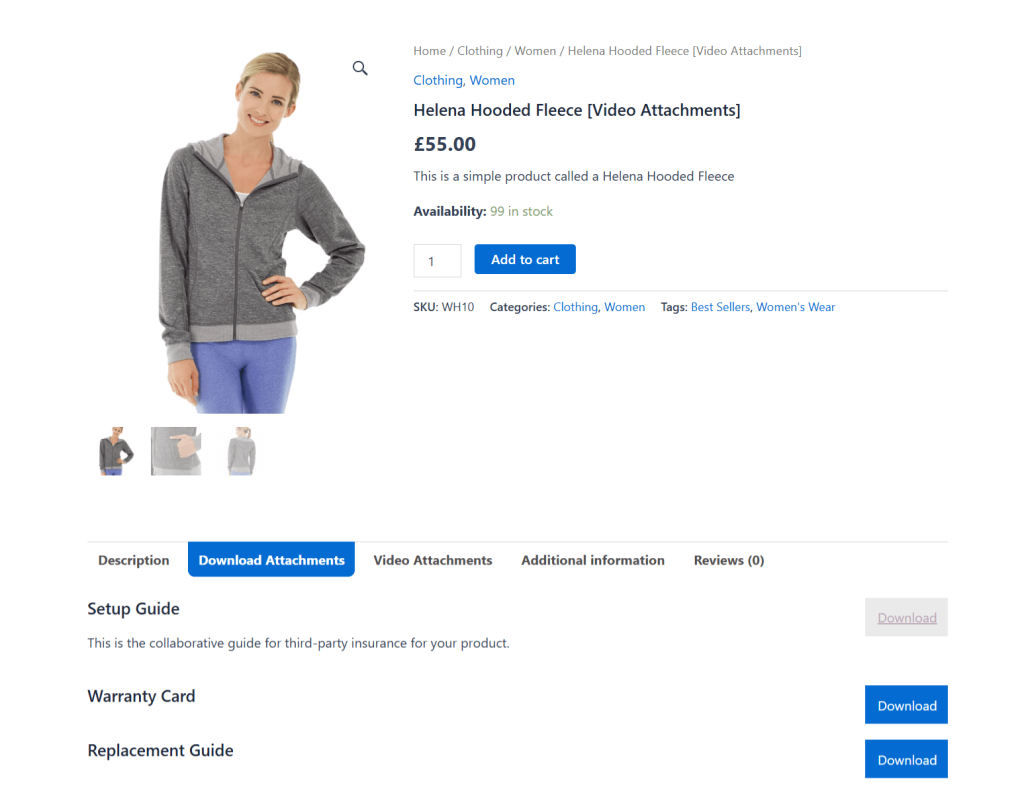
A quick note: Hi, we’re The Dotstore! Product Attachment for WooCommerce plugin is our handcrafted plugin. Since 2017, thousands of WooCommerce store admins across various niches have used it to improve users’ experience and their conversion rates by providing the right product information at the right time. Download the free or pro plugin version or try out the demo now.
WooCommerce Product Attachment
Increase conversion rates with detailed information using multiple attachments.
14-day, no-questions-asked money-back guarantee.
What is a WooCommerce product attachment?
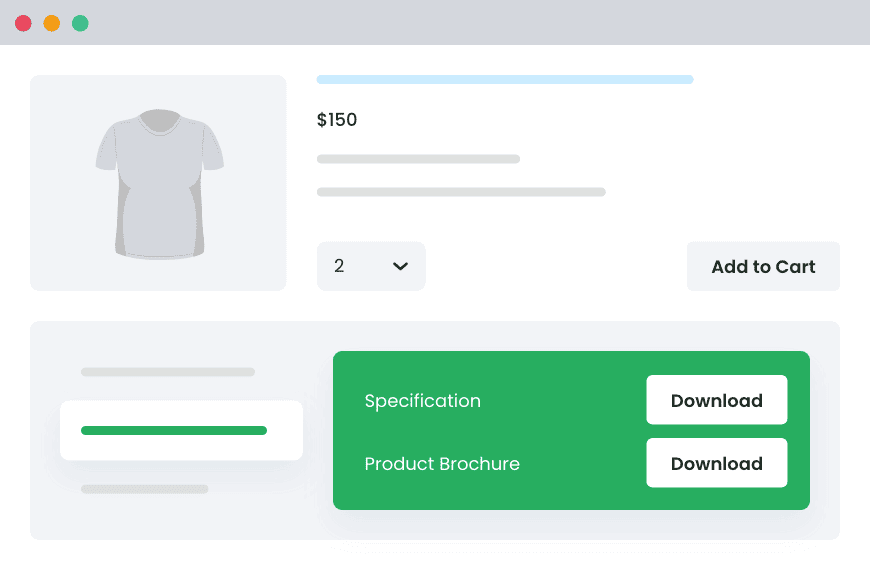
A WooCommerce product attachment is a file or link that store admins add directly to product detail pages to give shoppers extra, helpful information before or after they buy.
A product attachment can be in the form of a PDF, image, document, spreadsheet, video link, or external URL that’s linked to a specific product, category, or the entire product catalog.
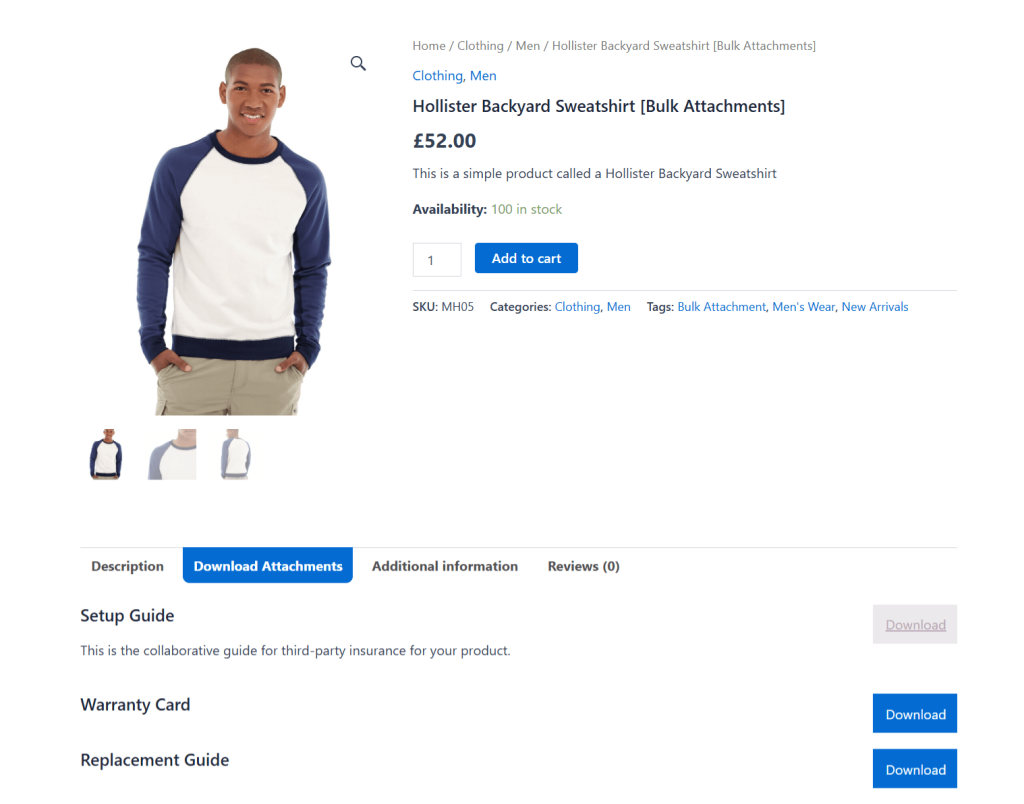
Here are a few popular examples of how WooCommerce stores across various niches use product attachments:
- PDF size charts attached to a clothing product.
- User manual or setup guides for an electronic item.
- Spec sheets for industrial or B2B products.
- Warranty documents linked to high-value items.
- Care instruction PDFs for handmade or custom products.
- Compliance or safety documents required by law in certain regions.
Why add WooCommerce product attachments?
Here are the top 5 reasons why WooCommerce stores across different niches rely on product attachments.
- Improved conversion rates. Some products require extensive context and details to sell well. If the required details are difficult to find on product pages, most shoppers won’t hunt throughout your site. Instead, they will leave for a competitor who readily provides all required information. Attaching relevant documents to product pages improves your site’s UX and conversion rates.
- Reduced returns and refund requests. One major reason behind return requests is that customers’ expectations don’t match reality. This is due to incompatible products, misunderstood features, or overlooked limitations. Attaching documents with relevant details like accessories and spare parts compatibility lists, care and usage instructions for clothing and handmade items, size, weight, or material breakdowns for physical products, etc., can help customers accurately judge if a product is the right fit before making the purchase.
- Reduced support tickets. Repeat customer questions in your support inbox about product features, how to use and care for them, warranty details, etc., signal a need to add those answers on product detail pages. If WooCommerce’s default main description section isn’t sufficient, you may need to add a dedicated attachments tab that addresses common customer questions. This frees up your team’s bandwidth to handle complex customer issues.
- Deliver post-purchase value automatically. Product attachments can be used to automatically deliver important documents needed immediately after purchase. Think: warranty registration forms, installation or onboarding guides, bonus PDFs or reference materials, maintenance schedules, care instructions, etc. This eliminates the need for manual follow-up emails. Customers get what they need immediately, and their post-purchase experience feels smooth and intentional.
- Meet legal and/or compliance requirements. In some industries, documentation is mandatory and not optional. Adding product attachments enables you to stay compliant by making important files like safety data sheets, certification documents, usage warnings and disclaimers, regulatory compliance PDFs, etc., easily accessible to customers.
The native WooCommerce product attachment settings
There’s no default WooCommerce product attachments setting that lets you attach PDFs, manuals, or documents to a product and control how and when customers see them.
A common workaround, however, is to create a downloadable product, set the price at “0”, and upload files that customers can access after purchase. But, since downloadable files themselves are intended to be the product, this approach can cause confusion and lead to a higher number of abandoned carts.
Here’s why this approach isn’t ideal:
- ❌ Attachments are locked behind checkout. Most stores need attached documents, such as size charts, compatibility lists, spec sheets, etc., to be visible before purchase. With the downloadable products feature, customers can’t access these files until after checkout.
- ❌ Confusing customer experience. Native downloads aren’t designed to be displayed as supporting content on product pages. As a result, there is no way to present file attachments in a clear, structured way on product detail pages alongside product information.
- ❌ Lack of visibility control based on user login status. The native downloadable products feature doesn’t include the option to hide or show attachments to users who aren’t logged into your site. Everyone will be able to access the documents.
- ❌ No clear way to attach multiple supporting documents. If the same document applies to multiple products, you’ll need to upload and manage it repeatedly. You can’t reuse the same attachment across multiple products. It’s easy to see how this can become unmanageable for growing WooCommerce stores.
Introducing a powerful WooCommerce product attachment plugin
To avoid the limitations of creating downloadable products as a workaround for product attachments, many store admins prefer to use dedicated WooCommerce product attachment extensions.
The Dotstore’s Product Attachment for WooCommerce plugin is a simple-to-use plugin that lets you attach files to products as supporting product documents without breaking the ordering flow or confusing customers.
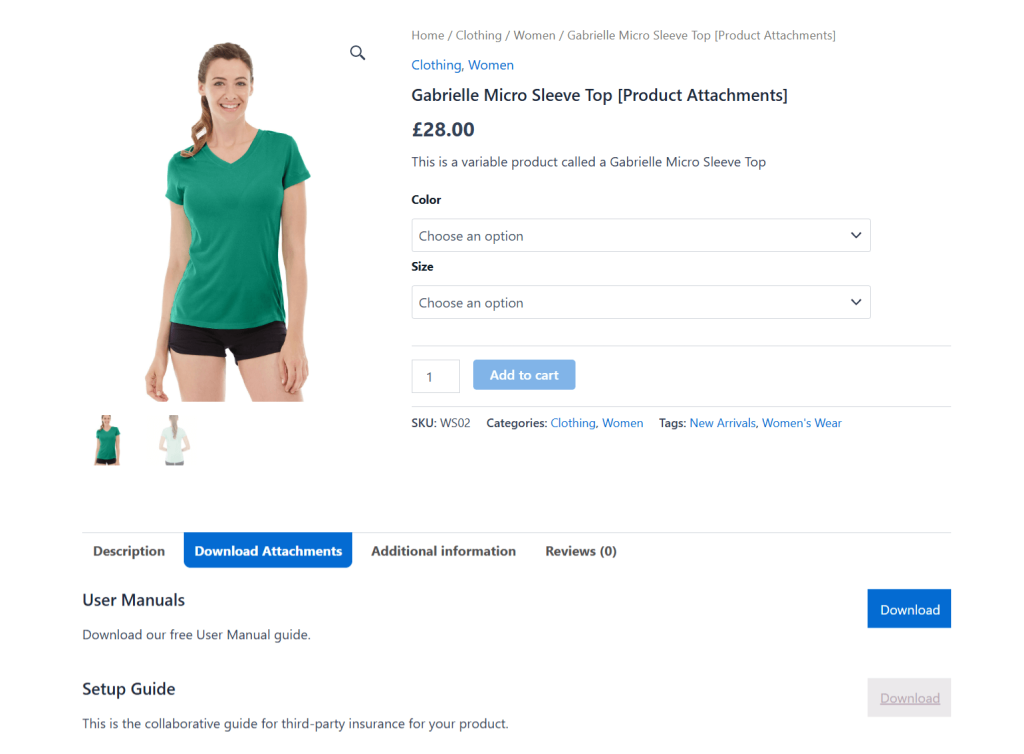
Since its launch in 2017, thousands of store admins across various niches—B2B companies, retail stores, growing DTC brands, etc.—continue to use it to gain full control over how product files are managed and displayed on their websites.
Product Attachment for WooCommerce is available in both free and pro versions. Attachments can be made available directly on product detail pages, so customers can review important documents before buying.
After purchase, the same files can also appear on the order details page inside the customer account, if needed. The pro version lets you go one step further and include attachments in order emails.
Key features
- ✔️ Support for multiple file types. You can attach a wide range of file formats, including PDFs, Word documents, Excel files, images, zip files, etc. You can also attach external links, such as YouTube video guides, cloud-hosted documents, or manufacturer resources. Note that some file types are only available for users on the Pro plan.
- ✔️ Bulk assign attachments to products, categories, tags, and attributes. If you have heaps of files, managing attachments one product at a time doesn’t scale. This product attachment plugin lets you assign attachments to multiple simple and variable products as well as entire product categories. You can exclude specific products as needed.
- ✔️ Set user role visibility controls. For documents that shouldn’t be public, you can decide whether attachments are visible to users based on their default or custom roles, e.g., guests, customers, wholesalers, retailers, etc. For example, an app developer can hide pricing sheets and technical specs from guests, while giving logged-in buyers full access.
- ✔️ Enable attachments auto-download based on order status. You can configure the plugin so attachments become available only when an order reaches a specific status: Pending payment, Processing, On hold, Completed, Cancelled, Refunded, or Failed. For example, to unlock installation guides for orders marked Completed. This makes sure customers get the right documents at the right time in their ordering journey.
- ✔️ Automatically expire attachments. If you don’t want certain documents to be available forever, you can set attachment expiration rules that limit access to time-sensitive documents. This guarantees that resources are used as intended post-purchase.
How do I add a product attachment in WooCommerce?
In this section, I’ll walk you through the steps to upload files (PDFs, docs, images), assign attachments to products or categories, display attachments on the product page, and preview attachments on the front-end. We’ll use the powerful Product Attachment for WooCommerce plugin by The Dotstore.
Visual learner? Here are the same setup instructions in video form.
Let’s get started.
How to add a product attachment in WooCommerce
- Log in to your WordPress admin, and add the free or pro version of the Product Attachment for WooCommerce plugin by The Dotstore.
- Go to the newly-added Dotstore Plugins →Product Attachment → Bulk Attachment in your WordPress dashboard.

- Press the “Add New Attachment” button.
- Enter a name for the product attachment, which will be shown next to its view/download buttons on your store’s product pages.
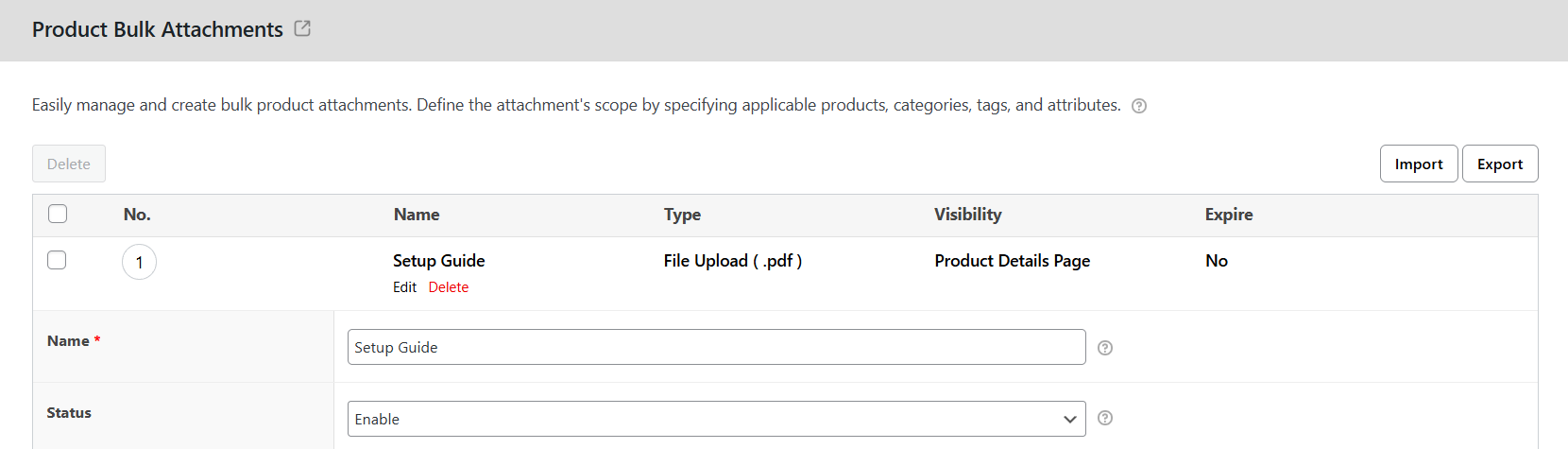
- Set the product attachment’s status to “Enable” to make it visible to users on your store’s front end.
- If needed, add a brief description of the product attachment. Otherwise, leave this field blank.
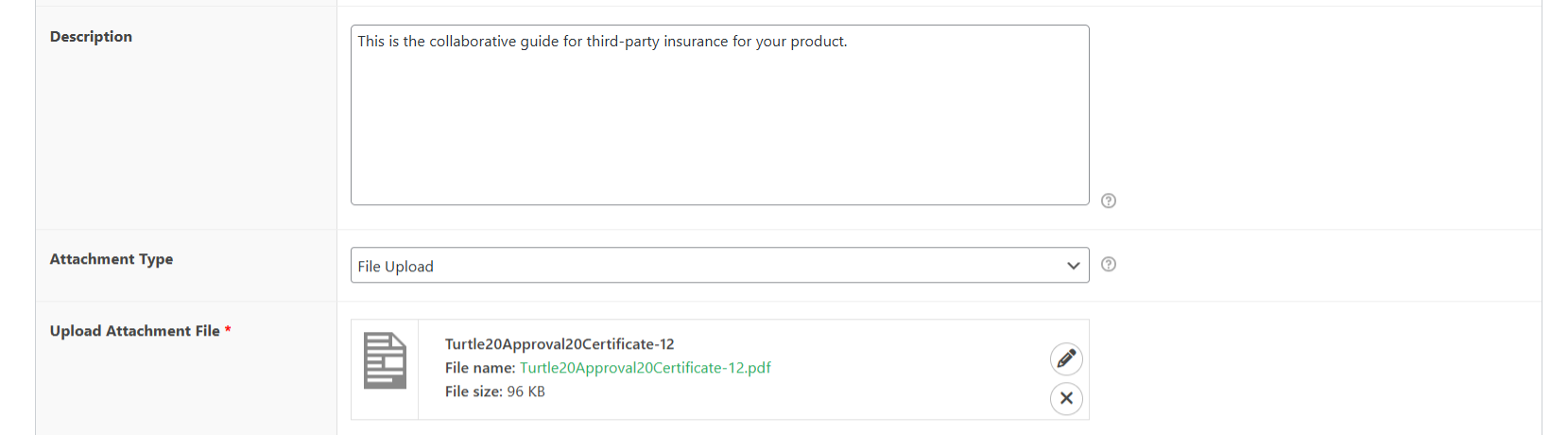
- Choose the attachment type (file upload or external URL). Then add the document or its link.
- Set the attached file/link behavior: whether or not to open in the same window or a new one.

- Define which products to add the attachment to: all products, specific products, categories, tags, and/or attributes. Then specify the included products.
- If needed, specify the parent and child product tags, attributes, and categories to exclude the product attachments from.
- Specify whether or not to only show this product attachment to logged-in users.
- Specify the order statuses for which you want to show product attachments. Leaving all options unselected means that the documents will be available for all order statuses.
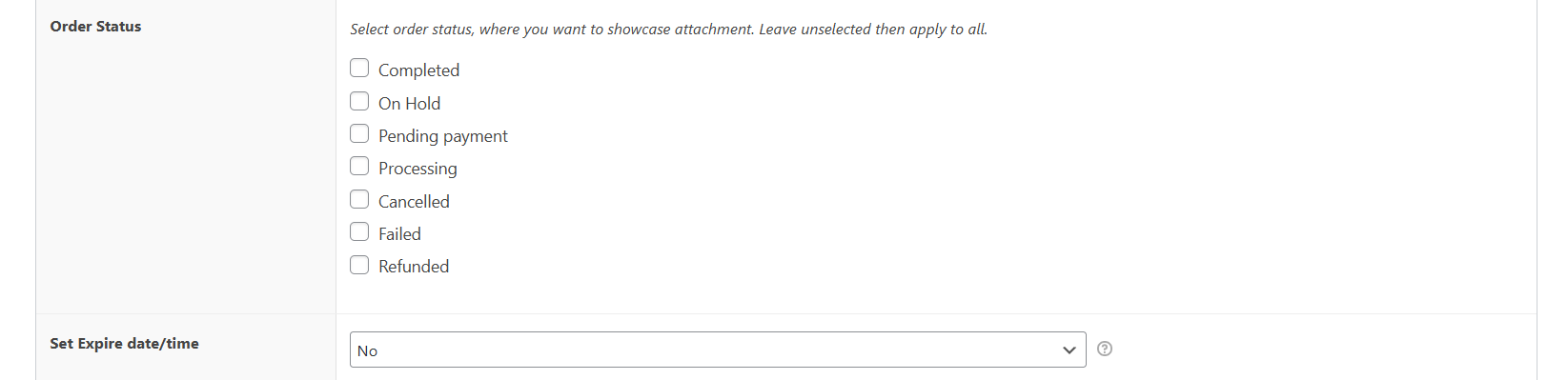
- To set an auto-expiry date for this attachment, set the specific date or time after purchase.
- Press “Save changes” to add this product attachment to your WooCommerce store.
Important: Define global product attachment settings
- Go to Dotstore Plugins → Product Attachment → Global Settings in your WordPress dashboard.
- In the “FRONTEND: Product Page” panel, update the name of the attachments tab on your store’s product detail pages in the “Frontend Product Page Tab Title” field.
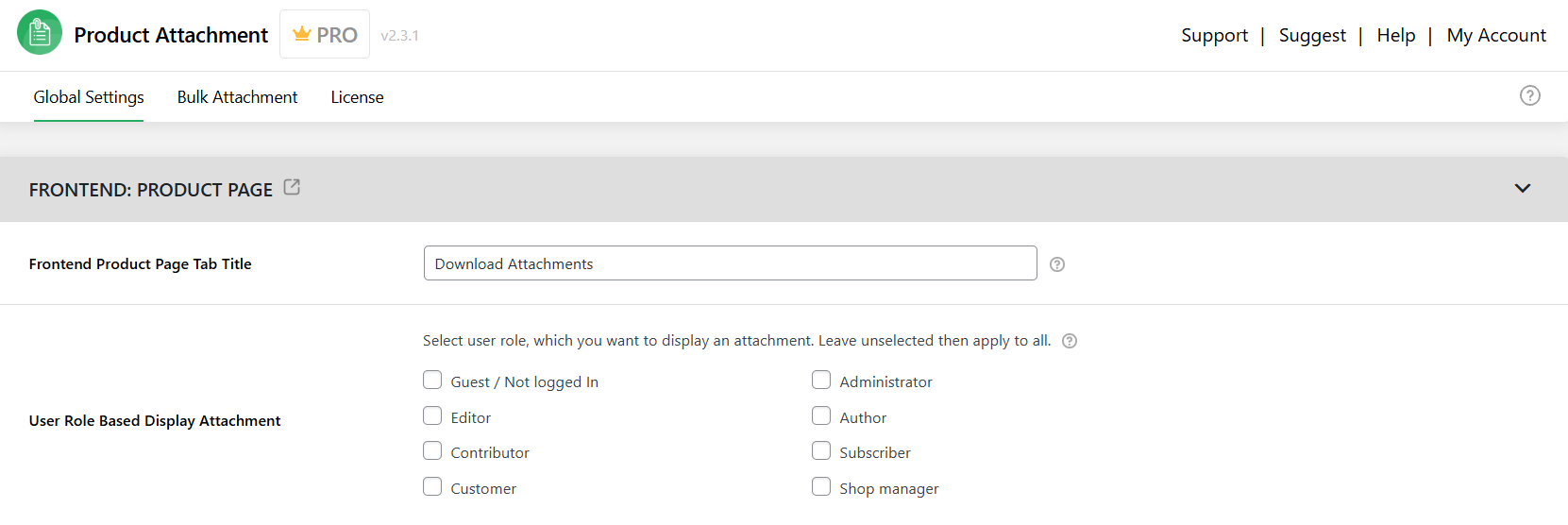
- In the “User Role Based Display Attachment”, decide which user roles you want to show attachments. Leaving all roles unselected shows attachments to all customers.
- In the “Order Attachment Setting” panel, update the name of the attachments tab on your store’s order detail pages in the “Order Details Page Tab Title” field.

- Choose whether or not to add product attachments to the order listing page and order emails.
- If enabled, update the subsequent settings as appropriate: attachment position on the order details page, order status that triggers attachments visibility, admin order details page tab and order attachments title.
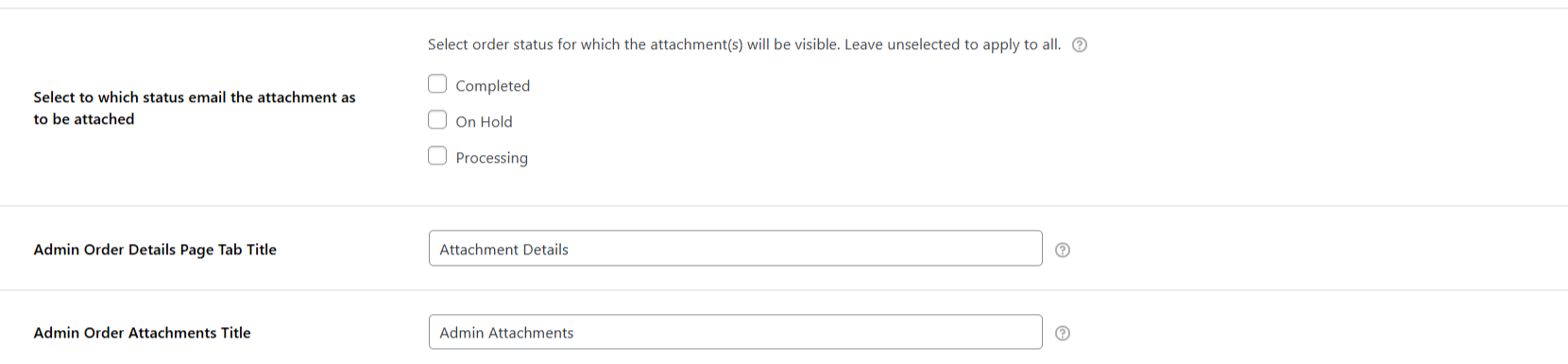
- Choose whether or not to show product attachments to logged-in customers on their “My Account” pages.

- The “Attachment Setting” lets you decide whether or not to show customers attachments’ expiry dates, file icon/download buttons, and enable them to be downloaded or viewed.
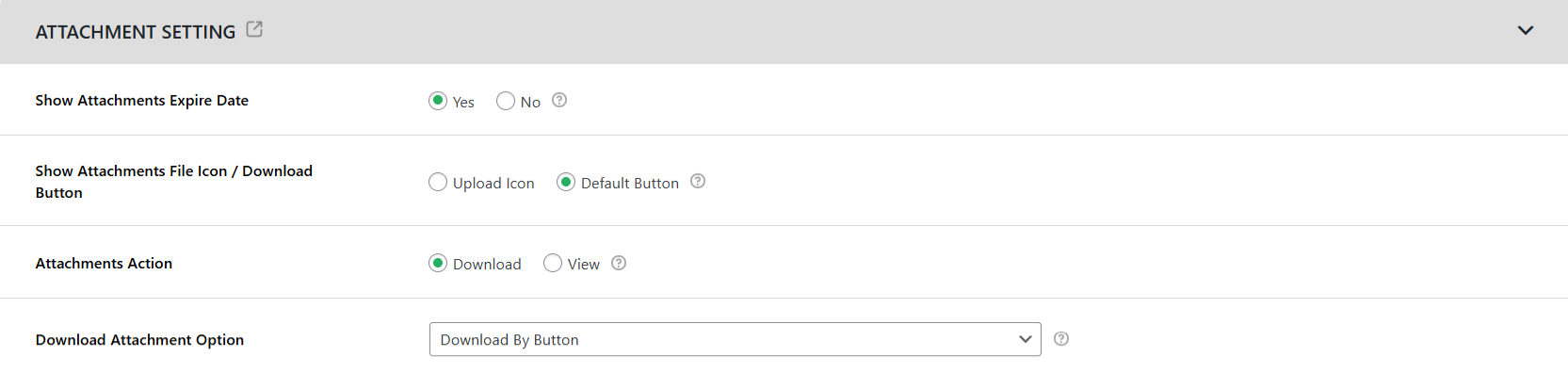
- Set the product attachment tab as the default selection on product pages, display attachment sizes, and enable customers to upload attachments during the checkout process.

- Choose whether or not to show YouTube links in a separate tab. And if needed, add custom CSS for the product attachments section.
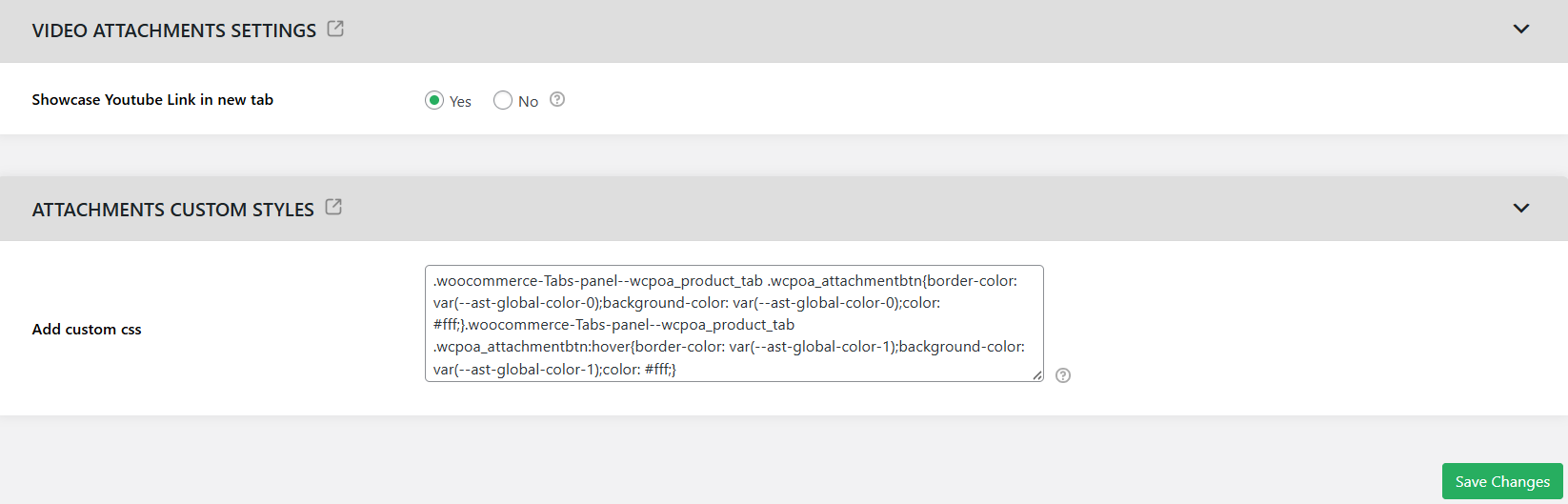
- Finally, save your settings.
Best practices for adding WooCommerce product attachments
Here are five tips for improving conversions, reducing friction, and improving users experience with product attachments in your WooCommerce store.
- Use a clear, descriptive file naming system so customers easily understand what each file contains. Some good examples are “Men’s Jacket Size Chart (PDF)”, “Installation Guide – Model X”, and “Warranty Terms – 2 Years”.
- Place attachments according to when they are needed in the ordering journey. Ideally, add pre-purchase info to product pages, confirmation documents on the order page, and instructions and warranty details post-purchase.
- Use access visibility rules to restrict sensitive files as appropriate.
- Optimize files for improved speed and accessibility by compressing documents, avoiding unnecessary high-resolution images, and using standard file formats that customers can open easily.
- Don’t overload the product detail page. If a product has multiple documents, group related files together, prioritize the most important attachment, and move secondary documents to other stages in the customer journey.
Add product attachments to WooCommerce
Some products require more information than the default WooCommerce product description, and the order details sections comfortably allow. Failing to make that information available at the right time reduces conversion rates and increases return requests in your store.
If a handful of products in your store require only one or two extra documents, then the workaround of using WooCommerce’s downloadable products feature might be sufficient. Otherwise, you’re better off using a dedicated extension to attach product documents.
The Dotstore’s Product Attachment for WooCommerce’s free and pro plugin lets you add attachments to product detail pages, order pages, and order emails.
It supports PDFs, Word documents, Excel files, images, zip files, YouTube videos, and various other types of files. You can assign attachments to products, categories, tags, and attributes, and control which users see them, when they’re available, and how long users’ access lasts.
Thousands of stores across various niches use it to show product size charts, technical spec sheets, warranty details, compliance documents, setup guides, bonus files, etc., at the most suitable time in the ordering journey.
Ready to add product attachments to WooCommerce? Download the free or pro version of the Product Attachment for WooCommerce plugin today!
WooCommerce Product Attachment
Increase conversion rates with detailed information using multiple attachments.
14-day, no-questions-asked money-back guarantee.