Table of Contents
At Dotstore, we make both WooCommerce plugins and Shopify apps. Here’s our in-depth, no-nonsense assessment of the pros and cons of WooCommerce, including its key advantages, limitations, and costs. We’ll also compare WooCommerce with Shopify, BigCommerce, and Magento to help you decide which ecommerce platform best fits your business.
Key Takeaways
- The main benefits of WooCommerce include low platform costs, beginner-friendliness, open-source flexibility, extensive customization, a large ecosystem of extensions, zero platform subscription fees, and scalability.
- The main disadvantages of WooCommerce include the responsibility of self-hosting, ongoing maintenance and updates, a steeper learning curve, and potentially rising costs for premium extensions, hosting, and developer support.
- WooCommerce is best for store owners who value flexibility and control, while hosted platforms may be more suitable for those who prioritize convenience and minimal maintenance.
WooCommerce has a strong foothold in the ecommerce market. As of 2026, it powers 47% of ecommerce websites worldwide. But does that make it the right platform for your online store?
At Dotstore, we’ve been building ecommerce software since 2016. Today, over 100K stores use our suite of WooCommerce plugins and Shopify apps, giving us deep insight into both platforms and the different needs of e-commerce businesses.
In this in-depth review, we break down the pros and cons of WooCommerce to help you decide whether it’s right for your business.
We examine WooCommerce’s advantages and disadvantages, from customization and ownership to hosting, maintenance, and long-term costs, so you can make an informed decision based on your budget and growth plans.
We also compare WooCommerce with other leading e-commerce platforms, Shopify, BigCommerce, and Magento, so you can make an informed decision about which platform is the best fit.
What are the pros of WooCommerce?
Pros of WooCommerce at a glance
I’ll explain more about the advantages of using WooCommerce later on. First, here’s the short version.
| Pros of using WooCommerce | What it means | Business impact |
| Free | The core plugin is 100% free and there is no platform subscription or revenue share. | Great for budget-conscious users, as it is easier to control the overall costs of setting up and running a WooCommerce store. |
| Ease of use for beginners | No prior coding or technical skills required. Most hosting providers offer one-click WooCommerce installs and there’s an abundance of free tutorials and community support to offset the initial learning curve. | It makes the platform accessible to first-time WooCommerce users who are willing to learn how to use it. |
| Open source | You keep full ownership of your WooCommerce store’s data and code. | It gives you complete control over your store’s data and makes it easier to comply with GDPR and other data sovereignty regulations across the world (especially for stores that sell to and are based in the EU). |
| Full customization | You can modify any part of your store’s design and layout, including the checkout flow (unlike hosted platforms). | WooCommerce gives you total freedom to customize your store as desired. |
| Massive ecosystem | There are thousands of readymade free and paid themes and extensions that you can use to add extra features to your WooCommerce site. | It is super quick and easy to add extra features like subscriptions, bookings, memberships to your website. This gives you unlimited flexibility to customize your site as desired. |
| No platform fees | There is no WooCommerce platform subscription fee, surcharge for using specific payment processors and no cut of your sales. Note that standard payment gateway fees still apply. | It helps keep costs as low as possible, especially for new stores and stores with lower revenue levels. |
| Highly scalable | WooCommerce doesn’t have a built-in product limit. Plus, you get complete control over your store’s hosting, data, and infrastructure. | Your store can scale with WooCommerce, without having to switch to another platform as you grow. Note that your technical setup must keep pace. |
The core WooCommerce plugin is 100% free
As open-source software, WooCommerce’s source code is publicly available for anyone to view, use, modify, and distribute under its license terms.
You can download and use WooCommerce at no cost. There’s no free trial that expires and no feature wall on the core selling tools. This empowers you to build and launch an ecommerce store, even on a tight budget.
WooCommerce is beginner-friendly
You don’t need to code or have technical skills to use WooCommerce. Most web hosting companies offer a one-click WordPress install. Adding WooCommerce to your site is equally breezy; its setup wizard guides you through the process.
If you have questions, there are heaps of free resources (YouTube videos, community forums, and blog posts like this one!) to fill in the gaps.
Related reading: If you’re starting from zero, our in-deoth WooCommerce tutorial for beginners shows you the whole setup, step by step.
WooCommerce’s software is open source
Because WooCommerce is open source, you own your store’s files, product data, and customer data (unlike hosted platforms like Shopify, Wix, Squarespace, etc.). Having total control over your store and its data matters if you want to switch hosting providers or add extra features to customize your store as desired.
It also makes complying with GDPR, CCPA, and other regulations that govern customer data easier.
Full customization
Another benefit of WooCommerce’s open-source nature is that it enables you to modify your store’s design, layout, or checkout flow as needed.
This is especially important because hosted platforms are known to set restrictions based on your chosen plan and design. For example, Shopify limits checkout customization on its Basic, Grow, and Advanced plans, while full checkout customization comes with Shopify Plus. On WooCommerce, there’s no equivalent ceiling.
Massive ecosystem of extensions
WooCommerce was launched in 2011. Over time, a massive ecosystem comprising thousands of free and paid themes and plugins that enable you to add features like subscriptions, bookings, memberships, shipping rules, analytics, and checkout optimization has been developed.
If you need to add a specific feature to your website, there are tons of readymade options to choose from. There’s also a steady supply of expert developers that can make advanced customizations to your site, if needed.
No platform fees
WooCommerce doesn’t charge a platform subscription or take a cut of your sales. Your chosen payment gateway (e.g., Stripe, PayPal, WooPayments) charges its own processing fees, typically 2–3% per sale. However, that’s a cost you’d pay on any platform.
This is noteworthy because on Shopify, using a third-party payment gateway instead of Shopify Payments adds a surcharge on top of your gateway’s fees. For US-based stores, it’s currently 2% on the Basic plan, 1% on Grow, and 0.6% on Advanced. On WooCommerce, there are no equivalent fees.
WooCommerce is highly scalable
WooCommerce has no built-in limit on products or variations. You control the hosting plan, setup, and infrastructure.
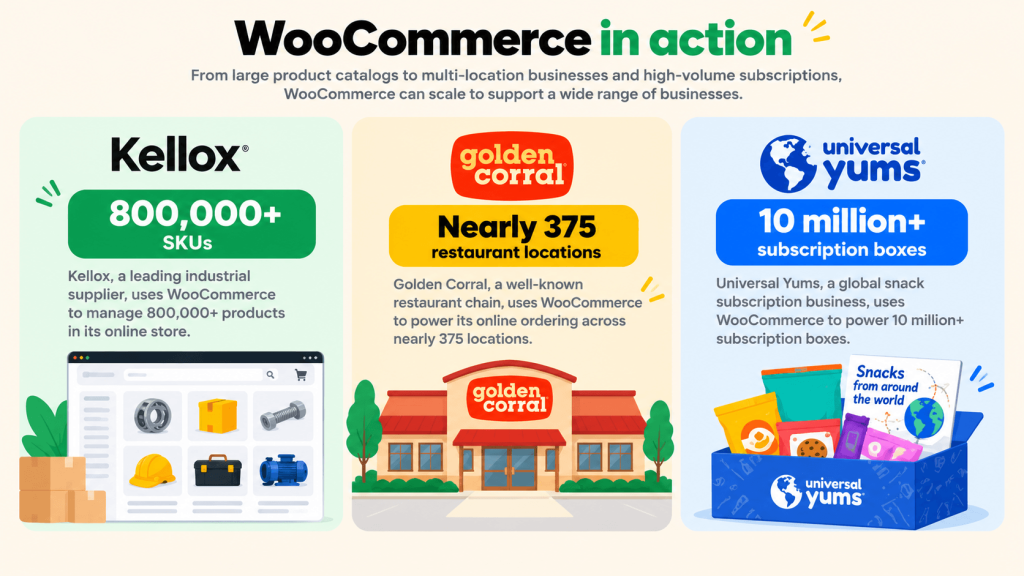
Here are a few examples of real-life stores that prove WooCommerce’s scalability:
- Kellox, a Norwegian importer of motorized products, runs over 800,000 SKUs on WooCommerce.
- Golden Corral uses WooCommerce for online ordering across nearly 375 restaurants.
- Universal Yums has shipped over 10 million subscription boxes with WooCommerce.
Important note: Your technical setup (hosting plan, themes, plugins, website optimizations) greatly impacts your site’s performance, especially at scale.
What are the cons of WooCommerce?
Cons of WooCommerce at a glance
What are the main limitations of WooCommerce? Before we get into the details, here’s a brief overview of the disadvantages of using WooCommerce.
| Cons of using WooCommerce | What it means | Business impact |
| Self-hosted burden | You must buy a hosting plan and install WooCommerce to use the platform. | You have to make hosting and setup decisions, which can make it slower to launch an online store with WooCommerce (compared to a hosted platform). |
| Maintenance and updates | You have to manually or semi-automatically update WordPress, WooCommerce, themes, and plugins. | Although updates are usually hassle-free, they can sometimes break your website. |
| Performance at scale | Site speed heavily depends on the web hosting plan, themes, extensions, caching, and optimizations. Large catalogs and traffic spikes need well-tuned, often expensive hosting to run well. | As your store scales and website traffic and catalog size increase, your hosting plan and other optimizations must scale too. |
| Hidden costs | Costs for premium plugins and security tools can make total cost of ownership add up quickly. You may need to hire expert developers to add advanced custom functionality. | Factor in costs for premium extensions while planning your budget. |
| Steeper learning curve | Compared to Shopify, Squarespace, or Wix, WooCommerce’s learning curve is relatively steeper. | Although you don’t need technical skills to use WooCommerce, you need to invest time upfront to learn how the platform works (unlike with hosted platforms). |
Self-hosting burden
Because WooCommerce is self-hosted, you must arrange your own web hosting, set up an SSL certificate, and register a domain. Nowadays, many web hosting providers offer plans that include all these. However, for beginners, the burden of choosing the right plan for their requirements remains.
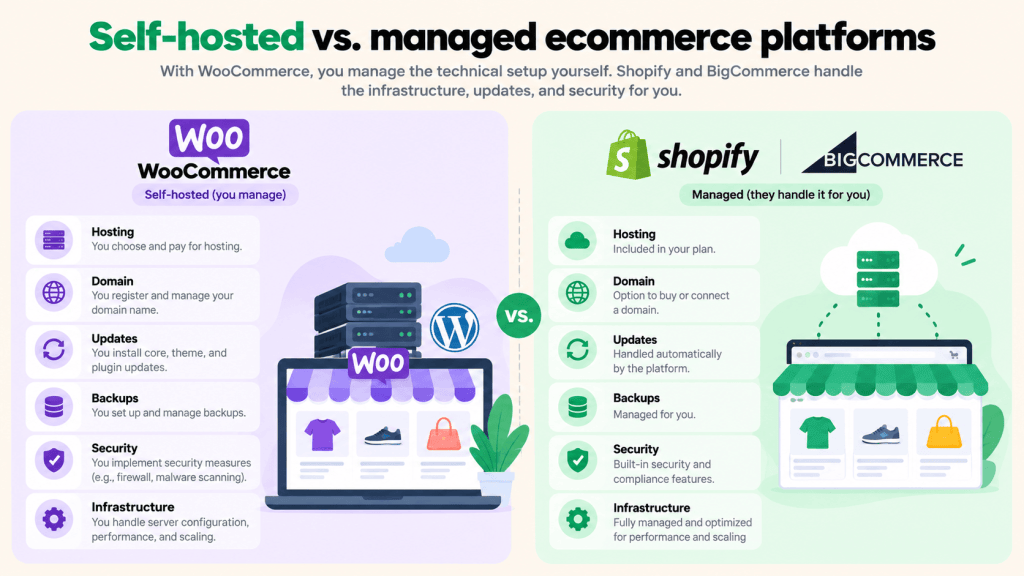
Your hosting plan significantly impacts your site performance. So choosing the right hosting plan isn’t a small decision, especially because there are tons of options to pick from.
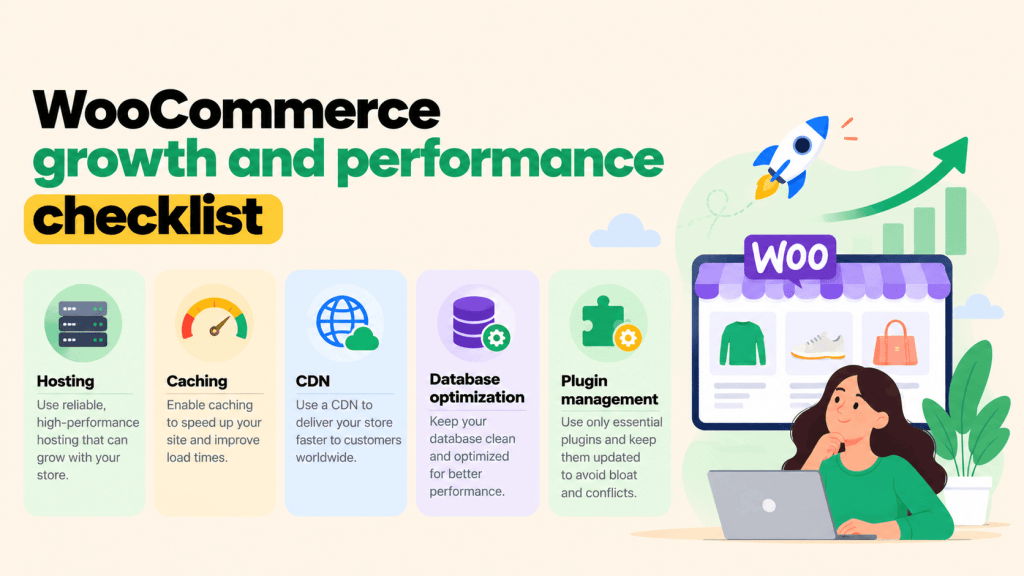
You want a WooCommerce-ready plan with caching, a CDN, free SSL, malware scanning, and regular backups. Top WooCommerce hosts include Kinsta, WP Engine, and Bluehost.
Maintenance and updates responsibility
You are responsible for keeping WordPress, WooCommerce, your theme, and your plugins up to date. Skipping updates can open the door to security holes and compatibility issues. Occasionally, plugin and theme updates can break features on your live WooCommerce store.
The same responsibility applies to keeping your store’s secure. WooCommerce itself is actively maintained, but how secure your store is depends partly on how well you maintain it: strong passwords, two-factor authentication for admins, regular backups, and more.
Performance at scale requires planning
WooCommerce has proven that it can support big catalogs and heavy traffic. However, its performance depends on your hosting, theme, extensions, caching, and additional optimizations.
The larger the size of your catalog, the more hosting, object caching, page caching, and CDNs cost.
For example, for each product variation you add, WooCommerce creates a separate database entry. So a product with 20 size and color combinations behaves more like 20 products in terms of database load.
Based on our sources: standard website setups handle up to around 10,000 products; 10,000 to 100,000 needs active optimization, and custom development is necessary for stores beyond 100,000.
Costs for paid extensions add up
The core WooCommerce plugin is 100% free. However, adding premium themes, plugins, and services (like Cloudflare, for example) can increase the total cost of ownership of running a WooCommerce store.
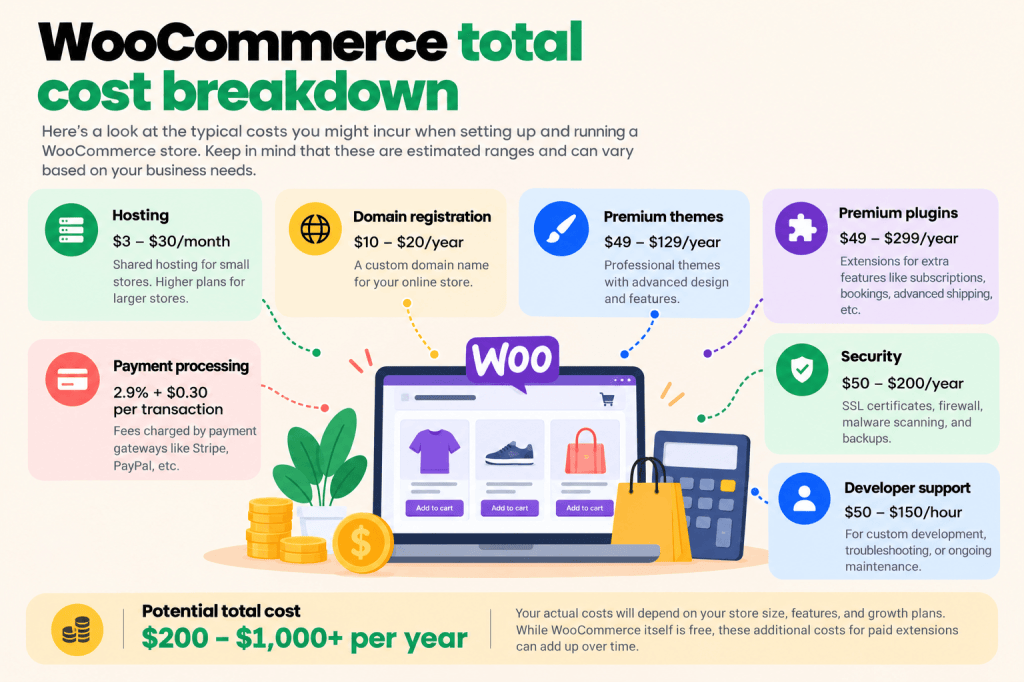
If you need advanced custom features, such as checkout modifications or custom integrations, you may need to hire an expert developer.
A steeper learning curve than hosted platforms
Competing platforms like Shopify, Squarespace, and Wix have a gentler learning curve. You sign up, pick a plan, and start building.
On WooCommerce, you need to understand how WordPress, your host, your theme, and your plugins fit together. Although the curve is easy to overcome, it’s a real time investment.
So if you’re happy with the costs of those platforms and don’t want to spend time upfront learning how WooCommerce works, a hosted platform may be the better fit. Convenience has a price, but so does your time.
Pros and cons of WooCommerce vs BigCommerce vs Magento vs Shopify
You now know WooCommerce’s advantages and disadvantages. But how does it compare against other ecommerce platforms?
Here’s a brief overview of how WooCommerce stacks up against Shopify, BigCommerce, and Magento.
| WooCommerce | Shopify | BigCommerce | Magento (Adobe Commerce) | |
| Hosting type | Open-source plugin for WordPress, self-hosted. | Fully hosted platform. | Fully hosted platform. | Open source self-hosted version or paid Adobe Commerce with a cloud option. |
| Ease of use for beginners | More upfront decisions about site hosting, but no coding or technical skills needed. | Easiest to set up among these options. | Easy to set up, similar managed experience to Shopify | Hardest to set up. Needs advanced technical skills or expert developer assistance. |
| Total cost of ownership | The core plugin is 100% free. A paid web hosting plan and domain is required to use the core WooCommerce plugin. You may also need a paid theme and plugins to add extra features to your website. | A paid subscription ($39 to $399/month or $29 to $299 billed annually) is required to create a live ecommerce website. In addition, you may need paid themes and apps to add extra website features. There is also a surcharge payments accepted through third-party gateways. | Requires a paid subscription ($39 to $399/month or $29 to $299 billed annually) for the main plans, with annual sales caps per plan. Additional fees apply for orders processed through non-embedded payment providers on its self-service plans. | The Open Source software is free. Site hosting, development, extensions, and maintenance add significant costs. |
| Customization options | The highest customization options as you own the code and checkout flow. Also, many customizations can be made using plugins, without an expert developer’s assistance. | Extensive storefront customization capability. However, checkout customization is limited by plan. | Strong customization options, with limits by plan. | Advanced customization options that require expert development skills. |
| Burden of maintenance | You are responsible for keeping your website 100% up to date. | Platform handles site hosting, uptime, and SSL. You still need to keep themes, apps, custom integrations and builds updated. | Platform handles web hosting and core infrastructure updates. You must keep extensions updated. | Unless on Adobe Commerce cloud, you must handle hosting, security patches, and upgrades. |
| SEO and AEO capabilities | Strong, through WordPress and established SEO plugins. | Strong built-in SEO capabilities. | Solid built-in SEO tools. | Full control, with more technical work required to maintain. |
| Scalability | No built-in product limit. Scale depends on your web hosting plan and additional optimizations. | Managed infrastructure that automatically absorbs traffic spikes. | Large catalogs supported, with pricing increasing by sales thresholds. | Built for large, complex catalogs, but needs strong servers and technical expertise. |
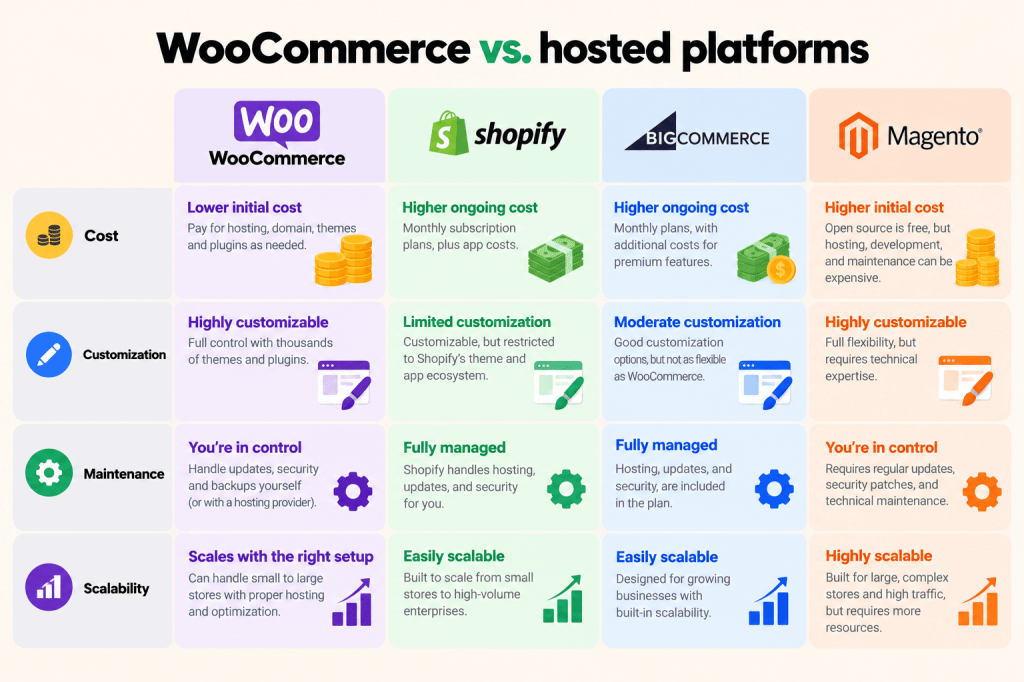
A note about the differences between WooCommerce, Shopify, BigCommerce, and Magento
- Pros and cons of WooCommerce vs. Shopify. Of the platforms assessed, WooCommerce and Shopify are the closest matchup. WooCommerce wins on customization, data ownership, and lower direct costs. Shopify wins on lower initial learning curve and lower maintenance burden. Want a full breakdown? See our in-depth WooCommerce vs Shopify comparison.
- Pros and cons of WooCommerce vs. BigCommerce. One of BigCommerce’s key disadvantages is that its pricing is tied to your annual sales. If your trailing 12-month sales pass $30K on the Standard plan, it automatically moves you to Plus, and so on. This raises your bill as your revenue grows, even if you don’t need the extra features. Also, the ecosystem of supporting BigCommerce’s extensions is relatively smaller than that of WooCommerce and Shopify.
- Pros and cons of WooCommerce vs. Magento. Magento Open Source is free to download, but it’s resource-intensive, doesn’t run reliably on low-cost shared hosting, and is impossible to run without expert technical skills. It might be appropriate for large, complex catalogs with a development team, but it’s overkill for most small and mid-size stores.
Who should use WooCommerce?
WooCommerce is a good fit if you…
- Want maximum customization at a lower platform cost.
- Want to own your store’s data and infrastructure.
- Have complex catalogs or custom checkout requirements.
- Already run WordPress and want ecommerce built into your content strategy.
- Are willing to invest time upfront to learn the platform or can get assistance from someone familiar with it.
A managed platform might be suitable if you…
- Want the fastest possible launch with minimal infrastructure work.
- Prefer not to make decisions about hosting, uptime, and PCI compliance.
- Don’t have the capacity to handle website updates, backups, and the occasional troubleshooting.
- Run a dropshipping or print-on-demand store that depends on a mature, tightly integrated app ecosystem.
FAQs about the pros and cons of WooCommerce
What are the biggest advantages and disadvantages of WooCommerce?
WooCommerce’s biggest advantages are its free core plugin, extensive customization options, open-source flexibility, robust community, and large ecosystem of extensions. Its main disadvantages include self-hosting and ongoing maintenance responsibilities, a steeper learning curve, and potentially rising costs and technical requirements as your store grows.
Is WooCommerce worth it despite its disadvantages?
Yes, WooCommerce can be worth it for users who value extensive customization options, data control, and flexibility. However, even though the core plugin is free, you’ll need to account for the costs of site hosting, premium extensions, maintenance, and development.
What are the hidden costs of WooCommerce?
Although there are no fees for using WooCommerce’s core plugin, running an online store involves costs for website hosting, domain registration, premium themes and plugins, security tools, payment processing, and developer support. The exact costs vary based on store size, feature set, website traffic, and technical requirements.
What are the main limitations of WooCommerce compared with Shopify?
Shopify is a fully hosted platform, so it handles website hosting and other technical decisions, which makes it easier to launch and manage an online store.
As an open-source plugin, WooCommerce requires you to arrange web hosting and manage site updates, backups, security, and performance. However, WooCommerce makes up for the increased responsibility by giving you more control over your code, data, and checkout customization than Shopify.
Is WooCommerce the right platform for your online store?
Ultimately, the right choice depends on how you weigh the pros and cons of WooCommerce against the alternatives.
Consider your budget, technical resources, customization needs, and growth plans before deciding which ecommerce platform to use.
- Choose WooCommerce if your top criteria are: data ownership, customization, and a lower platform cost. Remember to budget for hosting, extensions, and time to learn how the platform works.
- Choose a managed platform like Shopify or BigCommerce if setup speed and convenience matter most. Although pay a monthly subscription (and possibly extra fees), but you’ll skip most of the hosting and maintenance work.
Either way, you can start small. WooCommerce is free to try, and you can always migrate later. If you go the WooCommerce or Shopify route, you’ll likely want plugins to fill specific gaps in shipping, pricing, checkout, and analytics. Browse The DotStore’s catalog of WooCommerce plugins and Shopify apps to see what’s available, and check out our WooCommerce tutorial for beginners when you’re ready to build.
Must-Have WooCommerce Plugins
Turbocharge Your Store Sales by Simplifying Fees and Streamlining Shipping
14-day, no-questions-asked money-back guarantee.