Table of Contents
In this tutorial, I’ll show you how to set WooCommerce shipping restrictions using WooCommerce’s built-in features and with the Dotstore’s Hide Shipping Method plugin. Here, we’ll restrict shipping by country, state, postcode, product, and payment methods.
Key Takeaways
- WooCommerce shipping restrictions are rules and conditions that control which shipping methods appear during checkout. They don’t block products from being added to the cart; they determine available shipping options.
- Shipping restrictions, such as hiding free shipping for expensive-to-ship items, disabling cash on delivery for international orders, or limiting delivery to only serviceable postcodes, protect margins and reduce failed orders.
- WooCommerce core settings let you restrict shipping by country, define shipping zones, and hide paid methods when free shipping is available. They work fine for very simple stores, but don’t scale well for advanced scenarios.
- Hide Shipping Method for WooCommerce by the Dotstore is a powerful shipping restriction plugin. Available in both free and pro versions, it allows you to hide or fully block shipping or restrict shipping methods based on location, products, cart rules, payment methods, users, and various conditions.
- If all shipping methods are restricted, WooCommerce will show no available shipping options. This prevents customers from completing checkout.
Looking to set shipping restrictions in WooCommerce?
As your store scales, you’ll likely need to tailor your shipping offerings to match your business’s operations. Otherwise, you might end up having to manually review and refund orders you can’t fulfill, frustrating customers, or ending up on the wrong side of the law.
In this detailed tutorial, I’ll walk you through how to restrict shipping in WooCommerce step by step, for various popular real-world store scenarios.
Here’s what we’ll cover:
- How to restrict shipping by country to block entire regions where you don’t deliver.
- How to restrict shipping by state and postcodes, so no shipping options are shown when an address isn’t serviceable.
- How to restrict shipping based on payment method, such as disabling “Cash on Delivery for international orders or high-value carts.
- How to restrict specific shipping methods by product, product category, or cart conditions like weight and order value.
First, we’ll cover what WooCommerce core can do using the native settings. Then, I’ll show you how to use the powerful Hide Shipping Methods for WooCommerce plugin (available in both free or pro versions) to set more advanced shipping restriction rules and conditions.
Hide Shipping for WooCommerce
Hide all other shipping methods when free shipping and/or local pickup are available in two minutes or less.
14-day, no-questions-asked money-back guarantee.
What are WooCommerce shipping restrictions?
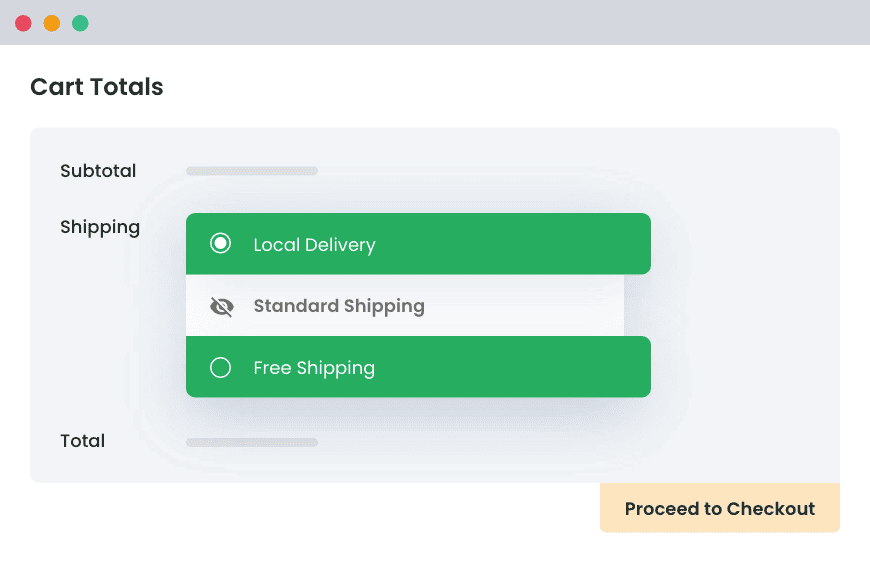
WooCommerce shipping restrictions are rules that control which shipping methods are available for each order. Shipping restrictions determine whether a shipping option appears or stays hidden during the checkout flow based on customers’ data and specific cart conditions.
Shipping restrictions can be tied to various conditions, such as:
- Customer location (country, state, city, postcode).
- Specific products in the cart (category, tag, weight, dimensions, or shipping class).
- Cart-related conditions (order total, total weight, item count).
- Payment type (cash on delivery, credit cards, bank transfer).
- Customer details (user role, specific user).
- Time-based factors (delivery cutoffs, holidays, blackout dates).
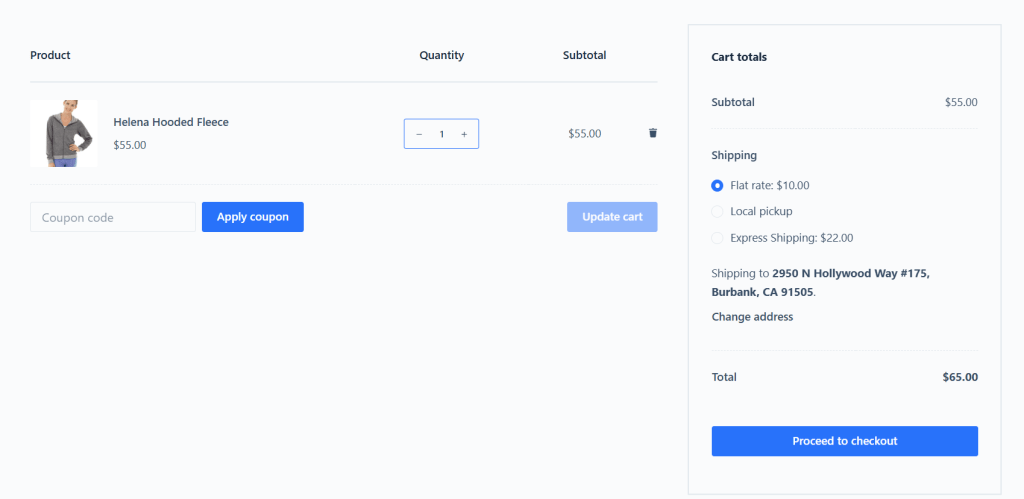
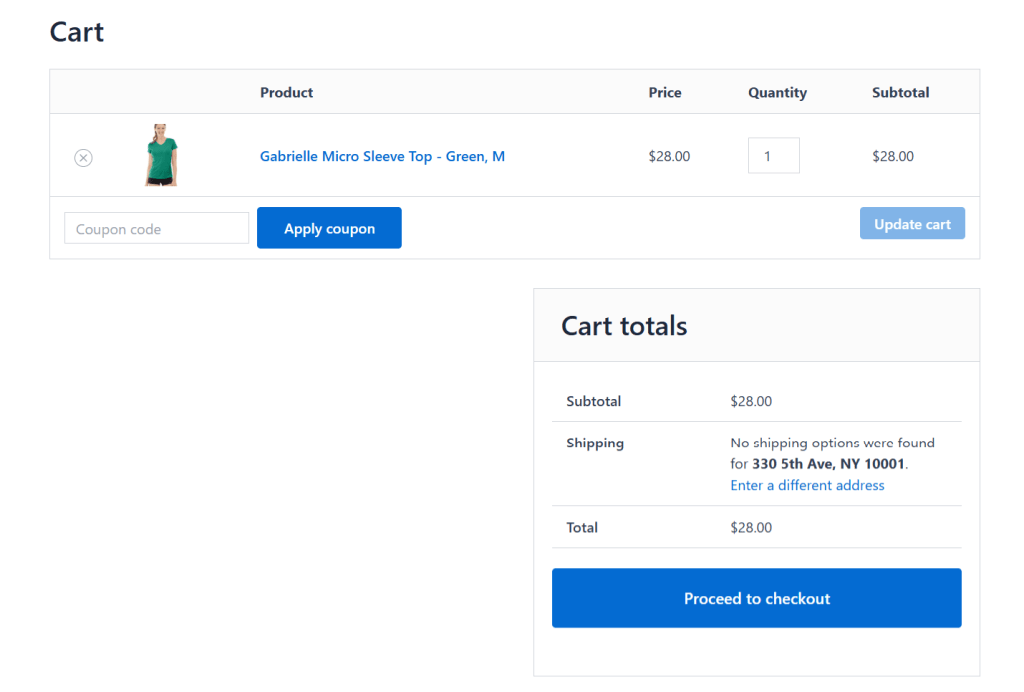
Important note: Setting shipping restrictions doesn’t prevent customers who match the restriction criteria from adding products to their shopping carts; however, it disables certain shipping methods or entirely removes the shipping option for them (depending on your configurations). For example, let’s say you restrict shipping by state for New York, USA. Customers located in New York, USA, can still browse your store’s catalog and add products to their shopping carts. But they will only be shown shipping methods according to the restrictions you set. If you restrict shipping entirely, then they will be shown the “No shipping options were found for [their address]” notice, and those orders will not be processed.
Why set shipping restrictions in WooCommerce?
Instead of showing every shipping method to every customer during the checkout flow, deliberately limiting them based on specific rules makes your shipping options more accurate, compliant, and profitable.
Here are the top 5 reasons why store admins across various niches opt to set WooCommerce shipping restrictions:
- To comply with legal requirements. Some products — think: ammunition, firearm accessories, alcohol, CBD products, hazardous chemicals, and the like — can’t be shipped everywhere. Without setting shipping restrictions in your WooCommerce store, you run the risk of customers placing orders that violate local laws. This can result in fines, carrier account suspension, refunds, and legal trouble.
- To safeguard profit margins. Shipping costs can quietly eat away at your profits. Some products cost too much to ship to certain locations, due to their size or low per-product profit margins. For instance, a gym equipment store might find that shipping a 70 kg treadmill to a remote zip code might cost more than the product’s margin. Shipping restrictions solve these issues by limiting which methods appear based on weight, dimensions, or product type. In the case of the gym equipment store, flat-rate or free shipping can be hidden for high-cost items, while freight or custom delivery options remain available.
- To match your logistical capabilities. Not every product should be shipped. Some are too fragile to ship safely, too large for standard carriers, or suitable for local pickup only. For instance, a local building materials store that sells tiles and cement may want to stock items locally so customers can place orders online and collect them from their warehouse. In this case, it may be ideal to restrict shipping methods for those products, so WooCommerce shows only local pickup at checkout.
- To offer different shipping options for different customers. Not all customers may need to be shown the same shipping methods. If you sell to different customer segments (e.g., wholesale and retail customers), setting shipping restrictions based on user roles or account status keeps the checkout flow relevant for each customer type. This makes sure that customers aren’t distracted by shipping methods that don’t apply to them.
- To deliver a better user experience during the checkout flow and prevent cart abandonment. Showing customers irrelevant choices during the checkout process confuses them. Unfortunately, the default WooCommerce shipping feature shows all available shipping methods per shipping zone, even if they don’t make sense (unless you opt to hide paid shipping methods when free shipping is available). Showing only relevant shipping options makes the checkout process smoother and can reduce your store’s cart abandonment rates.
The default WooCommerce shipping restriction settings
There are 3 main shipping restriction features available within WooCommerce’s core. Here’s an overview of how they work, how to configure them, and their limitations.
Restrict shipping to specific zones in WooCommerce
In WooCommerce, shipping zones define where an order can be shipped. Each zone can include countries, states, postcodes, or postcode ranges.
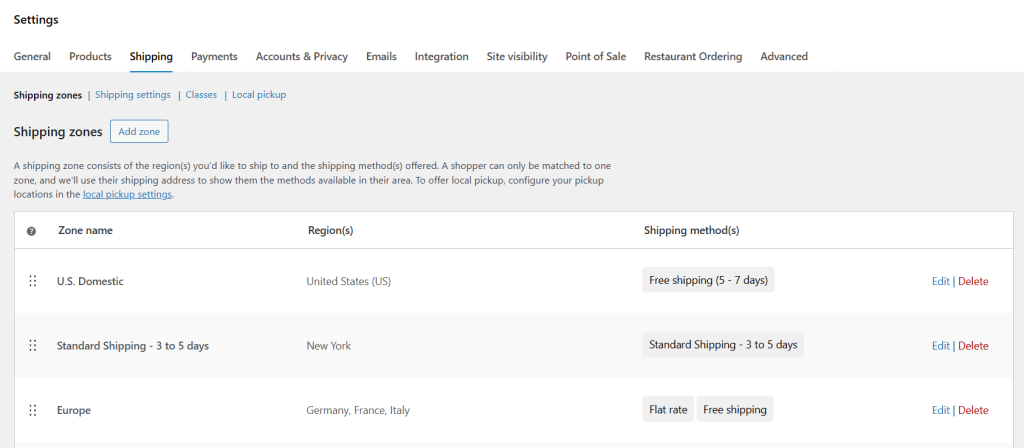
You have to first set up shipping zones, then assign shipping methods to each one. In effect, this restricts shipping options shown to each customer. If a customer’s address doesn’t match any zone, WooCommerce won’t show shipping methods unless you’ve set up a fallback zone.
How to restrict shipping by country in WooCommerce
WooCommerce lets you set a storewide restriction on the countries to which you ship. You’ll find this option under: WooCommerce →Settings →General →Shipping location(s) in your admin dashboard.

Here, you can choose to either ship to all countries, ship to all countries you sell to, or ship to specific countries. For example, if your store ships only within the United States, you can select “Ship to specific countries” and only choose the U.S. Customers located outside the U.S. won’t be able to place an order with a shipping address elsewhere.
Hide paid methods when free shipping is available

When this option is enabled, WooCommerce automatically hides all flat rates and other paid shipping methods if a free shipping method is available for the order. You’ll find this setting under: WooCommerce → Settings → Shipping → Shipping settings.
Limitations of the default WooCommerce shipping restriction settings
The built-in WooCommerce features for restricting shipping work fine for basic stores. However, they are pretty limited in scope. For instance:
- ❌ You can’t restrict shipping methods by state or postcode.
- ❌ You can’t hide shipping methods for specific products, tags, categories, or types.
- ❌ You can’t restrict shipping methods based on cart value or other cart conditions.
- ❌ There’s no way to restrict shipping for specific users or user roles, or users.
- ❌ While it can hide all paid shipping methods when free shipping is available, it can’t hide specific paid shipping methods when free shipping is available.
A powerful WooCommerce shipping restrictions plugin
WooCommerce’s built-in shipping restriction features aren’t enough for most growing stores, so you’ll likely need an add-on.
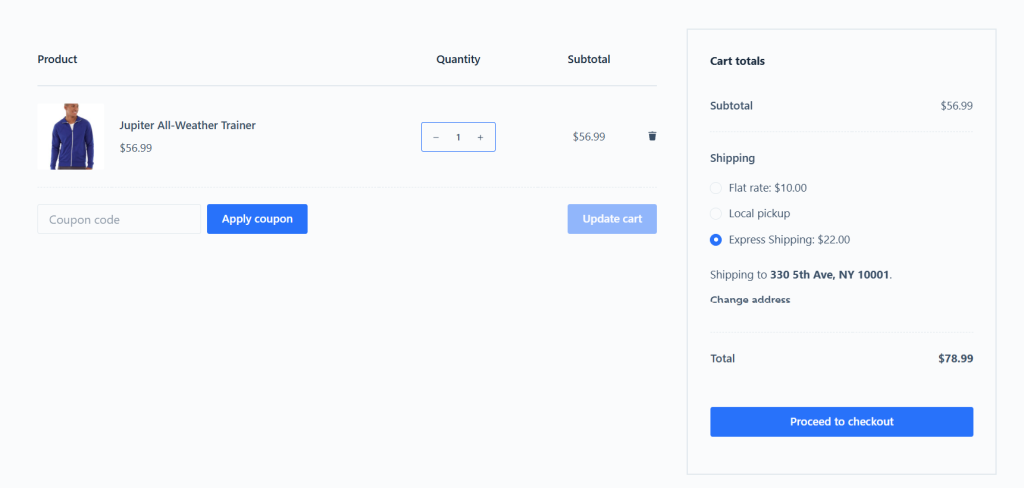
Hide Shipping Method for WooCommerce by The Dotstore is a powerful plugin that lets you set shipping restrictions to control which shipping methods appear and when. You can use it to restrict shipping, restrict shipping methods, and set condition-based shipping restrictions in WooCommerce. For instance, it lets you:
- ✔️Restrict shipping methods by location, i.e., country, state, post code, city, and shipping zone.
- ✔️Set product, tag, and category-based restrictions, such as hiding ground shipping when fragile or large-sized items are in the cart.
- ✔️Restrict shipping methods by payment method, e.g., COD, prepaid methods.
- ✔️Conditionally restrict specific shipping methods based on cart contents, order value, or other conditions.
- ✔️Restrict free shipping when specific shipping methods are available.
- ✔️Hide all other shipping methods when free shipping and/or local pickup is available, so customers focus on the most relevant choice.
- ✔️Hide specific shipping methods for specific users or user roles.
- ✔️Combine multiple shipping rules and conditions to tailor shipping options.
The Hide Shipping Method for WooCommerce plugin is simple to use for both admins and customers. The rule creation interface is pretty intuitive. Each rule shows its conditions and which methods it applies to, so you can activate, deactivate, reorder, or tweak rules with ease.
How do I restrict shipping in WooCommerce?
In this section, I’ll show you how to set WooCommerce shipping restrictions for 3 of the most popular real-world scenarios: by state, postcode, and payment method.
How to restrict shipping by state in WooCommerce
- Add the free or pro version of the Hide Shipping Method for WooCommerce plugin by The Dotstore.
- Navigate to WooCommerce → Hide Shipping →Manage Rules.
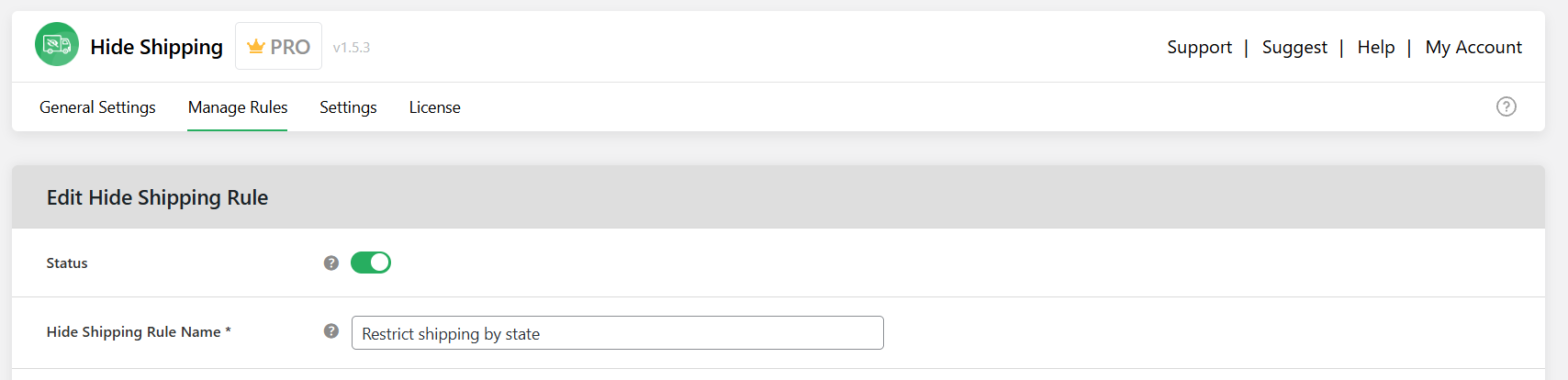
- Turn on the “Status” button.
- Add a name for this WooCommerce shipping restriction rule in the “Hide Shipping Rule Name” field.
- Specify the shipping methods you wish to restrict by state in WooCommerce:
- Select “Default shipping method and Compatible with Hide shipping method plugin” if you want to hide default shipping methods. Then, enter all shipping methods you want to restrict in the “Select shipping method” option. Note: if you enter all available shipping methods, shipping will be completely blocked for users in those states.
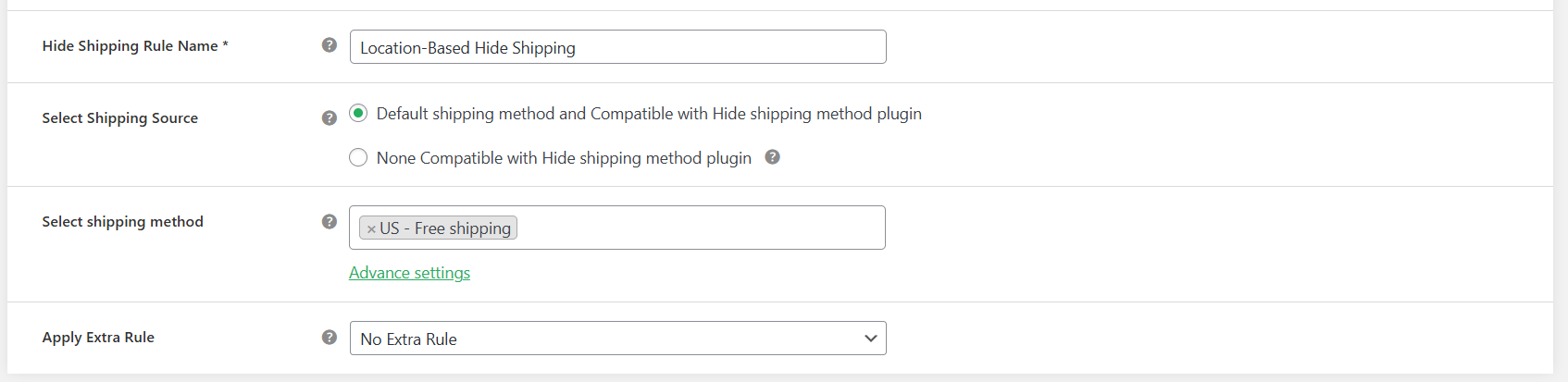
- Select “None Compatible with Hide shipping method plugin” then add all the appropriate shipping methods you wish to restrict by state in the “Shipping Method Option” field. Note: if you enter all available shipping methods, shipping will be completely blocked for users in those states.
- Select “Default shipping method and Compatible with Hide shipping method plugin” if you want to hide default shipping methods. Then, enter all shipping methods you want to restrict in the “Select shipping method” option. Note: if you enter all available shipping methods, shipping will be completely blocked for users in those states.
- Select “No extra rule” in the “Apply Extra Rule” field.
- Go to the “Basic Hide Shipping Rules” section.
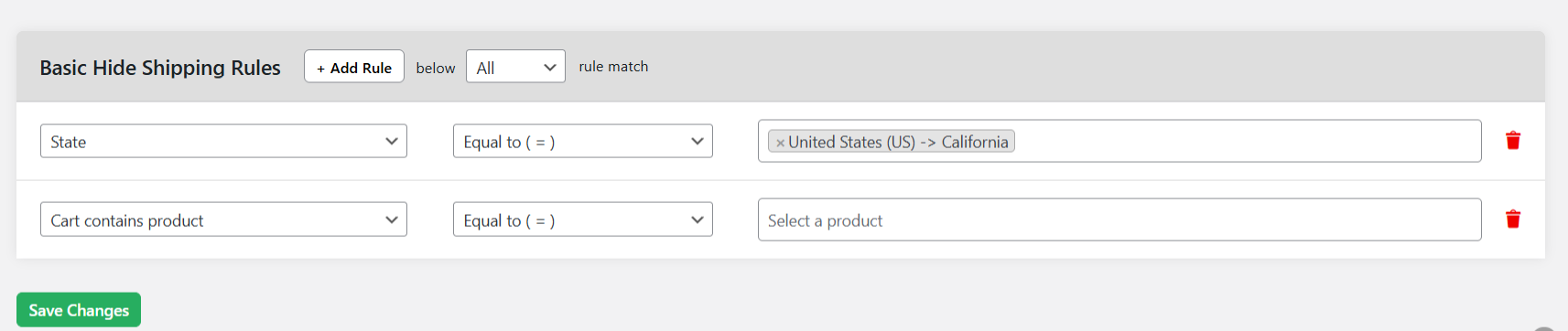
- From the left-side menu, under “Location specific”, select “State” to create the rule. Leave the middle-side menu as “Equal to”. Then, enter the specific states you wish to restrict shipping in WooCommerce. You can add as many states as necessary.
- Press “Save changes” at the bottom of the page.
Here’s the front end view of the WooCommerce shipping restriction by state. Customers won’t see the restricted shipping options:
How to restrict shipping by postcode in WooCommerce
- Install and activate the free or pro version of The Dotstore’s Hide Shipping Method for WooCommerce plugin.
- Go to WooCommerce → Hide Shipping → Manage Rules in your site’s admin.
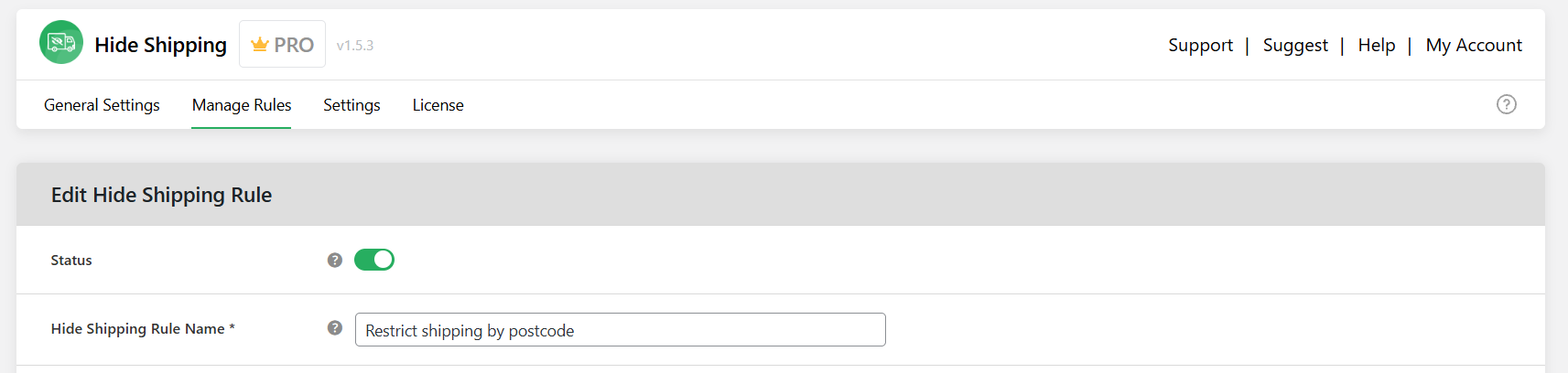
- Enable the postcode shipping restriction rule by switching the “Status” toggle on.
- Enter a clear title for this postcode shipping restriction rule in the “Hide Shipping Rule Name” field.
- Specify the methods you wish to restrict shipping by postcode:
- Select “Default shipping method and Compatible with Hide shipping method plugin” if you want to hide default shipping methods. Then, enter all shipping methods you want to restrict in the “Select shipping method” option. Note: if you enter all available shipping methods, shipping will be completely blocked for users in those postcodes.
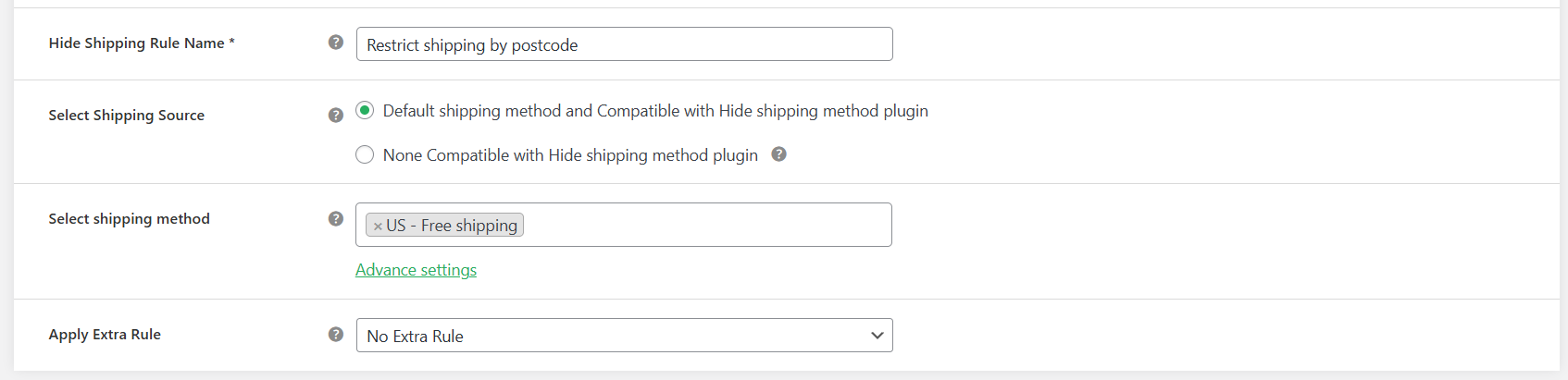
- Select “None Compatible with Hide shipping method plugin” then add all the appropriate shipping methods you wish to restrict by state in the “Shipping Method Option” field. Note: if you enter all available shipping methods, shipping will be completely blocked for users in those postcodes.
- Select “Default shipping method and Compatible with Hide shipping method plugin” if you want to hide default shipping methods. Then, enter all shipping methods you want to restrict in the “Select shipping method” option. Note: if you enter all available shipping methods, shipping will be completely blocked for users in those postcodes.
- In the “Apply Extra Rule” dropdown, choose “No extra rule”.
- Scroll down to the “Basic Hide Shipping Rules” modal.
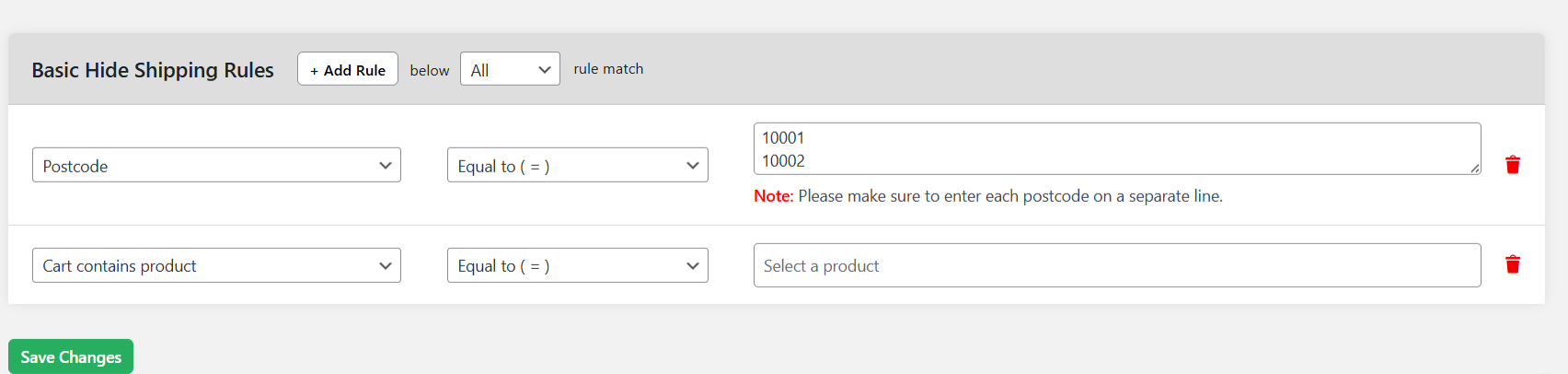
- From the left panel, under “Location specific”, select “Postcode”. Keep the middle option set to “Equal to”, then enter the specific postcode(s) where you want to block shipping. You can add multiple postcodes, if needed. (Important: enter each postcode on a separate line).
- Press “Save changes” to enable this postcode shipping restriction.
Here’s the front end view of the WooCommerce shipping restriction by post code. Customers won’t see the restricted shipping options:
How to restrict shipping based on payment method in WooCommerce
- Install and activate the Hide Shipping Method for WooCommerce plugin’s free or pro version.
- From your WordPress admin area, navigate to WooCommerce → Hide Shipping → Manage Rules.
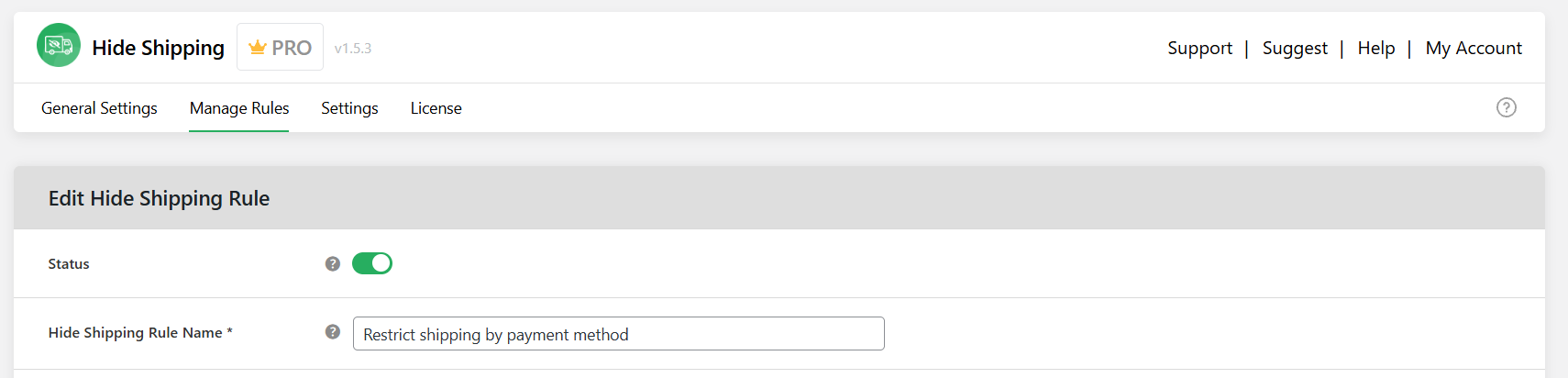
- Switch on the “Status” toggle to enable this shipping restriction.
- Add a name to this payment method restriction in the “Hide Shipping Rule Name” field.
- Choose which shipping methods you want to limit for the selected payment methods:
- Select the “Default shipping method and compatible with Hide Shipping Method plugin” option if you wish to hide WooCommerce’s default shipping methods. Then use the “Select shipping method” field to choose the methods you want to restrict.
Note: If all available methods are selected, shipping will be completely disabled for orders where users select those payment methods.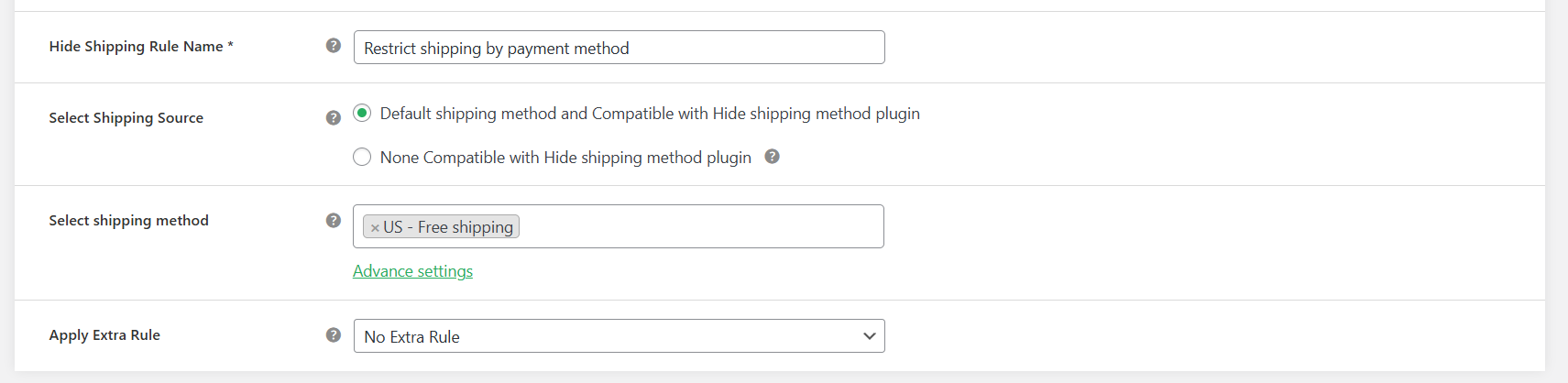
- Select the “None compatible with Hide Shipping Method plugin” option if you wish to restrict non-default shipping methods. Add the relevant methods in the “Shipping Method Option” field.
Note: Including all available methods will fully block shipping for orders where users select those payment methods.
- Select the “Default shipping method and compatible with Hide Shipping Method plugin” option if you wish to hide WooCommerce’s default shipping methods. Then use the “Select shipping method” field to choose the methods you want to restrict.
- In the “Apply Extra Rule” dropdown, pick “No extra rule”.
- Scroll down to the “Basic Hide Shipping Rules” modal.
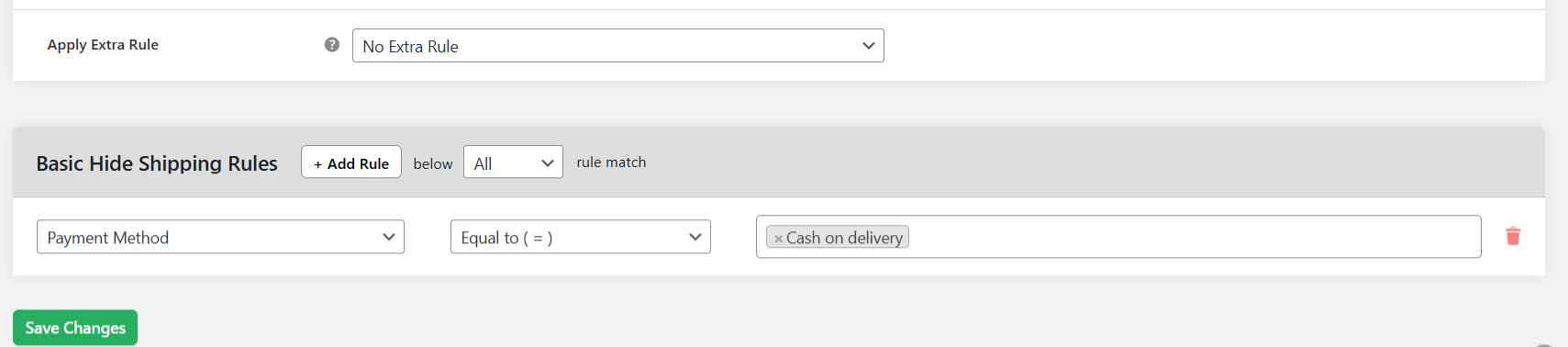
- From the left-side menu under “Checkout specific”, select “Payment method”. Keep the middle option set to “Equal to”, then enter the payment method(s) where shipping should not be available.
- Select “Save changes” to apply and enable the payment method-based shipping restriction to WooCommerce.
Here’s the front end view of the WooCommerce shipping restriction by payment method. Customers won’t see the restricted shipping options:
Ready to set up WooCommerce shipping restrictions?
Instead of offering every shipping method to every customer, you can tailor your store’s delivery options around your business’s constraints. This helps you sell within legal and logistical limits, reduces cart abandonment, and protects your profit margins. Plus, it saves you from having to manually cancel orders that never should’ve gone through.
As noted, WooCommerce’s native settings allow you to restrict shipping by country, exclude areas you don’t deliver to from shipping zones, and hide all paid shipping methods for orders eligible for free shipping. However, most growing stores need more than the default settings provide.
The Dotstore’s Hide Shipping Method for WooCommerce plugin (available in both free and pro versions) is a powerful WooCommerce shipping restrictions plugin. It gives you the flexibility to align shipping options with how your business actually operates. For instance, you can add shipping rules and conditions that:
- Hide shipping methods by country, state, or shipping zone without having to restructure zones.
- Restrict shipping methods for specific products (simple and variable), categories, tags, or shipping classes.
- Hide specific shipping methods when free shipping is available.
- Disable certain shipping methods for specific payment methods, like Cash on Delivery, credit cards, etc.
- Apply shipping restriction rules and conditions based on cart value, weight, item count, etc.
- Show or hide shipping methods based on user roles or specific users.
- Lots more.
Ready to set up WooCommerce shipping restrictions? Get started with the free or pro version of The Dotstore’s Hide Shipping Method for WooCommerce plugin today.
Hide Shipping for WooCommerce
Hide all other shipping methods when free shipping and/or local pickup are available in two minutes or less.
14-day, no-questions-asked money-back guarantee.