Table of Contents
I compared the leading WooCommerce Google Analytics plugins based on tracking accuracy, features, pricing, and ease of setup. Here are the seven best.
Key Takeaways
- General-purpose WordPress analytics plugins focus on pageviews and traffic but miss key GA4 ecommerce events like product views, add-to-cart actions, checkout steps, and refunds.
- This post compares the top seven Google Analytics plugins for WooCommerce so you can choose the right one based on your technical abilities, store size, budget, and reporting requirements.
Looking for the best WooCommerce Google Analytics plugin?
Most Google Analytics plugins are WordPress-first. They track pageviews, sessions, traffic sources, and various other stats. This is ideal for blogs, online magazines, or portfolio websites, but it also means that they tend to collect a pile of data that has nothing to do with running a store, while missing important ecommerce-specific events: product views, add-to-cart actions, checkout steps, purchases.
If you’re running a WooCommerce store, you need a plugin built specifically for ecommerce tracking.
I spent several weeks testing and researching various Google Analytics plugins to identify which are the best ones for WooCommerce stores of various sizes.
The short answer is that the best WooCommerce Google Analytics plugin depends on your requirements:
- Dotstore Enhanced Ecommerce Google Analytics for WooCommerce for complete GA4 ecommerce tracking.
- Google Tag Manager for WordPress (GTM4WP) for advanced GTM implementations.
- Google Analytics for WooCommerce for a free, official GA4 connection.
- MonsterInsights for beginner-friendly GA4 setup.
- ExactMetrics for WordPress dashboard reporting.
- Conversios for marketing and advertising integrations.
- PixelYourSite for multi-channel tracking and server-side events.
Below, I’ll break down all the options, what each one does well, and where it falls short. But first, let’s discuss what to look for in a WooCommerce Google Analytics plugin.
What makes the best WooCommerce Google Analytics plugin?
Most WooCommerce GA4 plugins fall into one of two categories:
- Basic plugins that connect WooCommerce to Google Analytics but don’t capture the full customer journey.
- Developer-focused solutions built around tools like Google Tag Manager that enable you to create custom events, build complex tracking logic, and integrate multiple marketing platforms, and therefore require significant technical expertise.
Neither is the right fit for most businesses. Based on my hands-on testing and firsthand experience, the best Google Analytics plugin for most WooCommerce stores sits somewhere in the middle. It should be easy enough for non-technical users to install while still providing accurate, in-depth ecommerce data.
Here are the features to look for when selecting the best WooCommerce Google Analytics plugin for your site.
- Complete GA4 ecommerce event tracking. In addition to tracking purchases, you should be able to track other key touchpoints in the ecommerce customer journey, namely product impressions, product clicks, add-to-cart, remove-from-cart, checkout steps, and refunds. Otherwise, your funnel reports in GA4 will show gaps.
- Simple to set up without custom coding. The best WooCommerce Google Analytics plugins enable you to set up analytics and get accurate ecommerce data without having to touch Google Tag Manager, edit theme files, or hire a developer.
- Accurate tracking across the entire customer journey. Many WooCommerce stores need more features than WooCommerce provides by default. Your chosen plugin should be able to properly track events no matter if you’ve added AJAX add-to-cart buttons, block-based checkouts, variable products, or a page builder.
- Support for custom dimensions and events. If you want to track custom parameters unique to your business (think: coupon usage, subscription renewals, wholesale pricing tiers, etc.), you should be able to do so without having to write your own tracking code.
- Role-based tracking exclusions. Admin logins, staff browsing, and internal QA testing shouldn’t skew your customer data. All the best WooCommerce Google Analytics plugins let you exclude specific user roles from tracking.
The best WooCommerce Google Analytics plugins at a glance
Keeping the checklist above in mind, here’s how the seven best WooCommerce Google Analytics plugins on the market stack up.
| Plugin | Best for | Standout feature | Pricing (without discounts) |
| Dotstore Enhanced Ecommerce Google Analytics for WooCommerce | Complete GA4 ecommerce tracking | Tracks the entire WooCommerce customer journey, including custom events and dynamic remarketing | Free version available; Pro from $139/year |
| Google Tag Manager for WordPress (GTM4WP) | Advanced GTM implementations | Pushes rich WooCommerce data into GTM’s data layer for complete control | Free |
| Google Analytics for WooCommerce | Free, official WooCommerce integration | Lightweight GA4 connection maintained by WooCommerce | Free |
| MonsterInsights | Beginner-friendly GA4 setup | Guided setup wizard with WooCommerce reports inside WordPress | Free version available; ecommerce reports from $399/year |
| ExactMetrics | Viewing WooCommerce analytics inside WordPress | Built-in WooCommerce dashboard with enhanced ecommerce reports | Free version available; ecommerce tracking from $399.50/year |
| Conversios | Google Ads, product feeds, and marketing integrations | Combines GA4 tracking, advertising pixels, Merchant Center, and product feeds in one plugin | Free version available; paid plans available |
| PixelYourSite | Multi-channel analytics and server-side tracking | Supports GA4, Meta, TikTok, Pinterest, Bing, Reddit, plus server-side tracking | Free version available; Pro plans available |
The 7 best WooCommerce Google Analytics plugins
Dotstore Enhanced Ecommerce Google Analytics for WooCommerce
Best for: Enhanced ecommerce tracking with the help of a simple-to-use tool.
Dotstore Enhanced Ecommerce Google Analytics for WooCommerce is the overall best Google Analytics plugin for WooCommerce. Unlike WordPress Google Analytics plugins with an ecommerce add-on, it is purpose-built for WooCommerce.
It is available in free and pro versions. Since its launch in 2015, thousands of ecommerce sites across various niches use it to collect complete and accurate data about each touchpoint in the customer journey, from product discovery to completed purchases.
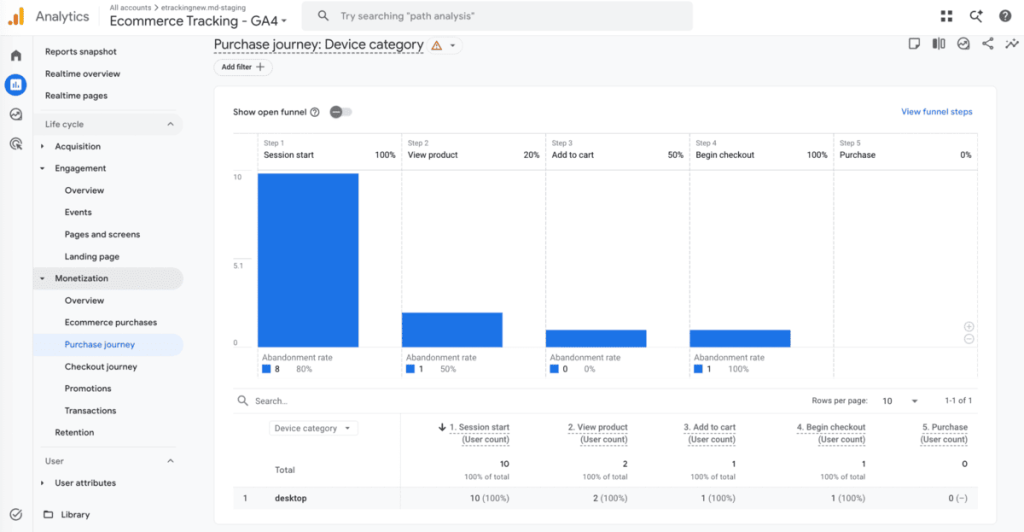
Setup takes two paths: you can sign in with your Google account and pick your GA4 property from a dropdown, or paste your Measurement ID directly if you prefer to skip the OAuth flow. Either way, the entire process is 100% no code and takes less than 10 minutes from start to finish, thanks to its guided setup wizard.
Once you add your Google Analytics measurement ID and turn on the button to enable enhanced ecommerce tracking, the plugin automatically maps key touchpoints to GA4’s recommended structure, including product impressions, product views, add to cart, remove from cart, cart views, checkout steps, shipping and payment information, purchases, refunds, coupon, promotion interactions, and more.
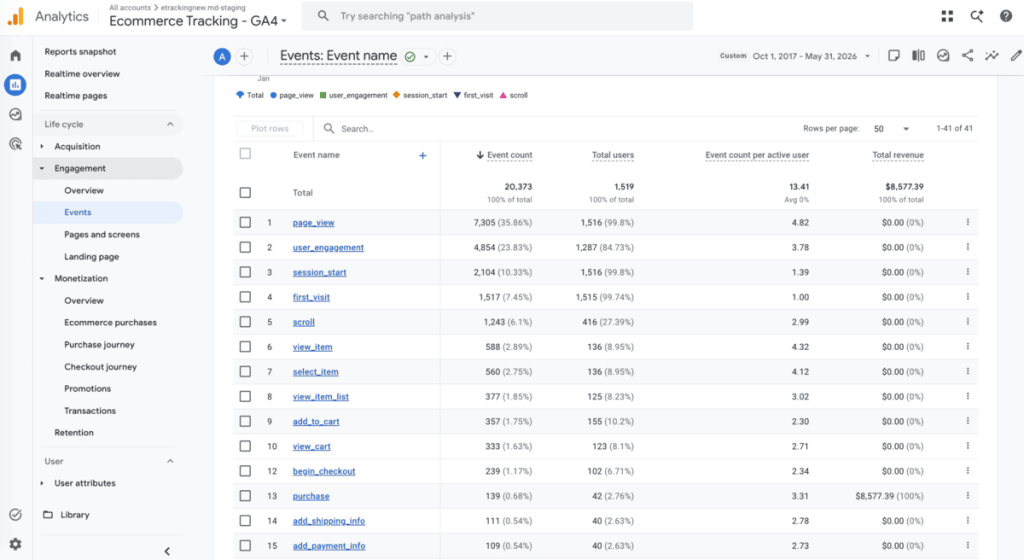
Beyond tracking standard ecommerce events, you can also track custom events, dimensions, and metrics to measure store-specific interactions (think: quote requests, product configurator usage, form submissions, etc) and segment the data as needed.
It supports dynamic remarketing by sending product and ecommerce data to Google Ads and Google Merchant Center, so you can build highly targeted remarketing audiences. And you can set up role-based exclusions to keep reports free from admin activity.
Dotstore Enhanced Ecommerce Google Analytics for WooCommerce plugin lets you capture the complete event set so you can build accurate checkout funnels, identify where customers abandon their purchase journey, and precisely measure how well your marketing campaigns are performing.
And because this plugin is designed with a WooCommerce-first approach, it reduces common tracking issues, like missing ecommerce events or incomplete purchase reports, and integrates nicely with other popular WooCommerce extensions and multilingual plugins.
Dotstore Enhanced Ecommerce Google Analytics for WooCommerce pricing: The free version includes basic ecommerce tracking. Upgrading to the Pro plan unlocks advanced ecommerce tracking features at $139/year for one site.
Enhanced Ecommerce Tracking
Leverage the power of analytics to boost your store’s performance and maximize profits.
14-day, no-questions-asked money-back guarantee.

Google Tag Manager for WordPress (GTM4WP)
Best for: Developers, agencies, or analytics experts comfortable with advanced configuration.
Google Tag Manager for WordPress (GTM4WP) takes a non-traditional approach to connecting WooCommerce with Google Analytics. It connects your WordPress site with Google Tag Manager (GTM), which allows you to deploy and manage Google Analytics 4, Google Ads, Meta Pixel, and other tracking tags from within your GTM container instead of installing separate plugins.
Rather than handling analytics directly, GTM4WP pushes WooCommerce data into GTM’s data layer. From there, you can configure exactly which events, triggers, and variables are sent to GA4 or other marketing platforms.
With GTM4WP, you can track product impressions, product clicks, product detail views, add-to-cart actions, remove-from-cart events, checkout steps, purchases, refunds, coupon usage, product list performance, and other customer interactions.
It also supports consent mode, custom dimensions, user data variables, as well as integrations with popular page builders and WooCommerce extensions. And because everything is managed through GTM, you can update tracking configurations without modifying your WordPress site.
However, as you can imagine, setting it up is significantly more complex than most purpose-built WooCommerce Google Analytics plugins. It requires a solid understanding of Google Tag Manager, triggers, variables, and GA4 event configuration to implement correctly. Incorrect GTM configurations can result in missing, duplicated, or inaccurate ecommerce events.
GTM4WP is best suited for developers and digital marketing teams with an in-depth understanding of Google Analytics and Google Tag Manager, and the resources to manage both.
Google Tag Manager for WordPress (GTM4WP) pricing: It is completely free to use.
Google Analytics for WooCommerce
Best for: A free, lightweight option to sync WooCommerce and Google Analytics.
Google Analytics for WooCommerce is the official plugin for connecting your store to Google Analytics.
Developed and maintained by WooCommerce, the plugin is intentionally lightweight. Rather than providing dashboards, marketing tools, or advertising integrations, it prioritizes collecting ecommerce data so you can analyze it directly within Google Analytics.
Once you install the plugin on your site and enter your GA4 Measurement ID, it will start sending analytics data to your Google Analytics property. Google Analytics for WooCommerce supports GA4 and tracks standard ecommerce interactions, including product views, cart actions, and purchases. And you can exclude admin visits from your reports to keep your data accurate.
WooCommerce itself positions this plugin as its basic analytics extension, making it best suited for small stores. That said, its simplicity is also its biggest limitation. Merchants who need to track custom event tracking, enhanced reporting, attribution features, and more are encouraged to upgrade to a paid analytics plugin.
Google Analytics for WooCommerce pricing: It is completely free to use.
MonsterInsights
Best for: Small WooCommerce stores that want an easy no-code method to connect to Google Analytics 4 (GA4).

With more than two million active installs, it’s safe to say that MonsterInsights is one of the most popular WordPress Google Analytics plugins. One of the key reasons it’s so popular is that it makes GA4 accessible to non-technical users through its guided setup wizard and by surfacing key reports directly inside the WordPress admin.
WooCommerce store owners can use its Pro plan, which includes an eCommerce add-on that automatically configures standard and enhanced ecommerce tracking and monitors important store interactions without requiring Google Tag Manager or manual event configuration. In addition, reports are presented in a simple-to-understand dashboard within your website’s admin, filterable by channel.
MonsterInsights is an excellent choice for those who want a polished, beginner-friendly analytics solution that goes beyond WooCommerce. Its setup process is pretty straightforward, reporting is simple to understand, and it offers a broad set of tracking capabilities for WordPress websites.
However, a quick glance at its dashboard reveals that many of its features are aimed at publishers, bloggers, and marketers. So if your primary objective is comprehensive WooCommerce ecommerce tracking at the best value, there are more specialized plugins that focus specifically on ecommerce analytics rather than general website analytics.
MonsterInsights pricing: The free version only installs the base tracking code. Ecommerce reports are available on the Pro plan and onwards, which starts at $399.00 per year.
ExactMetrics
Best for: Viewing WooCommerce GA4 performance reports from the WordPress admin panel.

ExactMetrics is another popular Google Analytics plugin for WordPress. It’s developed by the same team behind MonsterInsights and, like MonsterInsights, it emphasizes simplifying GA4 for non-technical users.
It connects your website to Google Analytics and displays key reports within your WordPress admin panel. You’ll need to use the Pro version to obtain WooCommerce stats.
Once you enable its ecommerce add-on, it automatically configures enhanced ecommerce tracking, which tracks product views, add-to-cart events, completed purchases, revenue, conversion rates, average order value, top-performing products, and other important customer interactions in the buying journey.
ExactMetrics’ simple-to-use reporting dashboard lets you access your store’s most important metrics from within WordPress, instead of navigating through multiple GA4 reports.
Alongside ecommerce tracking, it also supports custom dimensions, affiliate link tracking, outbound link tracking, form conversions, file downloads, demographics reporting, and GDPR-friendly configuration options.
Because ExactMetrics offers tons of general-purpose analytics features, it provides a less streamlined experience compared to other purpose-built WooCommerce Google Analytics plugins.
ExactMetrics pricing: Free version available. Ecommerce tracking requires the Pro plan, which starts at $399.50/year.
Conversios
Best for: Managing Google Analytics, advertising pixels, conversion tracking, and product feeds.
Conversios is an all-in-one marketing integration platform that combines GA4 ecommerce tracking, Google Ads conversion tracking, product feed management, and integrations with popular advertising channels like Meta, Microsoft Ads, TikTok, and Snapchat.
For GA4, the plugin automatically tracks the basic recommended ecommerce events for various stages in the customer journey, including product views, add-to-cart actions, cart views, checkout steps, and completed purchases.
However, you can’t track custom events and dimensions, which isn’t ideal for WooCommerce admins who want to monitor stats unique to their business. In addition, many advanced capabilities, such as unlimited product feeds, detailed ecommerce reporting, and server-side tracking, are reserved for paid plans.
Conversios supports Google Tag Manager, which allows you to implement tracking without manually configuring tags or editing code. Note that users on the free plan can only use Conversios’ default GTM setup with predefined dataLayer support.
Conversios pricing: Free and paid plans include GA4 ecommerce tracking for page_view, view_item_list, view_item, select_item, add_to_cart, view_cart, remove_from_cart, begin_checkout, add_shipping_info, add_payment_info, and purchase events.
PixelYourSite
Best for: Managing GA4, advertising pixels, and server-side conversion tracking.

PixelYourSite is a multi-channel analytics plugin that provides accurate conversion data across multiple marketing platforms, including Google Analytics 4, Meta, TikTok, Pinterest, Bing, Reddit, and Google Tag Manager.
It tracks key ecommerce events throughout the customer journey in WooCommerce, namely product views, add-to-cart actions, checkout events, purchases, and refunds. It then shares additional product and order data, such as categories, coupon usage, shipping costs, and item quantities, with marketing platforms to improve audience building, reporting, and campaign optimization.
One of PixelYourSite’s biggest strengths is its support for server-side tracking (available on its Pro plan). This sends purchase and refund events directly to GA4 via the Measurement Protocol, rather than relying solely on browser-based events. This enables you to recover conversions otherwise lost due to ad blockers, browser privacy restrictions, or custom payment flows that bypass the standard thank-you page.
The plugin also stores useful attribution data inside WooCommerce (think: landing pages, UTM parameters, traffic sources, lifetime value, and average order value), which you can view alongside individual orders and within WooCommerce reports.
Because PixelYourSite focuses on multiple advertising ecosystems rather than Google Analytics alone, some developers have reported that its extra functionality is overkill for many stores. Not to mention, it can add overhead on larger stores.
PixelYourSite pricing: Its free plan includes basic browser-based WooCommerce GA4 tracking, including standard ecommerce events. Users on its paid plan get advanced features like server-side tracking, richer attribution, and more.
What about Site Kit by Google?

Site Kit by Google isn’t a WooCommerce Google Analytics plugin. However, I’ve seen it on many roundups of the best Google Analytics plugins for WooCommerce, so it’s worth a mention.
As the name implies, Site Kit by Google is developed by Google. It is their official plugin for integrating popular Google services like Google Analytics 4 (GA4), Search Console, AdSense, Tag Manager, and PageSpeed Insights with WordPress.
Its primary purpose is to connect Google services to WordPress with ease. Instead of separately integrating each tool with your site, it lets you connect them all with one tool and view important metrics directly inside your WordPress admin dashboard.
For instance, after connecting your Google account, Site Kit automatically adds the Google tag to your website and links it with your GA4 property, which eliminates the need to manually edit your theme or insert tracking code. It then provides a high-level overview of traffic, search performance, and page metrics within your WordPress admin.
However, it does not provide comprehensive ecommerce-focused features like dashboards, customer journey reports, or advanced event management. So if you want those insights, you’re better off using a purpose-built WooCommerce analytics and tracking plugin.
Site Kit by Google pricing: It connects all Google services (Google Analytics 4 included) to your website from a single dashboard and is completely free to use.
Which is the best Google Analytics plugin for WooCommerce?
Every plugin on this list takes a different approach to providing ecommerce analytics data. The best Google Analytics WooCommerce plugin for your store ultimately depends on your store’s needs and your level of technical expertise.
Dotstore Enhanced Ecommerce Google Analytics for WooCommerce strikes a balance between ease of use and comprehensive ecommerce tracking, which makes it the best option for most WooCommerce stores.
It is 100% no-code and takes minutes to set up. It accurately tracks the full customer journey out of the box, including impressions, views, cart actions, checkout, purchases, and custom events, and more. Plus, it supports custom events, dynamic remarketing, and advanced ecommerce reporting without Google Tag Manager.
Try Dotstore Enhanced Ecommerce Google Analytics for WooCommerce‘s live demo or get started with its free or pro version now.
Enhanced Ecommerce Tracking
Leverage the power of analytics to boost your store’s performance and maximize profits.
14-day, no-questions-asked money-back guarantee.